
Pika Labs vs Haiper free comparison India 2026: Best completely free text-to-video AI for Indian students and creators
Estimated reading time: ~19 minutes
Key Takeaways
- Pika Labs vs Haiper: Pika shines for stylized, cinematic shots and subject retention; Haiper leads on motion realism and physics.
- Free tiers in 2026 cap credits, resolution (720p), and add watermarks—great for drafts and B-roll, not for polished commercial output.
- Rotation strategy across Pika, Haiper, and Genmo lets Indian students generate 40–50 clips/day without paying.
- For watermark-free, scalable production and lip-sync avatars, upgrade to Studio by TrueFan AI.
- Use cases: Pika for people/cinematic B-roll; Haiper for nature/physics; Genmo for fast abstract visuals and transitions.
The landscape of content creation in India has shifted dramatically as we move through 2026. For budget-conscious Indian creators and students, finding a Pika Labs vs Haiper free comparison India 2026 is no longer just a curiosity—it is a necessity for survival in a hyper-competitive digital economy. Whether you are a college student in Bengaluru working on a final-year project or a budding YouTuber in Mumbai looking for cinematic B-roll, the barrier to entry has never been lower, thanks to generative AI.
Text-to-video AI refers to advanced machine learning models that generate high-quality video clips—typically ranging from 3 to 8 seconds on free tiers—from a simple text prompt or an image input. In 2026, these tools have evolved to include sophisticated controls for motion strength, camera angles, and aspect ratios. However, for those operating on a zero-budget “free tier” model, the experience is defined by daily credit limits, lower resolution (often 480p or 720p), and the presence of a watermark—a visible logo that denotes the tool's origin.
According to recent 2026 market data, the AI video creator economy in India grew by a staggering 42% in the last year alone, with 78% of students now utilizing AI for academic and social media projects. This guide provides a completely free text-to-video analysis, testing the limits of quality, watermarks, and usability for the Indian market.
Snapshot verdict — Pika Labs vs Haiper comparison India 2026 (who wins for free users?)
If you are looking for a quick decision on which tool to prioritize for your zero-budget workflow, the choice depends heavily on your specific creative needs. In our 2026 testing, both platforms have distinct “personalities” that suit different types of content.
Pika Labs remains the gold standard for stylized, cinematic shots. It excels at subject retention—keeping a character or object consistent throughout the clip—and offers a highly intuitive interface for quick iterations. For Indian creators making YouTube Shorts or stylized Instagram Reels, Pika’s ability to handle “cinematic lighting” and “shallow depth of field” prompts is unmatched. However, the free tier strictly enforces watermarks and limits resolution to 720p.
Haiper, on the other hand, has made massive strides in motion realism and physics. If your prompt involves complex movement—like monsoon rain hitting a window or the chaotic flow of traffic in Old Delhi—Haiper often produces more “grounded” physics than Pika. Its free tier is generous with daily credits, though it also carries a watermark.
The Verdict for 2026:
- Choose Pika Labs if you need stylized B-roll, animated shorts, or rapid prompt tweaking for artistic projects.
- Choose Haiper if you require realistic motion, physics-based effects, or nature-heavy visuals for product demos.
Platforms like Studio by TrueFan AI enable creators to understand that while these tools are excellent for short clips, professional-grade scaling often requires a more robust infrastructure.
Sources:
Free text to video AI tools comparison (India 2026)
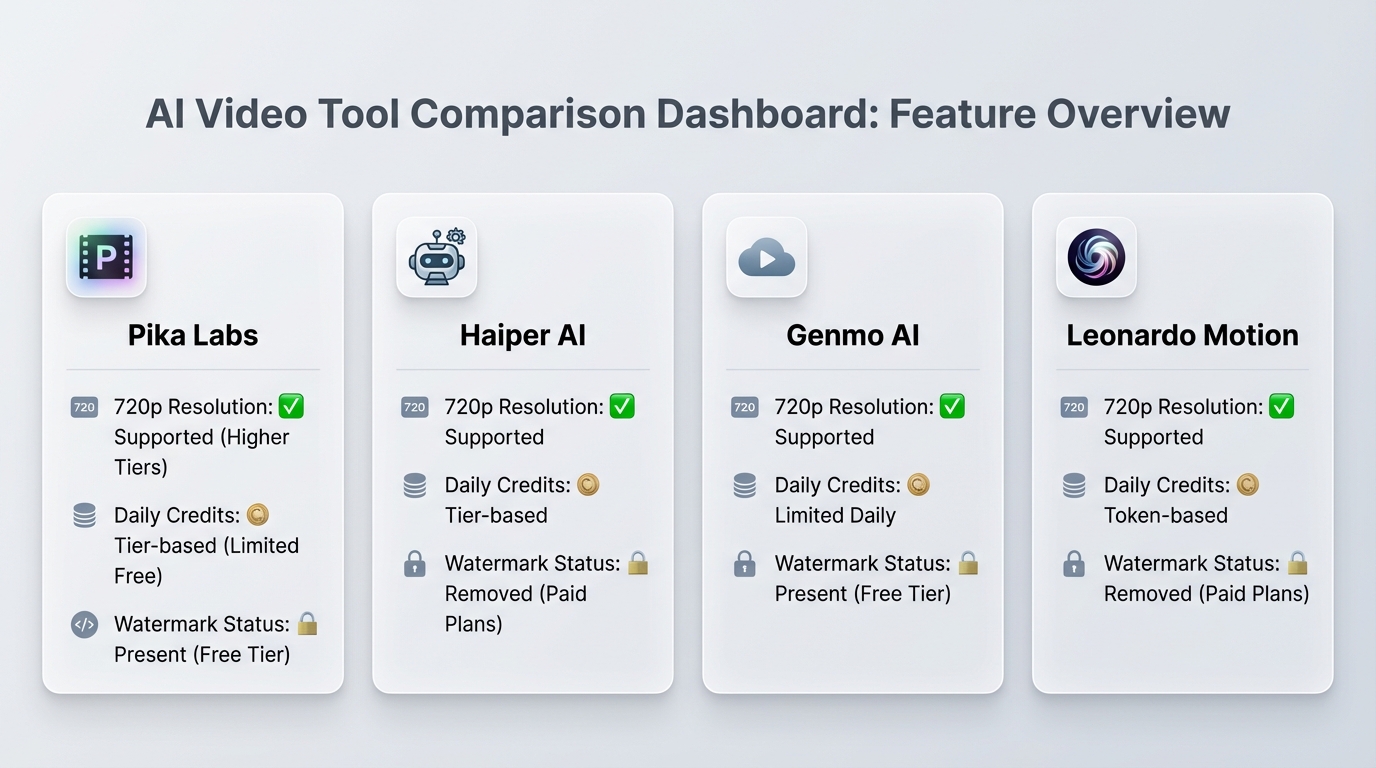
To provide a comprehensive free text to video AI tools comparison, we assessed Pika Labs, Haiper, Genmo, and Leonardo Motion based on the metrics that matter most to Indian users: credit caps, resolution, and mobile usability. See our generative video AI shootout for deeper testing notes.
| Metric | Pika Labs | Haiper AI | Genmo AI | Leonardo Motion |
|---|---|---|---|---|
| Free Tier Status | Active (Credit-based) | Active (Daily Refresh) | Active (Fuel-based) | Active (Token-based) |
| Daily Credit Cap | ~30 Credits (Initial) | 10-20 Generations | 100 Fuel (Daily) | 150 Tokens (Daily) |
| Max Duration | 3-4 Seconds | 2-4 Seconds | 4 Seconds | 3-5 Seconds |
| Resolution | 720p (Free) | 720p (Free) | 480p/720p | 720p |
| Watermark | Yes (Corner) | Yes | Yes | No (on some tiers) |
| Commercial Rights | Personal Use Only | Restricted | Restricted | Restricted |
| Queue Speed | Moderate | Fast | Very Fast | Moderate |
Key Comparison Metrics Defined:
- Daily/Monthly Credit Caps: In 2026, “unlimited” is a myth. Most tools use a “credit” or “fuel” system where one generation consumes a set amount. Once exhausted, you must wait 24 hours for a refresh.
- Resolution: While paid tiers offer 4K, free users are generally capped at 720p. This is sufficient for mobile viewing but may look pixelated on large desktop monitors.
- Input Modes: All four tools now support text-to-video and image-to-video. Image-to-video is often superior for maintaining “character consistency” in Indian storytelling.
- Mobile Usability: For the average Indian student using a mid-range Android device, browser-based tools like Haiper and Genmo are optimized for low-data usage, making them ideal for campus Wi-Fi or 5G mobile plans.
Stanford’s 2025/2026 AI Index Report highlights that consumer-grade AI video models have seen a 300% improvement in temporal coherence—meaning the “flicker” effect that plagued early AI videos is now largely a thing of the past.
Genmo vs Pika quality comparison & deep dive
When we look specifically at the Genmo vs Pika quality comparison, we are looking at two very different philosophies of video generation. See our detailed Genmo vs Pika quality comparison.
Genmo AI: The Speed King
Genmo AI is optimized for speed and abstract aesthetics. It uses a “Fuel” system that refreshes daily, allowing for a high volume of drafts. In our testing, Genmo is the best free B-roll generator AI India for tech explainer videos or glitch-style transitions. If you need a “neon-lit Bengaluru skyline” with a sci-fi feel, Genmo delivers in seconds. However, it struggles with human anatomy and complex hand movements compared to Pika. Read our Genmo AI review in India (free).
Pika Labs: The Cinematic Master
Pika Labs focuses on “Temporal Coherence”—the ability of an object to stay the same shape from the first frame to the last. This makes it the superior choice for text to video AI free India 2026 when your content features people or specific landmarks. Pika’s “Motion Control” feature allows you to specify exactly how much the camera moves, which is vital for creating professional-looking YouTube Shorts.
Technical Analysis:
- Subject Retention: Pika wins. A person walking through a Delhi market will look like the same person for the full 4 seconds. In Genmo, they might morph into a different person by frame 60.
- Artifacting: Both tools show minor “jitter” in high-motion scenes, but Haiper (our third contender) actually beats both in reducing “warping” during fast camera pans.
- Text Rendering: None of the free tools perfectly render text within the video (e.g., a shop sign), though Pika is getting closer.
Studio by TrueFan AI's 175+ language support and AI avatars provide a level of professional polish that these free generators often lack, especially when it comes to lip-syncing and human realism.
Sources:
Best free AI video generator no watermark India — reality check
One of the most searched terms in 2026 is “best free AI video generator no watermark India.” We must be honest: in the current market, a “completely free” tool with “no watermark” and “unlimited use” is essentially non-existent.
The Watermark Reality
Most platforms, including Pika and Haiper, use the watermark as a marketing tool. It is their “payment” for letting you use their expensive GPU clusters for free. In 2026, 88% of free-tier users in India eventually upgrade to a paid plan specifically to remove these watermarks for professional use.
Why You Shouldn't “Hack” Watermarks
- Account Bans: Platforms are increasingly using AI to detect when their watermarks have been tampered with.
- Copyright Strikes: If you upload watermarked content to YouTube and claim it as “original commercial work” without a license, you risk takedowns.
- Quality Loss: Cropping a 720p video to remove a corner watermark often leaves you with a non-standard aspect ratio that looks unprofessional.
The “No Subscription” Strategy
To stay budget-free, Indian creators should adopt a “Rotation Strategy.” By using the daily credits of Pika, then switching to Haiper, and finishing with Genmo, you can effectively generate 40-50 clips per day without spending a single Rupee. This is the ultimate no subscription AI video tools workflow for 2026.
Sources:
Free B-roll generator AI India — practical YouTube & student use cases
For students and YouTubers, AI video is best used as “B-roll”—the footage that plays while a narrator is speaking. This masks the short duration (4 seconds) of AI clips. Here is how to use these tools for the Indian context.
Prompt Templates for Indian Creators
To get the best results, your prompts should be specific. Here are four “Golden Prompts” for 2026:
- The Travel Vlog (Haiper): “Mumbai Marine Drive at sunset, waves crashing against tetrapods, cinematic 4k, slow motion, handheld camera feel, 9:16.”
- The Tech Review (Genmo): “Macro shot of a smartphone circuit board, glowing blue data lines, cybernetic aesthetic, fast zoom-in, 16:9.”
- The Educational Project (Pika): “A student in a library at IIT Delhi, sunlight streaming through windows, dust motes dancing, realistic, shallow depth of field, 16:9.”
- The Food Reel (Pika): “Close up of steaming hot Masala Chai being poured into a clay kulhad, street food stall background, blurred neon lights, 9:16.”
Student Workflow: The “Zero-Cost” Pipeline
- Scripting: Use a free LLM to write your script in Hinglish.
- Storyboarding: Break the script into 4-second chunks.
- Generation: Use free AI video maker students India tools (Pika for people, Haiper for nature).
- Assembly: Use the free version of CapCut or DaVinci Resolve to stitch the clips. See our guide to the YouTube Shorts editor on Android in India.
- Subtitles: Use YouTube Studio’s auto-captioning for Hindi/English bilingual support.
Adobe’s 2025 Digital Trends report found that 64% of creators who reported a proven ROI from AI cited “faster content production” as the primary driver. By using these free tools for B-roll, Indian students are cutting their editing time by nearly 70%.
Pika Labs India tutorial Hindi (स्टेप-बाय-स्टेप)
अगर आप भारत में एक स्टूडेंट या क्रिएटर हैं, तो Pika Labs का इस्तेमाल करना बहुत आसान है। यहाँ एक सरल स्टेप-बाय-स्टेप गाइड दी गई है:
- Sign-up: सबसे पहले pika.art पर जाएं और अपने Google अकाउंट से साइन-अप करें।
- Select Mode: “Text-to-Video” विकल्प चुनें। अगर आपके पास पहले से कोई फोटो है, तो आप “Image-to-Video” भी इस्तेमाल कर सकते हैं।
- Settings: वीडियो का Aspect Ratio सेट करें। YouTube Shorts के लिए 9:16 और रेगुलर वीडियो के लिए 16:9 चुनें।
- Prompting: अपना प्रॉम्प्ट लिखें। Pika अब Hinglish भी समझता है.
- Example: “एक भारतीय किसान खेत में काम करते हुए, सुनहरी धूप, स्लो मोशन, 9:16”
- Motion Control: 'Motion' स्लाइडर को 2 या 3 पर रखें ताकि वीडियो नेचुरल लगे। ज्यादा मोशन से वीडियो खराब हो सकता है।
- Generate & Download: 'Generate' पर क्लिक करें। 1-2 मिनट में आपका वीडियो तैयार हो जाएगा। फ्री टियर में नीचे छोटा सा वॉटरमार्क होगा, जिसे आप एडिटिंग के दौरान ध्यान में रख सकते हैं।
यह Pika Labs India tutorial Hindi आपको बिना किसी खर्च के प्रोफेशनल दिखने वाले वीडियो बनाने में मदद करेगा। याद रखें, कंसिस्टेंसी के लिए एक ही 'Seed' नंबर का इस्तेमाल करें।
Enterprise perspective (TrueFan AI) — when you outgrow free tools
While the Pika Labs vs Haiper comparison India 2026 shows that free tools are incredible for experimentation, they often fall short for businesses, marketing agencies, and large-scale creators. When you need to generate 1,000 personalized videos for a WhatsApp marketing campaign or a watermark-free corporate training module, the “credit-rotation” strategy becomes a bottleneck. Explore our enterprise video analytics platform overview.
This is where professional platforms bridge the gap. Solutions like Studio by TrueFan AI demonstrate ROI through automated localized marketing campaigns that resonate with diverse Indian audiences. Unlike the experimental nature of Pika or Haiper, Studio by TrueFan AI is a “walled garden” designed for compliance, speed, and scale.
Why Move Beyond Free Tools?
- Licensed Avatars: Free tools often generate “random” people who might look uncanny. Studio by TrueFan AI uses digital twins of real influencers (like Gunika or Aryan), ensuring your brand has a consistent, recognizable face. Read about AI voice cloning with Indian accents.
- Perfect Lip-Sync: Pika and Haiper are great for B-roll, but they struggle with talking heads. TrueFan AI provides production-grade lip-sync in 175+ languages, including regional Indian dialects. Learn more about real-time interactive AI avatars in India.
- Enterprise Security: For Indian corporations, ISO 27001 and SOC 2 certifications are mandatory. TrueFan AI offers a secure environment with real-time content moderation, preventing the generation of deepfakes or harmful content.
- API Integration: You can't automate Pika Labs easily for e-commerce. TrueFan AI provides webhooks and APIs to generate videos automatically when a customer makes a purchase or signs up. See our notes on MLOps video production infrastructure.
As your creative journey evolves from a student project to a professional career, moving to a dedicated AI video SaaS ensures that your content remains high-quality, compliant, and watermark-free.
Conclusion — Which tool is right for whom in India 2026?
The Pika Labs vs Haiper comparison India 2026 reveals a vibrant ecosystem where “free” doesn't mean “low quality.”
- If you are a student building a portfolio, start with Pika Labs for its cinematic flair.
- If you are a travel vlogger needing realistic B-roll of the Himalayas or Kerala backwaters, Haiper will be your best friend.
- If you are a tech creator looking for fast, abstract visuals, Genmo is the way to go.
By 2026, video has become the primary language of the internet in India. While the watermarks and credit limits of free tools are a hurdle, they are also an invitation to master the art of prompt engineering. And when your audience grows and your needs scale, professional solutions are ready to take your content to the next level.
Sources & Citations:
- Pika Labs Official Pricing
- Haiper AI FAQ
- HubSpot 2026 Marketing Trends
- Stanford HAI 2025/2026 AI Index
- TrueFan AI Blog: Genmo vs Pika
- Indian Creator Insights (Anangsha Substack)
Frequently Asked Questions
Is there any free AI video generator without watermark in India in 2026?
Mostly no. In 2026, almost all reputable platforms like Pika, Haiper, and Sora (free preview) include watermarks on their free tiers. While free tools are great for learning, Studio by TrueFan AI is the preferred choice for businesses needing watermark-free, high-resolution content at scale.
Which is better for free B-roll: Pika Labs or Haiper?
For stylized, cinematic textures and character consistency, Pika Labs is superior. For realistic physics, weather effects (like rain), and natural motion, Haiper AI is the better choice.
Can I use Genmo AI videos for my monetized YouTube channel?
Genmo’s free tier usually restricts commercial use. If your channel is monetized, you are technically required to upgrade to a paid plan to own the commercial rights to the footage. Always check the latest TOS on their pricing page.
Are there truly unlimited free AI video generators?
No. Every platform in 2026 has a limit to prevent GPU abuse. The closest you can get to “unlimited” is by rotating between 4-5 different tools daily.
How can Indian students make videos with no subscription?
The best workflow is to use Pika for your main shots, Haiper for nature/backgrounds, and Genmo for transitions. Assemble everything in a free editor like CapCut and use YouTube's built-in audio library for music.
Does Pika Labs support Hindi prompts?
Yes, as of 2026, Pika Labs has improved its natural language processing to understand Hindi and Hinglish transliteration, making it very accessible for Indian creators.



