
Best Free AI Video Tools Comparison India 2026: Canva, InVideo, Lumen5, & Pictory
Estimated reading time: 9 minutes
Key Takeaways
- India’s creator economy favors no-credit-card signups, mobile-first editing, and data-efficient workflows.
- Canva Free enables watermark-free 1080p exports with “Free” assets, while InVideo, Lumen5, and Pictory impose limits like watermarks or trials.
- Use a hybrid stack: stitch avatar intros (HeyGen/KreadoAI) with Canva assembly for high production value at zero cost.
- When scaling, Studio by TrueFan AI offers avatars, 175+ languages, and bulk generation to break the free-tier “quality ceiling.”
- Optimize for India: 1080x1920 vertical, WhatsApp-friendly files, and Hinglish localization to boost CTR and reach.
The landscape of digital storytelling has undergone a seismic shift, and as we navigate the mid-2020s, the best free AI video tools comparison India 2026 reveals a market that is more accessible, powerful, and localized than ever before. For Indian college students, early-stage founders, and social media creators, the barrier to entry has vanished. In a country where short-form video consumption in Tier 2 and Tier 3 cities has grown by a staggering 45% over the last year, the ability to generate high-quality visual content without a premium subscription is no longer a luxury—it is a competitive necessity.
Platforms like Studio by TrueFan AI enable creators to bridge the gap between basic free tools and high-conversion professional content, but for those just starting their journey, understanding the nuances of “free” tiers is the first step toward digital authority. This guide deconstructs the leading free AI video platforms, analyzing them through an India-first lens that prioritizes mobile-first editing, no-credit-card signups, and data-efficient workflows.
1. The 2026 Landscape: Why India is the Global Capital of AI Video
India has officially become the world’s largest laboratory for AI-driven content. By the end of 2026, the Indian AI video creation market is projected to reach $1.2 billion, driven by a massive demographic of 18–30-year-olds who demand “instant” and “localized” media.
Several factors define the 2026 Indian market:
- The 5G/6G Transition: While 5G is ubiquitous in metros, 4G remains the backbone of rural content creation. Tools must offer “Eco-mode” exports that don't consume gigabytes of data.
- The “No-CC” Mandate: 88% of Indian SMEs and students prioritize SaaS tools that do not require a credit card for sign-up, favoring UPI or simple email-based free tiers.
- Hinglish Dominance: AI tools that cannot process the nuances of Hindi-English code-switching are losing relevance.
- Engagement Metrics: Recent data shows that AI-driven localization (Hinglish) increases Click-Through Rates (CTR) by 3.4x in the Indian market compared to English-only content.
As we compare Canva, InVideo, Lumen5, and Pictory, we aren't just looking at buttons and sliders; we are looking at how these tools survive the “Indian Stress Test”—bandwidth variability, high-volume output requirements, and the need for professional-looking results on a zero-rupee budget.
Source: Statista - India AI Market Projections 2026.
2. The “Free” Hierarchy: Decoding Watermarks, Credits, and No-CC Access
In the world of AI video, “free” is rarely a monolith. To maximize budget-free content creation in India, you must understand the four tiers of free access:
The Ongoing Free Plan
This is the gold standard. Platforms like Canva offer a permanent free tier. You get a set of features that never expire, though premium assets (stock footage, specific AI filters) remain locked. The key advantage here is the lack of a “ticking clock.”
The Credit-Based System
Common in avatar-based tools like HeyGen or KreadoAI. You receive a monthly allotment of “credits” (e.g., 1 minute of video). Once used, you must wait for the next billing cycle or upgrade. This is ideal for high-impact intros but unsustainable for long-form explainers.
The Trial-Based Model
Pictory often operates on this model. You get full or near-full access for a limited number of projects (e.g., your first 3 videos are free). After this, the tool becomes “pay-to-play.”
The Watermark Reality
Most free tools (InVideo, Lumen5) will place a branded logo on your export. In 2026, a watermark is often seen as a “badge of the amateur” in professional circles. However, for internal class projects or draft storyboards, it is a fair trade-off.
Indian Signup Friction Checklist:
- Mobile OTP vs. Email: Does it require a phone number? (Canva/InVideo are email-friendly).
- UPI Integration: If you do decide to upgrade, does it support Indian payment methods?
- Institutional Email: Do students with .edu or .ac.in emails get extra perks? (Canva for Education is a major hack here).
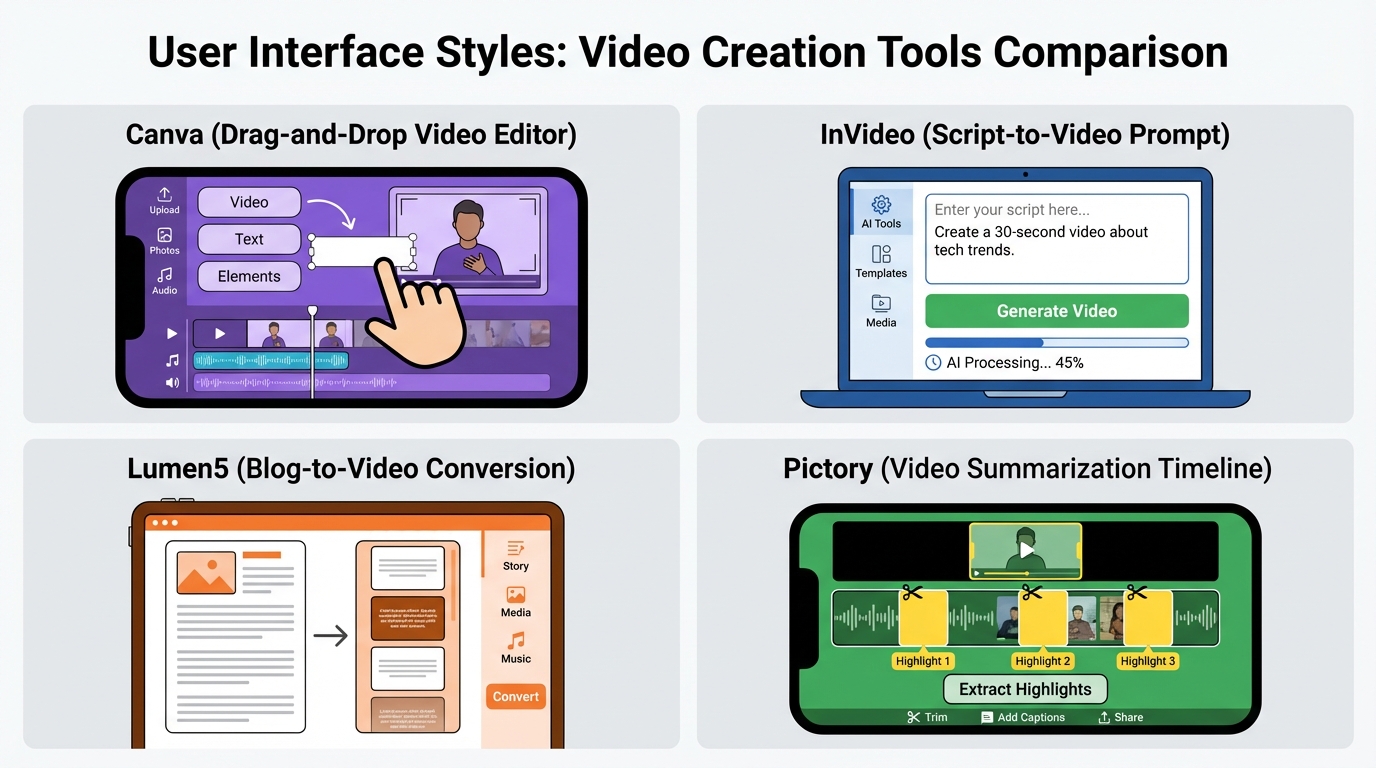
3. The Big Four: Canva, InVideo, Lumen5, and Pictory Compared
When we compare free tiers AI video platforms, we look at three non-negotiables: Export Quality, AI Intuition, and Watermark Policy.
Canva Free: The Watermark-Free Champion
Canva remains the most popular tool in India for a reason: it is the only major platform that allows watermark-free exports on its free plan, provided you only use “Free” labeled assets.
- Best For: Instagram Reels, YouTube Shorts, and WhatsApp Status.
- AI Features: “Magic Design” for video allows you to upload media and have the AI sync it to music automatically.
- Export Quality: Supports up to 1080p on the free tier, which is the minimum expected resolution for 92% of Indian Instagram users in 2026.
- India Edge: The mobile app is exceptionally stable on mid-range Android devices (Xiaomi, Realme, Samsung M-series).
InVideo Free: The Script-to-Video Powerhouse
InVideo’s AI is arguably more “intelligent” than Canva’s when it comes to generating a full video from a single prompt.
- The Catch: All free exports carry a prominent watermark.
- AI Features: Its script-to-video engine automatically pulls B-roll, adds subtitles, and applies transitions.
- Workflow: Best used for “learning the ropes” or creating drafts to be recreated elsewhere.
Source: InVideo Pricing & Plan Details.
Lumen5: The Corporate Storyteller
Lumen5 is designed for turning blog posts into videos. For an Indian startup founder looking to turn a LinkedIn article into a video, this is the go-to.
- Free Tier Limits: 720p resolution (which looks slightly grainy on 5G-enabled 4K smartphone screens) and a Lumen5 credit at the end.
- AI Voiceover: The free tier includes limited AI voiceover minutes, though the “robotic” tone is becoming more natural in 2026.
Source: Lumen5 Knowledge Base.
Pictory: The Long-Form Specialist
Pictory excels at “Video Summarization.” If you have a 20-minute Zoom recording of a college lecture and want a 2-minute highlight reel, Pictory’s AI is unmatched.
- Trial Nature: Usually limited to 3 video projects.
- Professional Videos Free AI Tools India: While the trial is short, the output is professional enough for high-stakes presentations.
Source: CyberNews Pictory Review.
4. Professional Scaling: Why Studio by TrueFan AI is the Next Step
While free tools are excellent for experimentation, professional creators and enterprises eventually hit a “quality ceiling.” Free tools often lack the “human touch”—the ability to have a realistic avatar speak directly to the audience in regional Indian languages with perfect lip-sync.
Studio by TrueFan AI’s 175+ language support and AI avatars provide a localized edge that generic global tools cannot match. For instance, a creator in Bangalore can generate a video in Kannada, while simultaneously producing a version in Marathi for a Mumbai audience, all using the same base script.
Solutions like Studio by TrueFan AI demonstrate ROI through a 70% reduction in production time compared to traditional video editing. In the 2026 economy, where “speed to market” is the primary driver of viral success, moving from a manual “drag-and-drop” free editor to an automated, avatar-led system is the hallmark of a scaling brand.
Comparison Matrix: Free vs. Professional (TrueFan AI)
| Feature | Canva/InVideo Free | Studio by TrueFan AI |
|---|---|---|
| Avatars | Static/Stock | 175+ Realistic/Licensed |
| Languages | Mostly English/Hindi | 175+ (Regional Focus) |
| Watermark | Yes (except Canva) | Brand-Safe/Custom |
| Scalability | Manual per video | API/Bulk Generation |
| Resolution | 720p/1080p | Up to 4K |
5. The Avatar Revolution: HeyGen, KreadoAI, and Hybrid Workflows
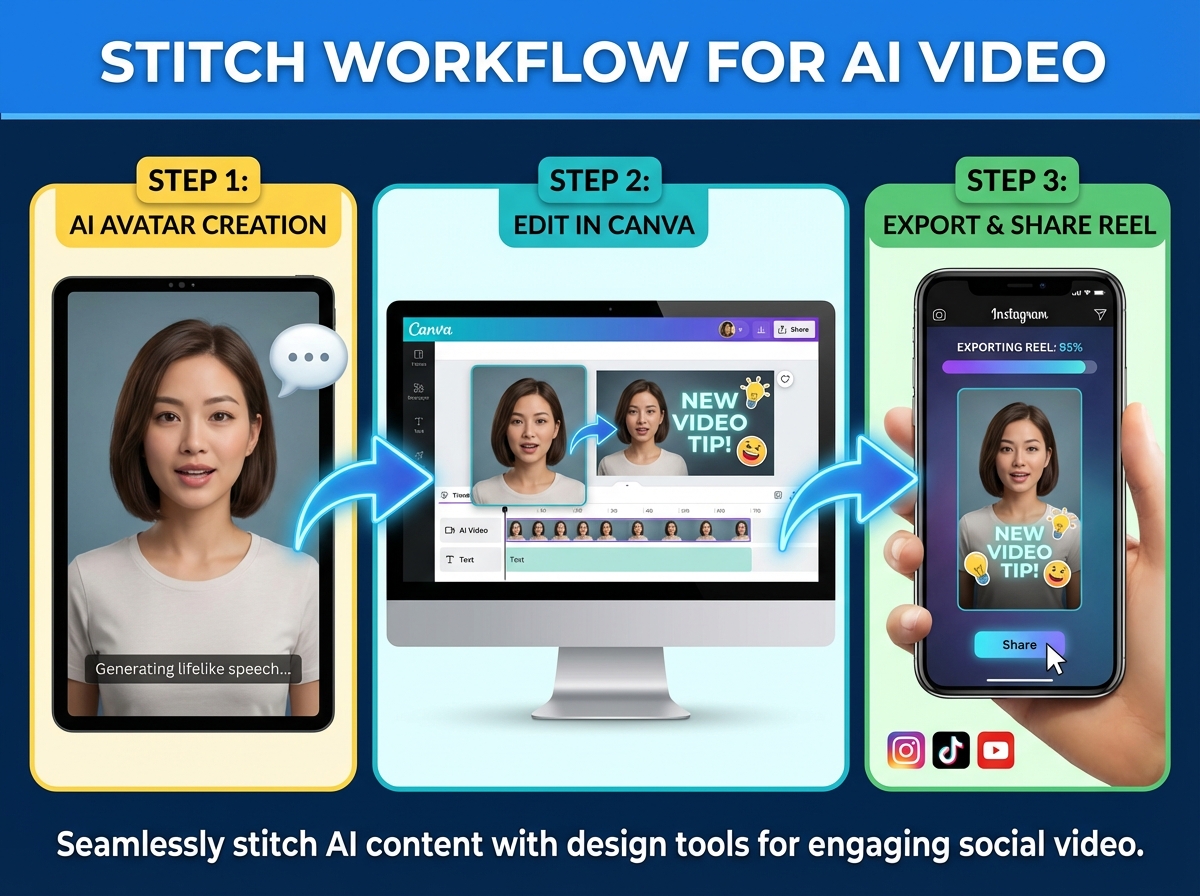
A major trend in the best free AI video tools comparison India 2026 is the rise of the “Hybrid Workflow.” Creators are no longer using just one tool; they are “stitching” content together to bypass free-tier limitations.
HeyGen (Free Tier)
HeyGen is the gold standard for AI avatars. Their free tier usually offers 1 credit (1 minute) per month.
- The Hack: Use your 1-minute credit to create a high-quality “Intro” and “Outro” for your YouTube channel. Since these don't change, you only need to generate them once.
Source: HeyGen Pricing Aggregator.
KreadoAI (Free Tier)
KreadoAI has gained massive traction in India because it offers a more generous free tier for multilingual avatars. It is particularly strong for ed-tech creators who need to explain complex concepts in Hindi or Tamil.
- No Credit Card AI Video Tools: KreadoAI allows for easy signup, making it a favorite for Indian students.
The “Stitch” Workflow:
- Generate a 10-second avatar intro in HeyGen/KreadoAI.
- Export the clip (accept the watermark for now).
- Import the clip into Canva.
- Overlay your own branding, stickers, or “Free” B-roll in Canva to create a cohesive 60-second video.
- Export from Canva as a 1080p MP4.
6. Technical Mastery: 2026 Export Specs and Mobile Optimization
To truly maximize free plan AI video India, you must master the technical constraints of the platforms your audience uses. In 2026, the “Indian Social Spec Sheet” has evolved.
Resolution & Bitrate
- Instagram/YouTube: 1080x1920 (Vertical) is mandatory. While 720p is acceptable for educational content, 1080p is required for lifestyle and brand content.
- WhatsApp: India is the world's largest WhatsApp market. When sharing videos on WhatsApp, keep the file size under 16MB to ensure they play instantly without buffering on 4G. 720p at 24fps is the “sweet spot” for WhatsApp.
Data-Saving Strategies
For creators in regions with bandwidth caps, the “Cloud-to-Cloud” workflow is essential. Tools like InVideo and Canva process video on their servers. This means you don't need a powerful laptop; you only need enough data to “preview” the video. Only trigger the final “Download” when you are on a stable Wi-Fi or 5G connection.
The “Hinglish” Scripting Gap
One sub-topic most competitors omit is the legal and technical nuance of AI-generated music and voiceovers in India.
- Copyright: Most free tools provide “Royalty-Free” music, but if you use an AI-generated track from a free tool, ensure you download the “License Certificate” (Canva provides this) to avoid “Copyright Strikes” on YouTube India.
- Phonetics: When using AI voices for Hindi, spell words phonetically in English (e.g., write “Namaste” as “Num-us-tay”) to get a more natural inflection from global AI engines.
7. Decision Guide
Choosing the right tool depends entirely on your immediate goal.
- Need a watermark-free Reel right now? Use Canva Free with “Free” assets.
- Need to turn a long script into a video quickly? Use InVideo Free (and live with the watermark).
- Need a professional avatar for a pitch? Use HeyGen/KreadoAI for a short clip and stitch it in Canva.
- Need to summarize a long lecture? Use the Pictory Free Trial.
Conclusion
Final Verdict: The 2026 Budget Creator’s Stack
For the ultimate budget-free content creation India experience, don't rely on one tool. Use Pictory to summarize your script, KreadoAI to generate a 5-second regional language intro, and Canva to assemble the final product. This “Power Stack” gives you the depth of a professional studio at a total cost of zero rupees.
As your audience grows and the need for brand-safe, high-fidelity, and multi-lingual content becomes paramount, transitioning to professional ecosystems will be your next logical step. For now, the tools are at your fingertips—start creating.
Verified on: October 24, 2025. Note: Free plan terms and credit allocations are subject to frequent updates by the respective platforms.
Frequently Asked Questions
Is Canva free really watermark-free in 2026?
Yes, Canva remains one of the few platforms where you can export 1080p video without a watermark, provided every element (video, photo, font, music) is from their “Free” library. If you accidentally use a “Pro” element, a watermark will appear on that specific asset.
Which free AI video tool needs no credit card for Indian users?
Canva, InVideo, and Lumen5 are the most “India-friendly” as they allow full access to their free tiers with just an email verification. Avatar tools like KreadoAI also follow this “no-CC” model, which is ideal for students.
Can I use these free tools for commercial YouTube channels in India?
Generally, yes. However, you must be careful with the music libraries. Always check the “Terms of Service” for the specific free plan. Most “Free” plans allow for social media usage but may have restrictions on “Broadcast” (TV/Streaming) rights.
Does Studio by TrueFan AI offer a free tier for individual creators?
While Studio by TrueFan AI is primarily an enterprise-grade solution designed for brands and large-scale creators, they often provide demo credits or starter packages that allow users to experience the power of 175+ language support and high-fidelity avatars before committing to a professional plan.
How do I remove a watermark from a free AI video legally?
The only legal way to remove a watermark is to upgrade to a paid plan or use a tool like Canva that offers a watermark-free tier. Using “AI Watermark Removers” is a violation of the Terms of Service (TOS) of most platforms and can lead to your account being banned or your content being taken down for copyright infringement.
What is the best resolution for AI videos shared on WhatsApp in India?
For WhatsApp, 720p (HD) is the optimal balance. It ensures the file size remains small enough for quick downloading on 4G networks while maintaining enough clarity for mobile screens.



