
AI Speed Ramping Cinematic Effects India 2026: Free Mobile + Browser Tools for Viral Reels, Smooth Transitions, and Film‑Look Videos
Estimated reading time: ~10 minutes
Key Takeaways
- AI-driven speed ramping uses optical flow and curve-based velocity to create ultra-smooth motion for viral Reels/Shorts.
- Free mobile and browser tools (VN, Alight Motion, Canva, VEED) now deliver professional results without Premiere.
- Film-look polish comes from AI color grading, LUTs, grain, aspect ratios, and stabilization tuned for Indian creators.
- Brands scale output with templates in Studio by TrueFan AI to localize content across India’s languages.
In the rapidly evolving digital landscape of the subcontinent, mastering AI speed ramping cinematic effects India 2026 has become the ultimate differentiator for creators looking to dominate Instagram Reels and YouTube Shorts automation with AI. As we move into 2026, the Indian creator economy is no longer just about "posting content"; it is about high-fidelity visual storytelling powered by agentic AI. With India’s 5G subscriptions on a trajectory to surpass 1 billion, the technical barriers to professional-grade editing have vanished. You no longer need a high-end PC or a Premiere Pro subscription to create world-class visuals. Today, free mobile apps and browser-based AI tools allow anyone from Mumbai to Mizoram to produce "film-look" videos with a single tap.
The shift toward mobile-first, AI-driven workflows is backed by significant data. According to the EY India 2026 Agentic AI Outlook, nearly 75% of Indian business and creative leaders now view AI as an existential necessity, with multi-use agentic AI cases already in full production. This technological surge, combined with the Ericsson Mobility Report insights showing that Indian mobile data traffic is among the highest globally, has created a perfect storm for high-bandwidth, visually complex video trends. Whether you are a solo influencer or a brand manager, understanding how to leverage AI speed ramping and smooth transitions is the key to capturing the "first 3 seconds" of attention in a crowded feed.
1. What is AI Speed Ramping? Defining the 2026 Viral Aesthetic
To the uninitiated, speed ramping might look like simple fast-forwarding or slow-motion. However, in 2026, AI speed ramping video India 2026 refers to a sophisticated algorithmic time-remapping process. Unlike traditional editing, where speed changes are linear and "steppy," AI speed ramping uses curve-based acceleration and deceleration paired with AI optical flow.
The Mechanics of the "Ramp"
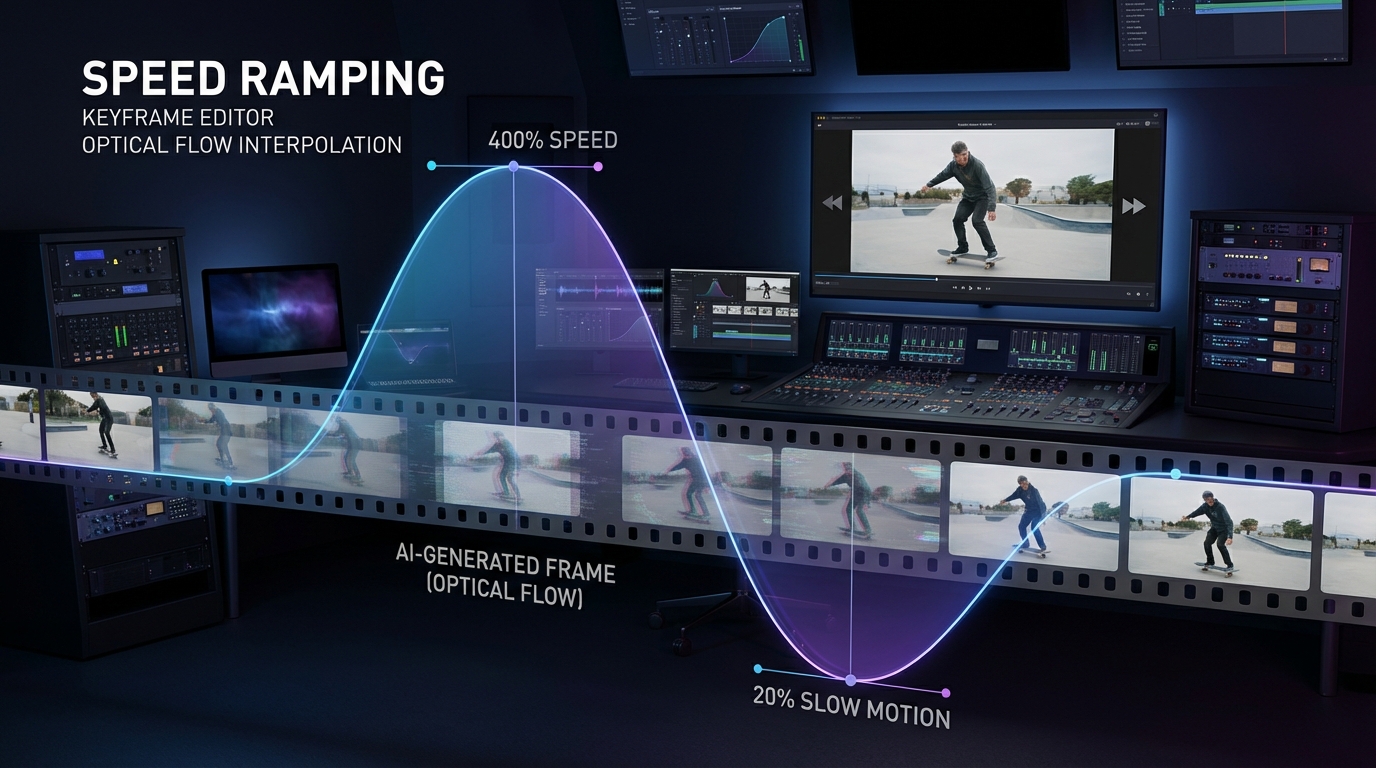
The "ramp" is governed by Bezier curves. Instead of a clip jumping from 100% speed to 20%, the AI creates a smooth "ease-in" and "ease-out" transition.
- AI Optical Flow & Interpolation: This is the secret sauce. When you slow down a video to 20% speed, traditional software simply repeats frames, causing a stutter. AI interpolation analyzes motion vectors between pixels and synthesizes entirely new "in-between" frames. This allows a standard 60 fps mobile video to look like it was shot at 240 fps on a professional Phantom camera.
- Cadence Targets: For Indian creators using mid-range smartphones, the 2026 standard is shooting at 60 fps. AI tools can then safely slow this down to 40% for a "dreamy" look or ramp it up to 400% for "punchy" jump cuts that align perfectly with bass hits in trending tracks.
Why It Drives Virality
Virality in 2026 is dictated by retention metrics. As noted in the TrueFan AI "First 3 Seconds" strategy, motion cues are the most effective way to stop the scroll. A speed ramp creates a "visual hook"—it pulls the viewer in with a fast movement and then holds them captive with a hyper-smooth, slow-motion reveal of the subject. This technique is essential for creating viral video transitions like whip pans, match cuts, and object wipes that feel organic rather than forced.
2. The India-Friendly Toolstack: Professional Effects Without Premiere
In 2026, the "Pro-sumer" gap has closed. You can now achieve professional video effects without Premiere using tools that are either completely free or offer robust free tiers tailored for the Indian market.
Top Mobile Apps for AI Effects
- VN Video Editor: The gold standard for Indian Reels creators. It offers advanced speed ramp curves, keyframe animation, and full LUT (Look-Up Table) support for cinematic color grading. Its "Motion Blur" AI feature adds a realistic smear to fast movements, making ramps look professional. YouTube Shorts editor for Android in India.
- Alight Motion: If you want "After Effects" power on a phone, this is it. It features advanced velocity graphs and AI-powered transition packs that are frequently updated to match trending transition effects 2026.
- InShot: Ideal for quick edits. While less "technical" than VN, its AI beat-sync and stabilization features make it perfect for creators who need to post high-quality content daily. CapCut alternatives in India 2025.
Browser-Based AI Editors (No Install Required)
With 5G becoming ubiquitous, browser-based editing is now a viable alternative to heavy software.
- Canva: Beyond graphic design, Canva’s 2026 video suite includes AI beat-detect and seamless transitions that allow for rapid template remixing.
- VEED & Kapwing: These platforms lead the way in browser-based video effects AI India. They offer AI object removal, auto-subtitles in regional Indian languages, and sophisticated time-remapping tools that work directly in Chrome or Safari.
- Clipchamp: Now integrated with advanced AI overlays, it’s a reliable tool for exporting high-bitrate 9:16 videos optimized for the Instagram algorithm.
For those looking for zero-budget hacks, Go Digital Alpha provides a comprehensive list of how to maximize these free tools to achieve a "million-dollar look" on a zero-rupee budget.
3. Step-by-Step AI Speed Ramp Tutorial: From Capture to Export
Creating a slow motion speed ramp AI effect requires a blend of good cinematography and smart editing. Follow this 2026 workflow to ensure your videos stand out.
Step 1: The "Cinematic" Capture
You cannot fix bad footage with AI.
- Frame Rate: Always shoot at 60 fps or 120 fps. In 2026, even budget Indian smartphones support 1080p at 60 fps.
- Shutter & Exposure: Lock your exposure. If the light changes mid-ramp, the AI interpolation will create "flicker" artifacts.
- Deliberate Motion: Move your camera physically. A "whip" into the subject or a "pull-back" creates the necessary motion vectors for the AI to work with.
Step 2: Setting the Markers
Import your clip into a smooth transition video maker AI like VN or Alight Motion.
- Place your audio first.
- Identify the "drop" or the "beat."
- Add markers on the timeline where the action peaks.
Step 3: Applying the Velocity Curve
Open the "Speed" or "Velocity" editor.
- The 1% Trick: For an elastic feel, ramp the speed to 400% just before the beat, then drop it to 20% exactly on the beat.
- Bezier Handles: Smooth out the points. You want a "U" or "S" shape in your graph, not sharp angles. Sharp angles cause "jerky" motion that breaks the cinematic illusion.
Step 4: AI Enhancement
Enable "Optical Flow" or "AI Interpolation." This will fill in the gaps in your slow-motion sections. Finally, add a "Directional Blur" or "Motion Blur" effect at a 30-40% intensity to blend the high-speed sections into the slow-motion ones.
Step 5: The Transition
Pair your ramp with a transition. If you ramped "into" a camera move (like a zoom), the next clip should start with a matching ramp "out" of that same move. This creates a "seamless" loop that keeps viewers watching.
Source: 2026 Speed Ramping Workflow Guide.
4. Mastering the "Film-Look": AI Color Grading and Cinematic Polish
A speed ramp is only as good as the "vibe" of the video. To achieve cinematic video effects AI free, you must focus on the "Film-Look" science. See these cinematic AI video prompts for 2026.
AI Color Grading Tools Mobile India
In 2026, AI grading has replaced manual color correction for most creators. Tools like VN and Lightroom Mobile now feature "Scene Intelligence."
- Normalization: The AI automatically balances your whites and blacks.
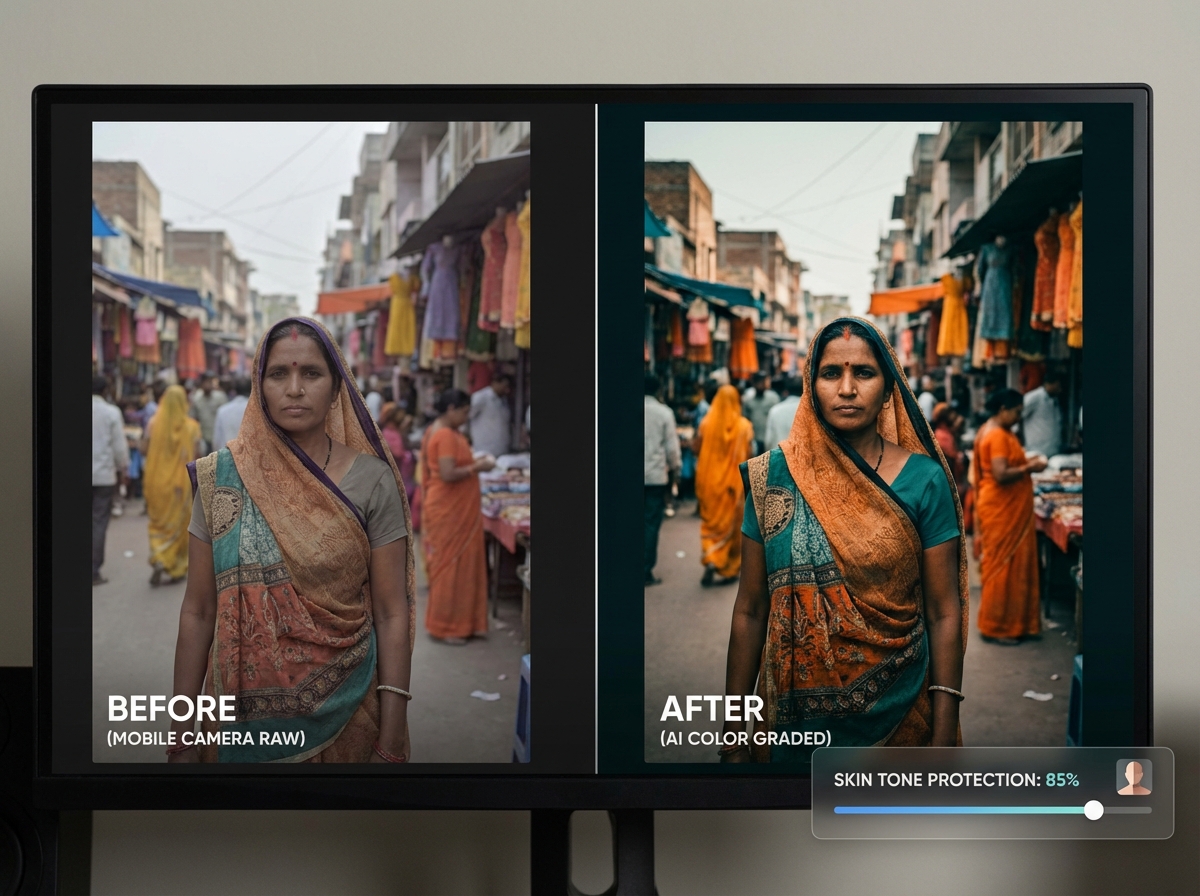
- Skin Tone Protection: This is crucial for Indian creators. AI tools now isolate "Melanin" frequencies to ensure that while the background might have a "Teal and Orange" look, the skin tones remain natural and vibrant.
- LUT Integration: Use film emulation LUTs (like Kodak 5218) at 40% opacity. This adds a "chemical" feel to digital mobile footage.
The 2026 Cinematic Checklist
- Film Grain: Add a 10% fine grain overlay. This hides AI interpolation artifacts and gives the video a "texture" that feels expensive.
- Aspect Ratio: Use a 2.39:1 letterbox (black bars). While Reels are 9:16, adding subtle bars or keeping your action in the "cinematic center" creates a premium feel.
- Halation & Bloom: Use AI "Glow" effects on highlights. In 2026, the "dreamy" look is trending in India, mimicking the look of vintage anamorphic lenses.
- Stabilization: Use AI-powered "Warp Stabilizers" in-app to remove micro-jitters, but keep some "organic" handheld movement to avoid looking like a robotic drone shot.
According to Reality Premedia, the integration of AI in creative pipelines is accelerating, allowing creators to achieve realism that was previously only possible in high-budget Bollywood productions.
5. Viral Transition Techniques: 2026’s Most Popular Effects
To stay ahead of the curve, you need to master the trending transition effects 2026. These are the effects currently dominating the Indian social space:
The "Object Wipe"
This involves a person or object walking across the frame, acting as a "curtain" that reveals the next scene.
- AI Execution: Use a viral transition effects generator AI to "mask" the moving object automatically. In 2026, browser tools like VEED can track a moving person and create a perfect mask in seconds.
The "Punch-In Zoom Match"
Start with a wide shot of a landmark (like the Gateway of India), ramp the speed into a digital zoom, and "land" the zoom on a close-up of a product or person in a completely different location. The AI ensures the "zoom" speed matches the "ramp" speed, making the jump feel physical.
The "Time Warp Cut"
This is the "elastic" transition. The video speeds up to 800% for 5 frames, then "snaps" into the next clip at 10% speed. This creates a high-energy "pop" that is perfect for fashion and travel Reels.
Regional Context: Hinglish and Localization
In India, transitions aren't just visual; they are cultural. Using AI to time your transitions to popular "Hinglish" tracks or regional hits (Tamil, Telugu, Punjabi) is a major trend. Platforms like Social Samosa highlight that content which blends high-tech visuals with local audio cues sees 40% higher engagement in Tier 2 and Tier 3 Indian cities.
6. Enterprise Scaling: How Brands Use AI for High-Volume Video
Platforms like Studio by TrueFan AI enable brands to move beyond manual editing. Instead of hiring a fleet of editors to manually speed-ramp every video, enterprises use template-driven AI workflows. These workflows ensure that every video—whether it's a product launch or a regional promo—maintains a consistent "film-look" and high-energy pacing.
Studio by TrueFan AI's 175+ language support and AI avatars allow brands to take a single "cinematic" concept and localize it for every state in India. AI voice cloning for Indian accents. Imagine a speed-ramped, high-fashion Reel where the avatar speaks perfect Marathi, then switches to Bengali for a different audience, all while maintaining the same viral transitions and color grading.
Solutions like Studio by TrueFan AI demonstrate ROI through massive reductions in production time. What used to take a creative agency weeks—shooting, editing, and localizing cinematic content—now takes minutes. This "Canva-fication" of high-end AI video means that even small D2C brands in India can compete with global giants on visual quality. Furthermore, these platforms offer "walled garden" compliance, ensuring that all AI-generated content is brand-safe and free from the deepfake controversies that often plague unmoderated AI tools. Real-time interactive AI avatars in India.
7. Optimization, Export, and FAQ for the Indian Algorithm
The final step in your AI speed ramping video India 2026 journey is ensuring the Instagram algorithm actually shows your work to people.
Export Settings for 2026
- Resolution: 1080 x 1920 (4K is often compressed too harshly by Instagram; 1080p stays sharper).
- Bitrate: 15–20 Mbps. This is the "sweet spot" for 5G uploads in India.
- Frame Rate: Export at 60 fps. Even if your "base" video is 24 fps, a 60 fps export ensures your AI speed ramps remain fluid and don't "stutter" during playback.
- Color Space: Rec.709 (Standard). Avoid HDR exports unless you are certain your target audience is using high-end iPhones, as HDR can look "blown out" on older Android devices.
The "Hook" Strategy
As per the TrueFan AI blog, your first 3 seconds must contain:
- A high-speed ramp or transition.
- A bold, AI-generated caption.
- A clear "visual promise" of what the video is about.
Conclusion
AI speed ramping and cinematic polish are no longer reserved for studios—Indian creators and brands can now achieve them with free mobile apps and powerful browser editors. Focus on solid capture, intelligent velocity curves, AI interpolation, and film-look grading to stand out in the first 3 seconds. To scale consistently across languages and campaigns, tap into template-driven workflows in Studio by TrueFan AI and turn repeatable cinematic quality into your competitive edge.
Frequently Asked Questions
What is the best AI video effects app free India creators should use?
For mobile, VN Video Editor and Alight Motion offer the best free tiers for speed ramping. For browser-based work, Canva and VEED are excellent. Studio by TrueFan AI's 175+ language support and AI avatars also provide a powerful way for creators and brands to generate localized, high-quality video content without needing complex editing skills.
How do I fix "choppy" slow motion in my speed ramps?
Ensure you are using "Optical Flow" or "AI Frame Interpolation." This synthesizes new frames to fill the gaps. Also, never slow down 30 fps footage below 50%; always shoot in 60 fps or higher for smooth results.
Can I get professional video effects without Premiere Pro in 2026?
Absolutely. The combination of mobile apps like VN and browser-based AI tools like Kapwing now provides 90% of the functionality of Premiere Pro for short-form content, including keyframing, masking, and advanced color grading.
Is AI speed ramping safe for my Instagram account?
Yes, as long as you are using standard editing tools. Avoid "automated" engagement bots, but "automated" editing tools are fully compliant with platform guidelines.
How does 5G impact my video editing workflow in India?
5G allows for "Cloud Editing." You can now upload raw 4K footage to browser-based editors like VEED or Clipchamp and edit in real-time without lag, which was impossible on 4G.
What is the "Film-Look" secret for mobile videos?
The secret is a combination of a 2.39:1 aspect ratio, a 10% film grain overlay, and AI-driven color grading that protects skin tones while applying a cinematic LUT.



