
AI video tools 4GB RAM India: The 2026 Guide for Budget Phones and Student Laptops
Approx. 8 min read
Key Takeaways
- India’s 2026 creator boom is thriving on 4GB RAM devices by pairing lightweight editors with cloud AI.
- Adopt a Cloud-First workflow for heavy AI tasks and keep offline ASR or TTS local using tiny models.
- Use thermal management, proxy editing, and 720p export presets for stable performance on budget phones and student laptops.
- For brands, centralize creation with Studio by TrueFan AI to ensure quality, scale, and DPDP compliance.
In the rapidly evolving landscape of Indian digital content, 2026 has brought an unexpected twist: the return of the 4GB RAM smartphone. While global tech enthusiasts anticipated a shift toward 16GB standards, economic constraints and rising component costs have led to a resurgence of budget-friendly, low-memory devices in the Indian market. For the millions of students and aspiring influencers in Tier 2 and Tier 3 cities, finding AI video tools 4GB RAM India compatible is no longer just a preference—it is a necessity for survival in the creator economy.
The “RAM shortage” of 2026, as highlighted by recent reports from NDTV Profit, has created a performance inequality gap. However, this hasn't slowed down the demand for high-quality video. With short-form content consumption in India projected to see 65% of its growth from non-metropolitan areas this year, creators are looking for RAM shortage video solutions that allow them to produce professional-grade Reels and Shorts without owning a high-end workstation. This guide provides a comprehensive playbook for navigating these hardware constraints using memory-efficient video tools, offline-first workflows, and cloud-based AI offloading.
1. The 2026 Reality: Why 4GB RAM is Back and What it Means for Creators
The Indian smartphone market in 2026 is witnessing a “Great Reversion.” According to market analysis from m9.news, several leading manufacturers have reintroduced 4GB RAM variants for their budget lineups to keep prices below the ₹10,000 threshold. This shift is driven by a global shortage of high-density memory modules and a strategic focus on 5G connectivity over raw internal memory. For a creator, 4GB of RAM is a tight tightrope; the operating system alone often consumes 1.5GB to 2GB, leaving very little “breathing room” for heavy video editing suites.
Beyond the RAM crunch, creators in India face the dual challenge of thermal throttling and data caps. Budget devices often lack advanced cooling systems, meaning that intensive AI processing can cause the CPU to slow down significantly after just ten minutes of editing. Furthermore, while 5G is widespread, data remains a precious commodity for students. This has led to the rise of low storage video tools India can rely on—software that prioritizes small installation footprints and efficient cache management.
2. Lightweight Toolkits: Best Editors for Budget Androids and Student Laptops
For those working on a student laptop video creation setup or a budget Android phone, the choice of software is the difference between a finished video and a crashed app. In 2026, the “Lite” ecosystem has matured significantly. These tools are designed to run with a minimal memory footprint, often staying under 200MB for mobile and 300MB for desktop.
Mobile: The Android “Lite” Powerhouses
On Android, the goal is to find a lightweight video editor 2026 edition that supports 720p exports without lag.
- CapCut Lite & YouCut: These remain the gold standard for 4GB devices. They offer offline trimming, basic text overlays, and essential filters. To prevent crashes, creators should adopt the “Trim First” habit—cutting raw footage into smaller segments before applying any effects.
- VN Editor: While slightly heavier, VN’s “Performance Mode” allows it to run smoothly on 4GB RAM by reducing the preview resolution. This is a critical feature for budget phone video editing AI workflows, as it prevents the device from overheating during the creative process.
Desktop: The Student Laptop Playbook
For students using laptops with integrated graphics and 4GB RAM, the traditional Adobe suite is often out of reach. Instead, the 2026 workflow relies on:
- LosslessCut: This tool is essential for “shrink-and-stitch” operations. It allows you to cut and join video files without re-encoding, which uses almost zero RAM and keeps the CPU cool.
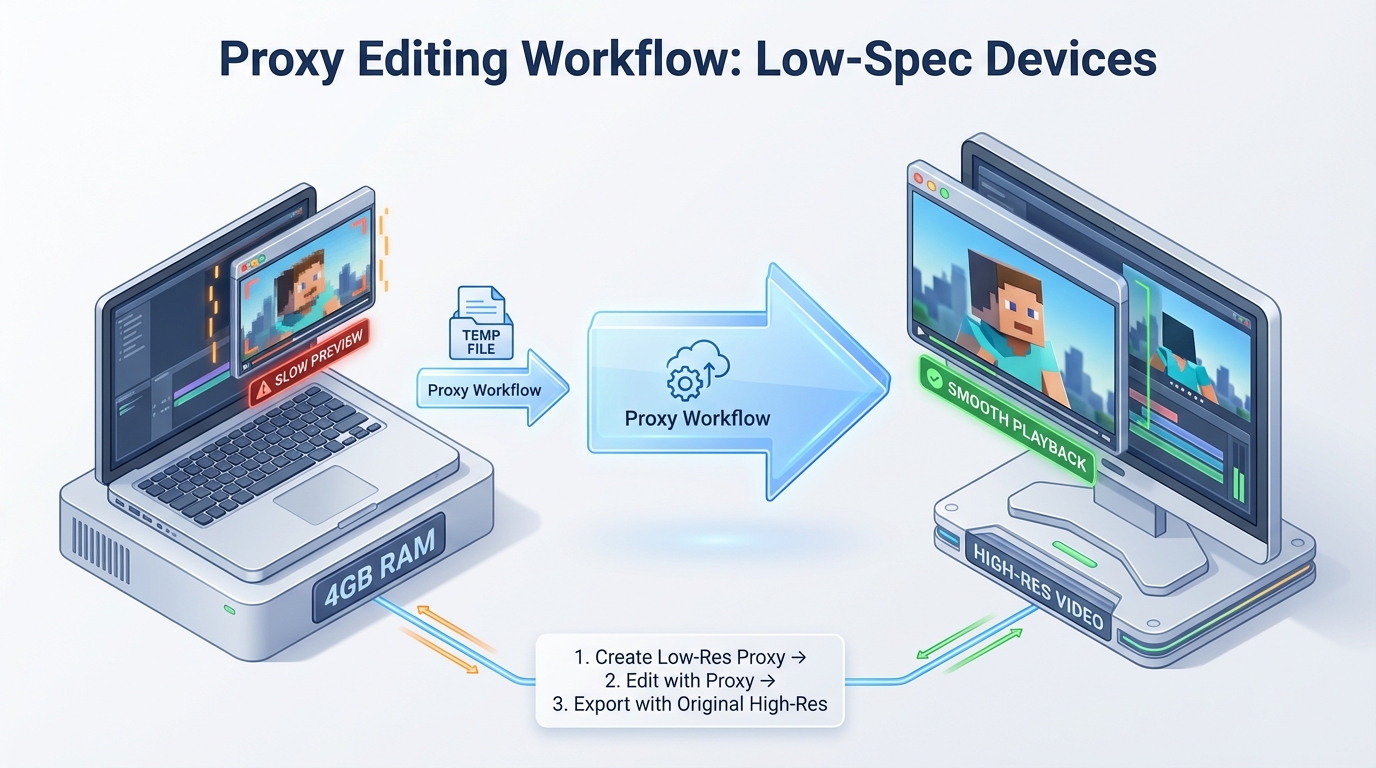
- Shotcut with Proxies: By setting proxy resolutions to 360p or even 240p, Shotcut can handle 1080p footage on a 4GB machine. The software creates a low-resolution “shadow” of your video for editing and only uses the high-res file during the final export.
- Movavi Video Editor: For those who need a more intuitive interface, Movavi’s 2026 version includes a “Low-RAM Mode” that toggles off background processes. It’s particularly effective for one-click auto-subtitles, which are processed in small batches to avoid memory spikes.
3. The “No-GPU” Strategy: Running AI in the Cloud to Bypass Hardware Limits
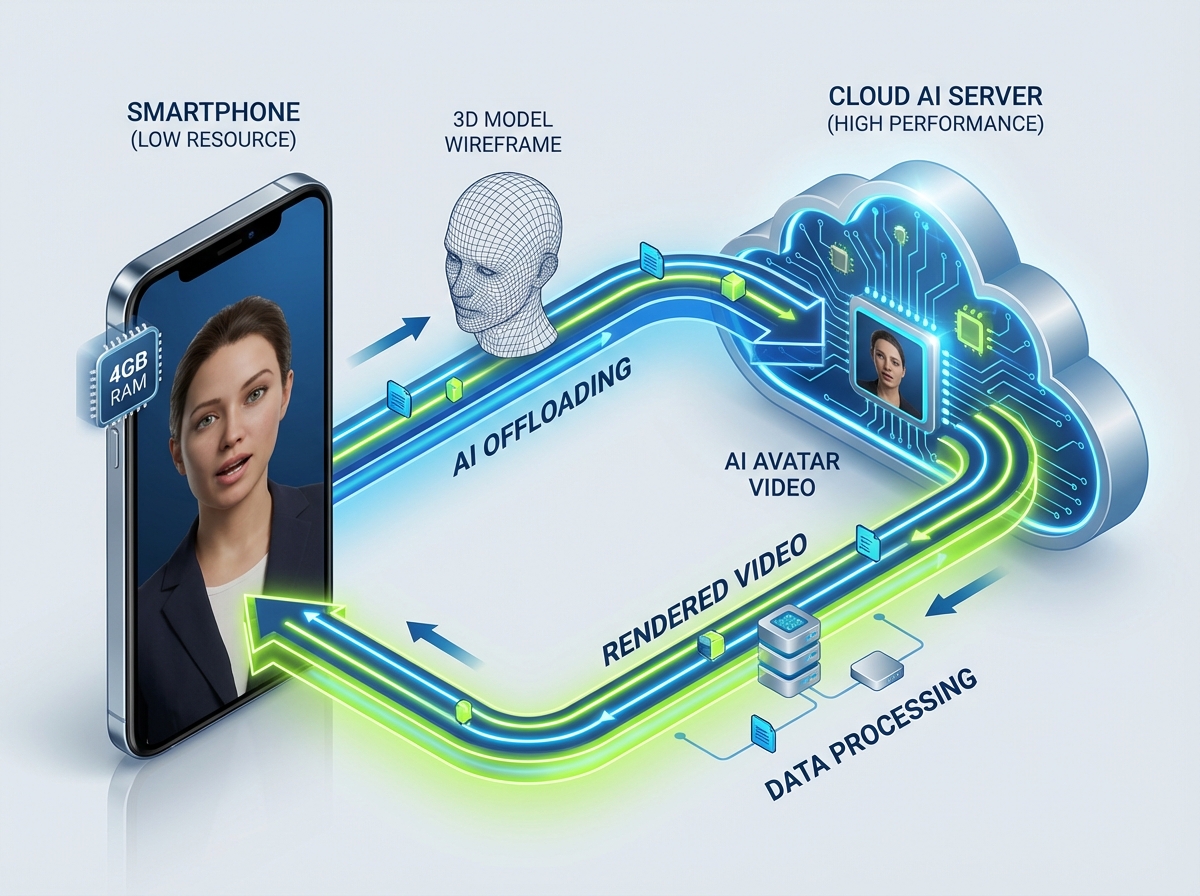
The most significant breakthrough for low-spec creators in 2026 is the democratization of AI video without GPU requirements. Traditionally, AI features like background removal, photorealistic avatars, and deepfake-style dubbing required powerful NVIDIA GPUs. Today, the compute has moved to the cloud.
What to Run Locally vs. In the Cloud
On a 4GB device, “Local AI” should be restricted to tiny models. For instance, offline AI video generator tasks like basic text-to-speech (TTS) using Piper or speech-to-text (ASR) using Whisper.cpp’s “tiny” model are feasible. These models are optimized to fit within 500MB of RAM. However, anything involving video synthesis—such as generating a talking head or complex style transfers—must be pushed to the cloud.
The 2026 Cloud Landscape
The 2026 landscape for AI video generators is dominated by platforms that handle the heavy lifting on their own servers. According to recent roundups on anangsha.me, the most successful Indian creators are using cloud-based tools to generate their core assets and then using their 4GB devices only for the final assembly. This “Cloud-First” approach ensures that even an entry-level smartphone can produce content that looks like it was made on a ₹2 lakh workstation.
4. The Memory-Optimized Pipeline: Presets, Thermal Management, and Offline ASR
To succeed with AI video tools 4GB RAM India, one must master the “Memory-Optimized Pipeline.” This is a set of habits and technical settings designed to maximize every megabyte of available RAM.
Thermal Management: The Hidden Bottleneck
A sub-topic often omitted by competitors is the impact of heat. On 4GB devices, as the CPU heats up, it “throttles,” reducing its speed to prevent damage. This makes video editing feel “choppy.” To combat this, creators should:
- Edit in 15-minute Sprints: Give the device a 5-minute break between heavy editing sessions.
- Remove Phone Covers: This allows for better heat dissipation.
- Disable Background Sync: Turn off WhatsApp, Instagram, and Gmail sync while editing to free up both CPU cycles and RAM.
Offline-First ASR for Indian Dialects
While cloud transcription is great, it consumes data. A modern 2026 hack is using Whisper.cpp (tiny model) for offline captions. This model is specifically tuned for Indian English and common dialects like Hinglish. It runs efficiently on 4GB RAM and allows creators to generate subtitles without an internet connection, saving data for the final upload.
The India-Ready Export Presets
For compressed AI video processing, the goal is “Viewability over Vanity.” While 4K is trendy, 720p is the sweet spot for the Indian mobile audience.
- Shorts/Reels (720p): Use H.264 Baseline profile, a CRF (Constant Rate Factor) of 23, and a bitrate of 3 Mbps. This produces a 30-second video that is roughly 15–20MB—perfect for quick sharing on WhatsApp or Instagram.
- Long-form (1080p): If you must use 1080p on a student laptop, set the export to “Overnight.” Use a CRF of 25 and disable “Two-Pass Encoding” to save RAM.
5. Enterprise Scaling & Safety: Studio by TrueFan AI and DPDP Compliance
For brands and agencies managing networks of thousands of campus ambassadors or micro-influencers, the 4GB RAM reality is a logistical challenge. How do you ensure quality and consistency when your creators are using budget hardware? This is where enterprise-grade cloud solutions become essential.
Scaling with Cloud Infrastructure
Studio by TrueFan AI's 175+ language support and AI avatars provide a centralized “brain” for decentralized creator networks. Instead of requiring each student to have a powerful laptop, the enterprise provides access to a browser-based studio. The creator simply uploads a script or a low-res video, and the cloud handles the generation of a high-definition, lip-synced AI video.
The DPDP Act and Ethical AI
A critical gap in most creator guides is the legal framework. In 2026, India’s Digital Personal Data Protection (DPDP) Act is in full effect. This means that using AI to generate videos of people requires explicit consent and clear “Content Credentials.”
- Consent-First Avatars: Studio by TrueFan AI uses only licensed photorealistic virtual humans based on real influencers who have provided legal consent. This protects brands from the legal pitfalls of “unauthorized deepfakes.”
- Moderation & Watermarking: To comply with 2026 regulations, all outputs are watermarked and passed through real-time profanity filters. This ensures that the content is safe for brand use and compliant with MeitY’s latest AI governance guidelines.
Mastering AI video tools 4GB RAM India is about embracing the constraints of 2026 rather than fighting them. By combining lightweight offline editors with powerful cloud-based AI, any creator in India can compete on the global stage.
Conclusion
The 2026 “RAM shortage” in India has not stifled creativity; it has simply refined it. By utilizing memory-optimized AI creation techniques creators can produce world-class content on budget hardware. Whether you are a student on a 4GB laptop or a mobile creator in a Tier 3 city, the tools for success are now accessible, affordable, and cloud-powered.
Frequently Asked Questions
Can I generate a full AI avatar video on my 4GB phone without internet?
No. High-fidelity AI avatars require massive GPU power that 4GB phones lack. You can do the scriptwriting and basic trimming offline, but the actual avatar generation must happen in the cloud.
Why does my video editor crash during export?
This is usually due to “Out of Memory” (OOM) errors. To fix this, close all other apps, clear your app cache, and try exporting at 720p instead of 1080p.
Is 720p resolution enough for Instagram Reels in 2026?
Absolutely. Most viewers in India watch content on mobile screens where the difference between 720p and 1080p is negligible.



