
Opus Clip vs Captions.ai comparison India 2026: INR pricing, virality scores, Hindi/English captions, eye contact, B‑roll
Estimated reading time: ~12 minutes
Key Takeaways
- Opus Clip excels at automated clip discovery with AI-driven virality scores, ideal for turning long videos into viral Shorts/Reels.
- Captions.ai prioritizes visual polish with eye-contact correction, lip-sync, and stylized Hinglish captions for premium on-camera content.
- Vizard is optimized for agencies with batch generation, collaboration, and transcript-driven editing at scale.
- For India 2026, success hinges on Hinglish ASR accuracy, robust B‑roll automation, and seamless YouTube→Reels scheduling.
- A scalable stack pairs discovery (Opus/Vizard) with branding and localization in Studio by TrueFan AI for maximum ROI.
The Indian creator economy has exploded to over 15 million active creators in 2026, making the Opus Clip vs Captions.ai comparison India 2026 a critical decision for anyone looking to dominate the short-form landscape. As attention spans shrink and mobile data consumption in India hits record highs—with 85% of traffic now driven by video—the ability to transform one long-form podcast or tutorial into 20 viral Reels is no longer a luxury; it is a survival requirement. Whether you are a solo YouTuber in Bangalore or a digital agency in Mumbai, choosing between a virality-focused clipper like Opus Clip and a visual-perfection tool like Captions.ai determines your ROI and reach.
In this comprehensive 2026 guide, we break down the nuances of AI video clipping comparison 2026, exploring everything from Opus Clip India pricing rupees to the technical fidelity of AI auto-caption tools Hindi English. See our AI video clipping tools comparison for more detail. We will also dive into a Vizard AI video clipper review for India and look at budget-friendly alternatives for those just starting their journey.
1. Evaluation Criteria: What "Great" Looks Like for India 2026
Before choosing a tool, we must define the benchmarks for success in the current market. In 2026, "good enough" editing is ignored. To rank on the SERPs and go viral on social, your tools must excel in five specific areas:
Virality Score AI Video Tools
A virality score is no longer a random number. In 2026, it is an AI-derived prediction of engagement based on hook detection (the first 3–5 seconds), sentiment analysis, and speaker turn density. Tools like Opus Clip analyze historical retention proxies to rank your clips, allowing you to A/B test the top 5 picks per video before you even hit "export." See the full Opus Clip vs Captions.ai guide for methodology.
AI Auto-Caption Tools Hindi English
With 70% of Indian viewers preferring Hinglish or regional captions, your ASR (Automatic Speech Recognition) must be tuned for Indian accents. This includes support for Indic-friendly fonts, keyword highlighting, and the ability to handle the "mixing" of languages seamlessly. Readability is key, requiring high-contrast strokes and shadows optimized for 9:16 mobile viewing. Explore our AI video clipping tools comparison for options.
Eye Contact Fix AI Tools
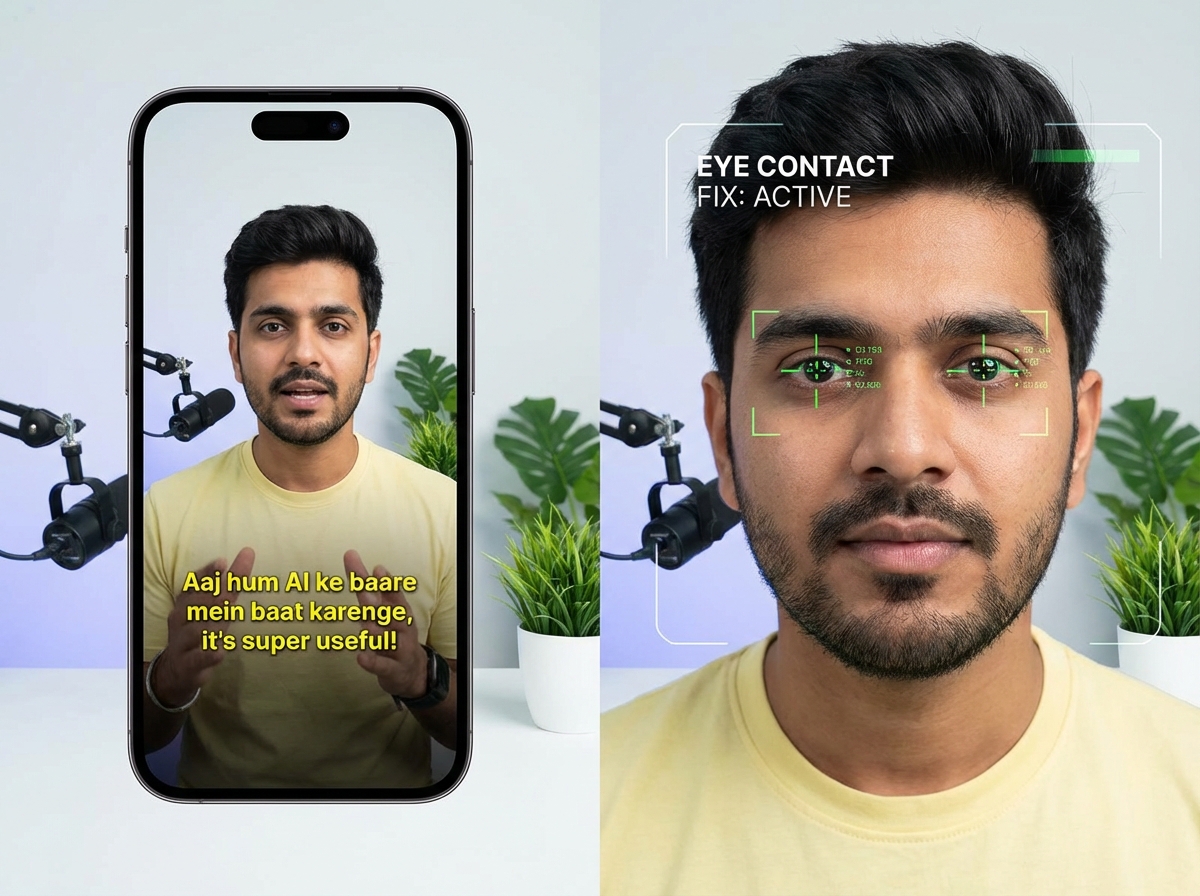
Gaze redirection is the secret weapon of 2026. Using facial landmark detection and eye region warping, these tools ensure you are looking directly at the viewer, even if you were reading a script or looking at a second monitor. The best tools handle glasses and side-angle frames without the "uncanny valley" artifacts. Read more in our Opus Clip and Captions.ai eye contact deep-dive.
B-roll Generator AI Free
Modern NLP (Natural Language Processing) now detects the topic of your speech and automatically fetches or generates relevant cutaways. This keeps the visual pace high—ideally one cut every 2–3 seconds—without requiring hours of manual stock footage searching. See our 2026 AI clipping comparison for top picks.
YouTube to Reels Automation Tools India
The workflow must be frictionless. This means one-click ingestion from a YouTube URL, batch generation of clips, auto-reframing to 9:16, and direct scheduling to Instagram Reels or YouTube Shorts with UTM tracking built-in. See the YouTube Shorts automation guide.
2. Head‑to‑Head: Opus Clip vs Captions.ai Comparison India 2026
Opus Clip: The Viral Clips AI Generator India
Opus Clip remains the gold standard for creators who prioritize "content atomization India"—the process of turning one long video into 12–30 distinct assets.
Key Features:
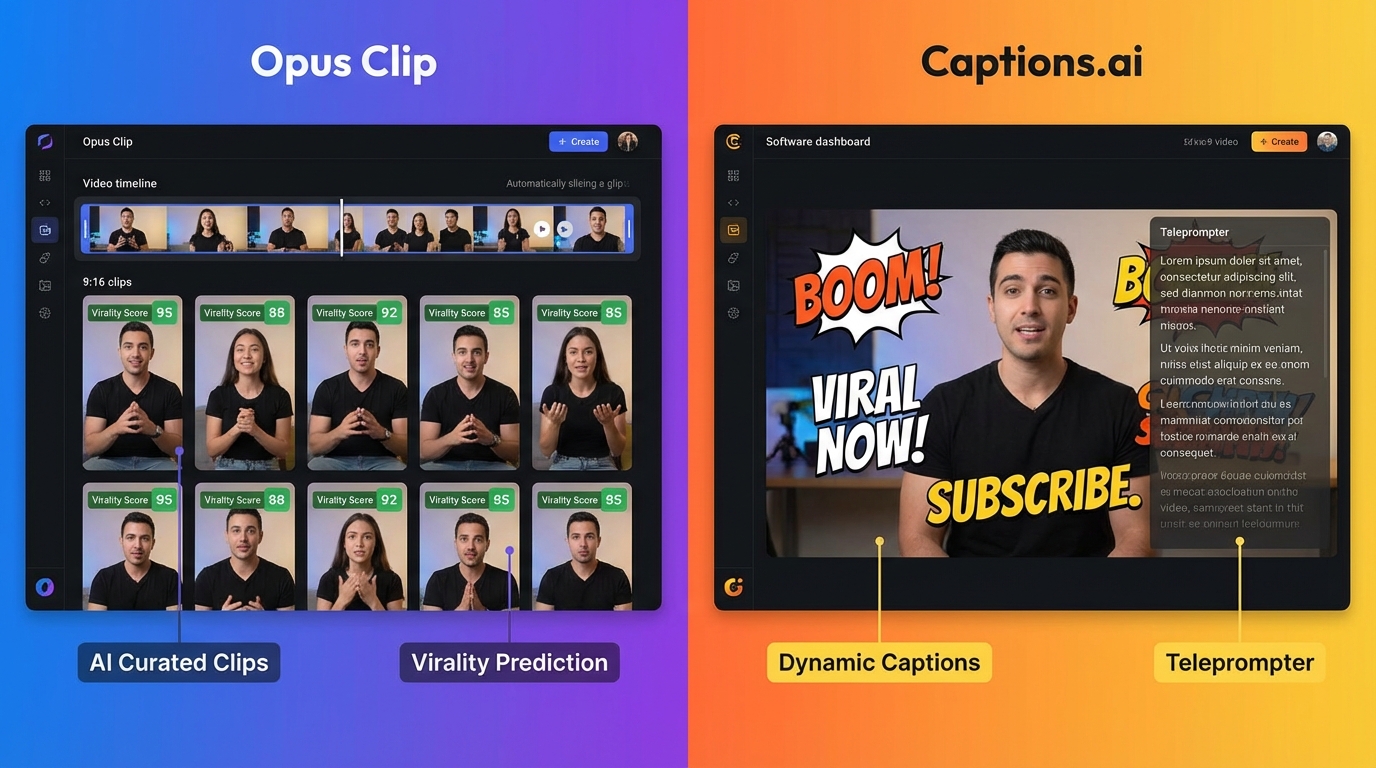
- Hook Detection: It identifies the most "sharable" moments using AI that understands narrative structures.
- Auto-Reframe: It keeps the speaker centered in a 9:16 frame, even with multiple speakers.
- Virality Score: Each clip gets a score from 1–100, explaining why it might go viral (e.g., "Strong emotional opening").
- B-roll Suggestions: Automatically inserts relevant visuals to maintain high retention.
Opus Clip India Pricing Rupees:
Opus Clip offers a tiered structure that is highly competitive in the Indian market. While they offer a "free forever" plan with watermarks, professional creators often look for the paid tiers. As of 2026, you can find Opus Clip coupons and India-specific offers that bring the cost down significantly. Expect to pay roughly ₹1,200 to ₹2,500 per month for high-volume plans, making it an affordable choice for growing channels.
Pros for India: It is incredibly fast. You can get a first draft of 15 clips in under 10 minutes. The Hindi/English captioning is robust, handling diverse accents from Delhi to Chennai with high accuracy.
Cons: It can occasionally suffer from "context drift," where the AI cuts a clip too early or late, requiring a quick manual trim.
Captions.ai: The Visual Perfectionist
If Opus Clip is about finding the content, Captions.ai is about polishing the creator. It is a mobile-first powerhouse that has expanded into a desktop suite.
Key Features:
- Eye Contact Fix: The most realistic gaze correction in the industry, essential for educators and influencers.
- AI Lip-Sync: Can actually adjust your lip movements if you decide to change a word in the script post-recording.
- Stylized Subtitles: Offers the "Alex Hormozi" style captions that have become the standard for high-engagement Reels.
- Teleprompter: Built-in AI teleprompter that follows your voice speed.
Captions.ai Alternatives Budget:
For those who find Captions.ai's subscription a bit steep, many Indian creators use CapCut for basic stylization or VEED.io for quick subtitle burns. However, for the specific "Eye Contact Fix," Captions.ai remains the leader.
Pros for India: Unmatched visual quality. The "Hinglish" caption styles are trendy and highly customizable.
Cons: It lacks the deep "long-to-short" bulk automation that Opus Clip provides. It is better suited for videos you record specifically for short-form, rather than repurposing a 2-hour podcast.
3. Vizard AI Video Clipper Review India
Vizard AI has carved out a significant niche in the Indian agency space. While Opus targets the solo creator, Vizard is built for teams and high-volume video repurposing workflow automation India.
What Makes Vizard Different?
Vizard excels in topic and scene detection. If you are running a corporate webinar or a multi-guest talk show, Vizard’s ability to distinguish between different segments is superior. According to Vizard's Capterra India listing, users praise its collaboration features, allowing editors and social media managers to leave comments on specific clips.
Features for the Indian Market:
- Batch Generation: Generate 20+ clips at once with consistent branding.
- Transcript-Driven Editing: Edit the video by simply deleting text in the transcript—a huge time-saver for non-editors.
- ASR Accuracy: High fidelity for Indian English, making it a favorite for YouTube to text conversion workflows.
Practical Verdict: Use Vizard if you are an agency managing 10+ clients. Use Opus if you are a creator looking for the "viral" edge.
4. Best AI Short Form Repurposing Tools India: 2026 Roundup
Beyond the big three, the 2026 market offers several specialized tools for different budgets.
The "Long Video to Shorts Converter Free" Stack
If you are on a zero-budget start, you can still achieve professional results. See the YouTube→Reels automation guide.
- CapCut: Use the "Auto-Reframe" and "Auto-Captions" features. It is widely adopted in India because it offers watermark-free exports if you use their mobile app or specific desktop versions.
- Submagic: Excellent for those who want the Captions.ai look but prefer a web-based interface.
- VEED.io: Great for quick social media crops and basic progress bars.
Viral Clips AI Generator India: The 2026 Rankings
- Opus Clip: Best for automated "moment" detection.
- Munch: Strong competitor for social media trend alignment.
- Vizard: Best for professional/corporate repurposing.
As AI editors in 2026 continue to evolve, we are seeing more "text-to-video" features being integrated, allowing you to add B-roll just by typing what you want to see.
5. The Ultimate 2026 Video Repurposing Workflow Blueprint
To truly scale, you need a repeatable system. Here is the blueprint for video repurposing workflow automation India:
Step 1: Ingest and Transcript
Paste your YouTube URL into your chosen clipper (Opus or Vizard). The AI will generate a full transcript. Ensure you check for regional name spellings (e.g., "Aarav" vs "Arif") to maintain accuracy.
Step 2: Clip Generation + Ranking
Generate 15–20 clips. Use the virality score AI video tools from our 2026 comparison to filter for the top 5. Focus on clips that are 15–30 seconds for Instagram and 50–60 seconds for YouTube Shorts.
Step 3: Captions (Hindi/English) + Style
Apply your brand kit. Platforms like Studio by TrueFan AI enable creators to standardize these styles across entire libraries, ensuring that every Reel looks like it belongs to the same brand. Ensure your "line speed" is around 14 characters per second—any faster and the Indian mobile viewer might struggle to keep up on a small screen.
Step 4: B-roll and Eye-Contact
Use the B-roll generator AI free tools to fill in visual gaps. If you were looking down at your notes during a key point, apply the eye contact fix AI tools to re-engage the audience.
Step 5: Distribution
Use YouTube to Reels automation tools India via the YouTube Shorts Automation AI guide to schedule your posts. Don't post all 5 clips at once; stagger them over 48 hours to maximize the algorithm's "freshness" boost.
6. ROI Analysis, INR Pricing, and TrueFan AI Integration
The Math: Cost Per Published Short
Let’s look at the ROI of using these tools in 2026.
- Manual Editing: 1 hour per short. At a modest ₹500/hour rate for a freelance editor, 20 shorts cost you ₹10,000.
- AI Automation: 5 minutes per short. A subscription to Opus or Vizard (approx. ₹2,000/mo) allows you to produce 100+ shorts.
The "Time is Money" Equation:
If you publish 200 shorts a month, you save 1,000 minutes of manual labor. That is roughly ₹8,333 in value saved every month, even after paying for the software. Solutions like Studio by TrueFan AI demonstrate ROI through this massive reduction in "time-to-market," allowing agencies to scale from 5 clients to 50 without increasing headcount.
Standardizing with Studio by TrueFan AI
For enterprises and high-growth agencies, the "fragmentation" of using 5 different tools can be a nightmare. This is where the integration layer becomes vital.
Studio by TrueFan AI's 175+ language support and AI avatars allow you to take your top-performing clips and add localized intros or outros. Imagine taking a viral clip of a tech review and having an AI avatar introduce it in Marathi, Tamil, and Bengali—all within minutes.
TrueFan AI Pricing (India):
- Starter (₹2,999/mo): Perfect for solo creators.
- Growth (₹19,999/mo): Designed for agencies needing team collaboration and 1080p HD.
- Enterprise: For brands requiring 4K and custom "digital twin" avatars of their own spokespeople.
7. FAQs & Final Verdict
Q1: Which tool is better for Hinglish captions?
Opus Clip generally handles the "mixing" of Hindi and English better in its ASR, but Captions.ai offers more "trendy" visual styles that appeal to the Gen-Z Indian audience.
Q2: Can I remove watermarks for free?
Most "long video to shorts converter free" tools like Opus or Vizard will include a watermark on the free tier. To remove them, you typically need a paid plan. However, CapCut remains a popular workaround for watermark-free exports in the Indian market.
Q3: Is the eye contact fix realistic for people with glasses?
In 2026, yes. Captions.ai has updated its facial landmark detection to account for lens reflection, though we recommend keeping the "intensity" of the fix at 70% to avoid a robotic look.
Q4: How do I ensure my AI-generated B-roll is license-safe?
Tools like Vizard and Opus use licensed stock libraries (like Pexels or Storyblocks). If you are using a generative AI B-roll tool, ensure it is a "walled garden" platform like Studio by TrueFan AI, which prioritizes 100% content compliance and licensed assets.
Q5: What is the best way to schedule YouTube to Reels?
Use a dedicated scheduler like Buffer or Hootsuite, or the built-in "Direct Publish" features found in Vizard and Studio by TrueFan AI to maintain your UTM tracking and naming conventions.
Final Verdict: Opus Clip vs Captions.ai comparison India 2026
- Choose Opus Clip if your primary goal is speed and virality. It is the best tool for finding the "needle in the haystack" of a 1-hour video.
- Choose Captions.ai if you are an on-camera personality who needs to look perfect. The eye-contact and lip-sync features are unmatched.
- Choose Vizard if you are an agency handling bulk volume and need a collaborative workspace.
For those looking to build a professional, scalable content machine, the winning strategy is often a hybrid: Use Opus Clip to find the viral moments, and then bring them into Studio by TrueFan AI to add branded avatars, localized intros, and ensure 100% compliance across your entire distribution network.
Sources:
- AI Insider India: 15 AI video tools tested in 2026
- EdTechReview India: Creator economy trends
- GrabOn India: Opus Clip pricing and offers
- Capterra India: Vizard reviews
- HubSpot: 2026 marketing statistics
- SourceKode Blog: Becoming a content creator in India (2026)
Recommended Internal Links
- Opus Clip vs Captions.ai comparison India 2026: which wins?
- AI video clipping comparison 2026: Opus Clip vs Captions.ai
- AI video clipping tools comparison: Opus Clip vs VEED
- Opus Clip vs Captions.ai Comparison India 2026 Guide
- Opus Clip vs Captions.ai comparison India 2026 guide
- YouTube Shorts Automation AI (YouTube→Reels scheduling)
Frequently Asked Questions
What is the key difference between Opus Clip and Captions.ai?
Opus Clip focuses on automated clip discovery and virality scoring from long-form content, while Captions.ai specializes in creator polish—eye-contact correction, lip-sync, and stylized Hinglish captions. Many teams use Opus for discovery and Captions.ai for final-touch visuals.
Which tool is best for accurate Hinglish captions in India?
For ASR accuracy on mixed Hindi/English, Opus Clip often leads in detection and timing. Captions.ai offers superior visual caption styles. Agencies commonly generate captions in Opus or Vizard, then style them in Captions.ai.
How realistic is AI eye-contact correction in 2026?
Modern gaze redirection handles glasses and side angles with minimal artifacts. Captions.ai is a standout here. Keep intensity below 70% for a natural look and test across sample frames before bulk export.
How do I scale a YouTube to Reels/Shorts workflow?
Automate ingestion, clip ranking, captions, B‑roll, and scheduling. Use Opus or Vizard for discovery, then localize and standardize branding via Studio by TrueFan AI, and finally schedule via native tools or integrated schedulers.
How can Indian creators and agencies prove ROI with INR pricing?
Compare hourly editing costs versus AI subscriptions. With AI, output scales dramatically (100+ shorts/month at ~₹2,000). Track CPM/CPC lift, retention, and time-to-publish reduction—then reinvest savings into growth via Studio by TrueFan AI templates and localization.



