

AI speed ramping cinematic effects India 2026: Free mobile and browser tools for film‑look Reels and Shorts
Estimated reading time: ~10 minutes
Key Takeaways
- AI-powered speed ramping lets creators align motion to music beats with smooth optical-flow slow motion on mobile.
- Master viral transitions (whip-pan, depth parallax, morph cuts, spin) with timing recipes for seamless edits.
- Use AI color grading, motion blur, bloom/halation, and export at 1080x1920, 10–15 Mbps to retain a film-look.
- Optimize phones for heavy AI renders: manage RAM, avoid thermal throttling, and prefer offline-capable tools.
- Scale content with Studio by TrueFan AI for localization, captions, and avatar-led workflows.
AI speed ramping cinematic effects India 2026 is exploding among Reels creators who want to transform ordinary footage into high-octane visual stories. In this guide, we show how Indian mobile-first editors can achieve AI speed ramping video India 2026 with free apps and browser workflows that rival professional desktop suites. As the digital landscape shifts, mastering these tools is no longer optional for those seeking to dominate the attention economy.
1. What is AI speed ramping video India 2026 and why it matters
Speed ramping is a time-remapping technique where the speed of a video clip changes dynamically—accelerating or decelerating around specific actions or musical beats to emphasize motion and narrative tension. In the context of AI speed ramping video India 2026, artificial intelligence now handles the heavy lifting by automatically detecting beats and generating keyframes. This allows for “optical flow” interpolation, where the AI creates new frames to ensure that even footage shot at standard frame rates looks buttery smooth when slowed down.
By 2026, the Indian creator economy has reached a tipping point. With over 1.2 billion smartphone users and a projected 80% of mobile data traffic dedicated to short-form video, the competition for “the scroll” is fiercer than ever. Recent data from Social Samosa indicates that 52% of Gen Z parents in India are already using AI for daily advice, signaling a massive cultural shift toward AI integration. For creators, this means using cinematic video effects AI free tools to maintain a daily posting schedule without sacrificing the “film-look” that viewers crave.
2. Smooth transition video maker AI India: Viral video transitions AI tools
Achieving a professional flow requires more than just cutting clips; it requires a smooth transition video maker AI India workflow. In 2026, the most viral transitions are those that feel invisible or physically impossible. AI has revolutionized four key transition types:
- Whip-Pan & Directional Blur: AI now analyzes the direction of movement in Clip A and automatically applies a matching directional blur to the start of Clip B. This creates a seamless “whip” effect that hides the cut.
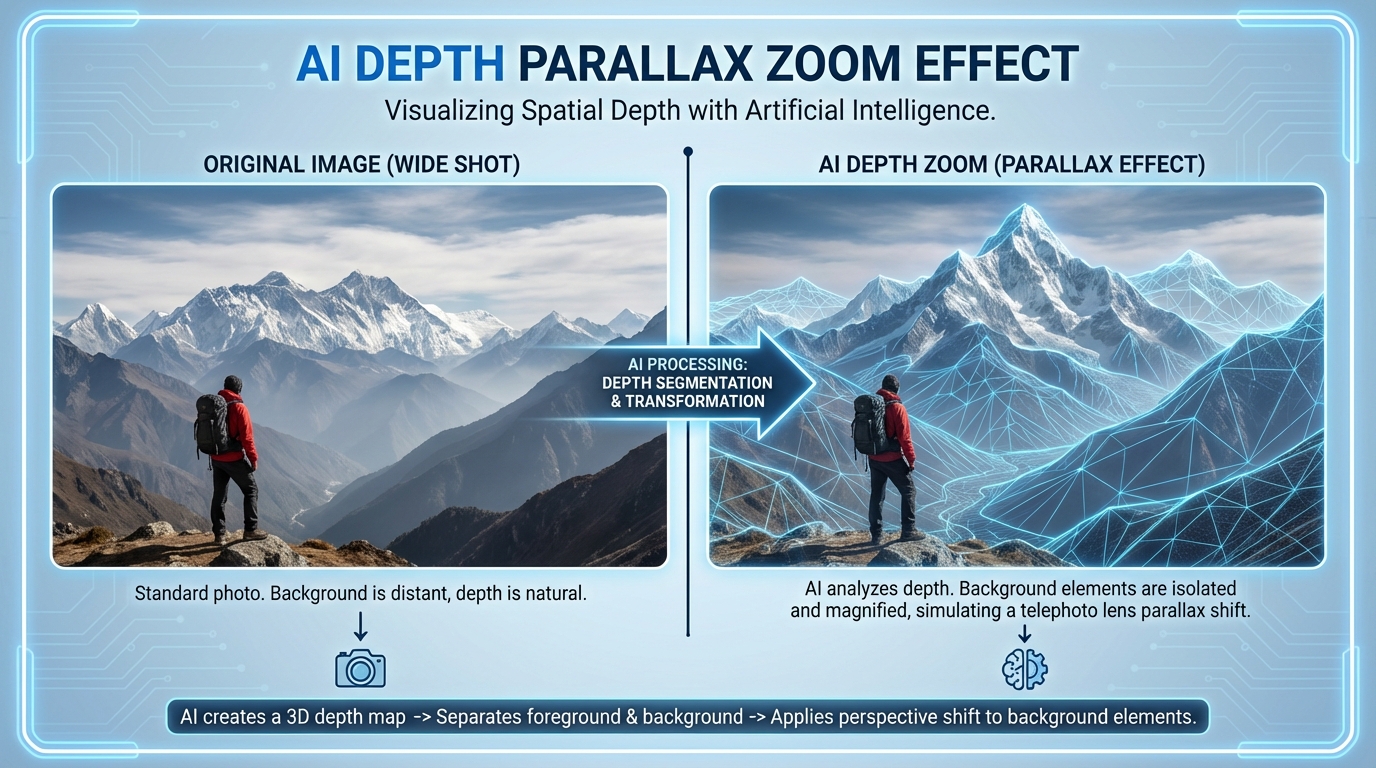
- AI Depth Parallax Zoom: By using AI to segment the foreground from the background, creators can now execute a “Dolly Zoom” or “Vertigo Effect” on a mobile device. The AI scales the background while keeping the subject stable, a feat previously reserved for expensive gimbal setups.
- Morph/Match Cuts: This is the pinnacle of viral video transitions AI tools. AI identifies similar shapes—like a round tea cup transitioning into a round car wheel—and generates “bridge frames” to morph the two objects together.
- Spin & Roll: By syncing radial blur to the peaks of a speed ramp, AI ensures that the rotation feels grounded in physics, preventing the “cheap app” look.
For the best results, timing is everything. A standard “recipe” for a viral transition involves a 4-frame pre-ramp (accelerating), an 8–12 frame transition window (the effect), and a 4-frame post-ramp (decelerating back to normal or slow-mo). Platforms like Higgsfield are leading the way in browser-based AI pipelines that automate these timing maps, making a viral transition effects generator accessible to anyone with a smartphone. See the companion guide: YouTube Shorts editor Android India.
Sources:
3. Instagram Reels cinematic effects free: AI color grading tools mobile and film-look video AI tools
To achieve a true “film-look,” you must look beyond motion and focus on color and texture. Instagram Reels cinematic effects free are no longer limited to basic filters. Explore Instagram Reels hooks India. In 2026, AI color grading tools mobile users can access include:
- Skin-Tone HSL Isolation: AI detects human skin and protects its natural hue while you push the rest of the image toward a “Teal and Orange” or “Moody Monsoon” aesthetic.
- AI-Generated Motion Blur: If you shoot at high shutter speeds to capture detail, your video can look “staccato.” AI motion blur adds the natural smear back into the footage, which is essential for smooth speed ramps.
- Bloom and Halation: These film-look video AI tools simulate the way light bleeds on old 35mm film stock, softening highlights and adding a nostalgic glow to Indian street scenes or sunset shots.
When exporting for Instagram, the technical settings are just as important as the aesthetic. To avoid the dreaded “Instagram compression,” Indian creators should aim for 1080x1920 resolution at a bitrate of 10–15 Mbps. Using an AI video effects app free India like CapCut or VN allows you to toggle “Smart HDR” off, which often prevents the over-sharpened look that ruins cinematic quality.
Sources:
4. Speed ramp tutorial AI tools India: Step-by-step for mobile and browser
Creating a professional ramp requires a blend of high-fps capture and intelligent software. Here is a speed ramp tutorial AI tools India creators can follow today:
Step 1: The Capture
Shoot your footage at 60fps or 120fps. In 2026, even mid-range Indian smartphones (refer to Gadgets 360 for the latest camera-centric models) support high-frame-rate recording. If you only have 30fps footage, use the “AI Frame Interpolation” or “Optical Flow” setting in your editor to simulate the missing frames.
Step 2: The Curve (Mobile Workflow - CapCut/VN)
See the companion guide: YouTube Shorts editor Android India.
- Import your clip and select ‘Speed’ > ‘Curve’.
- Choose the ‘Hero’ or ‘Montage’ preset as a starting point.
- Place a keyframe on the beat of the music.
- Drag the curve down to 0.25x just before the beat to create a “slow-mo reveal,” then spike it to 2.0x immediately after the beat for a “fast-forward” energy boost.
- Ensure the “Ease-In” and “Ease-Out” transitions between keyframes are smooth, not jagged.
Step 3: The AI Polish (Browser Workflow)
For those who prefer a browser-based video effects AI approach, tools like CapCut Web or Adobe Express offer “Auto-Beat Sync.” Learn automation strategies in YouTube Shorts automation AI.
- Upload your footage and your audio track.
- Click “Auto-Generate Ramps.” The AI will analyze the transients in the music and align your speed changes perfectly with the drums or bass drops.
- Apply slow motion speed ramp AI effects to ensure the slow segments don’t stutter.
Step 4: Final Touches
Add a “Whip” transition at the point of highest speed. Apply a cinematic LUT (Look-Up Table) and add 8% film grain to tie the clips together. Platforms like Studio by TrueFan AI enable creators to take these edited clips and further enhance them with AI avatars (Real-time Interactive AI Avatars India) or localized captions for a global audience.
Sources:
5. Mobile cinematic video editing India: Devices, export, and watermark avoidance
The mobile cinematic video editing India landscape is unique due to the wide variety of hardware used. To ensure your AI effects render correctly without crashing your device, follow these 2026 optimization tips:
- RAM Management: AI rendering is memory-intensive. Before exporting a complex speed ramp, close all background apps. Ensure you have at least 3GB of free RAM.
- Thermal Throttling: India’s climate can cause phones to overheat during long editing sessions. If your phone feels hot, the CPU will slow down, leading to “glitchy” AI frame interpolation. Edit in a cool environment or take breaks between rendering clips.
- Data-Light Workflows: For creators in regions with fluctuating connectivity, use editors that support offline AI processing. Avoid browser-based tools that require a constant high-speed upload for every minor adjustment.
- Watermark Avoidance: Many “free” apps hide watermarks at the end of the video. In CapCut, you can simply delete the final “ending” clip. In VN, there is no watermark by default. Refer to YouTube Shorts editor Android India. For professional video effects without Premiere, these mobile alternatives are superior for quick social media turnaround.
When selecting a device, look for those with UFS 3.1 or 4.0 storage. Faster read/write speeds mean the AI can process high-resolution frames more quickly, reducing the “lag” when scrubbing through a 120fps timeline.
Sources:
6. Trending transition effects 2026: Recipes for a viral transition effects generator workflow
As we move through 2026, certain “recipes” have emerged as the gold standard for viral content. Using a viral transition effects generator mindset, you can replicate these high-end looks:
- The “Hyper-Lapse Ramp”:
- Capture: A walking shot through a crowded market (e.g., Chandni Chowk).
- Edit: Speed up the walking to 5x, then suddenly ramp down to 0.3x when you pass a colorful object.
- AI Effect: Apply “Motion Blur” at 100% during the 5x segment.
- The “Portal Morph”:
- Capture: Shot A is you jumping toward the camera in a park. Shot B is you landing away from the camera in your room.
- Edit: Use an AI morph transition at the peak of the jump.
- AI Effect: The AI will blend the park background into the room background during the mid-air frames.
- The “Cinematic Glitch”:
- Capture: Any high-motion action shot.
- Edit: Add a speed ramp that “stutters” (1x -> 0.5x -> 1x -> 0.5x) in sync with a glitch sound effect.
- AI Effect: Use a “Datamosh” AI filter to melt the pixels of the two clips together during the stutter.
These techniques are part of the broader AI video trends identified by LTX Studio, which emphasizes the use of “virtual cameras” to create movement that didn’t exist in the original footage. By 2026, the line between “shot on a phone” and “shot on a RED camera” has blurred significantly thanks to these AI enhancements.
7. Enterprise Playbook & FAQs: Scaling with Studio by TrueFan AI
For businesses and large-scale creators, manual editing isn't enough. You need a way to standardize quality across hundreds of videos. Studio by TrueFan AI's 175+ language support and AI avatars allow brands to take a single cinematic Reel and localize it for every region in India instantly. Whether you need a Marathi version of a speed-ramped product launch or a Tamil version of a travel vlog, AI handles the translation and lip-syncing perfectly.
Solutions like Studio by TrueFan AI demonstrate ROI through reduced overhead and hyper-personalized content delivery. By integrating these cinematic effects into an automated pipeline, enterprises can maintain a premium brand image while scaling their output to meet the demands of the 2026 market.
FAQs
What’s the best AI video effects app free India for speed ramping? See our picks in YouTube Shorts editor Android India.
CapCut remains the leader due to its intuitive velocity curves and “Optical Flow” AI. However, VN Video Editor is a close second for those who want a more traditional, watermark-free timeline experience.
How do I get Instagram Reels cinematic effects free on mobile without watermarks? Read this mobile editor guide.
Use VN Video Editor or the “delete ending” trick in CapCut. Additionally, Studio by TrueFan AI offers a professional browser-based environment for finalizing videos without the intrusive watermarks found in many entry-level mobile apps.
Can I achieve professional video effects without Premiere or Final Cut using only my phone?
Absolutely. By 2026, mobile AI chips are powerful enough to handle complex tasks like depth-mapping, AI color grading, and frame interpolation. The key is using the right “stack” of apps (e.g., CapCut for cutting, Lightroom for color, and TrueFan for scaling).
Which browser-based video effects AI tools support 9:16 and fast captions? Explore YouTube Shorts automation AI.
CapCut Web and Adobe Express are excellent for 9:16 layouts. For enterprise-level captioning and multi-language support, Studio by TrueFan AI is the preferred choice for Indian creators looking to go global.
How to do slow motion speed ramp AI on older phones that can’t shoot 120 fps? See this Android editor overview.
Shoot at 30fps or 60fps and use an “AI Slow Motion” tool. These tools use “Frame Synthesis” to create new frames between your existing ones, making 30fps look like 120fps. Just ensure your lighting is bright to avoid “ghosting” artifacts.
What are the content gaps in current AI video tutorials?
Most tutorials ignore the “Data-Light” needs of rural Indian creators, the thermal management of budget devices, and the ethical use of AI-generated frames in commercial work. This guide addresses these by focusing on offline-capable apps and hardware optimization.
Sources:
Recommended Internal Links
- Instagram Reels hooks India: 2026 Stop-the-Scroll Strategies
- YouTube Shorts editor Android India: budget AI picks
- Harnessing YouTube Shorts Automation AI
- Real-time Interactive AI Avatars India: Live Video Chat
- Shoppable Video Ads Instagram Reels: India 2026 Guide
Frequently Asked Questions
What is the best free mobile app for AI speed ramping in India 2026?
CapCut leads for velocity curves and optical flow, with VN as a strong watermark-free alternative. See picks in YouTube Shorts editor Android India.
How can I avoid Instagram compression while keeping a film-look?
Export 1080x1920 at 10–15 Mbps, keep Smart HDR off, add AI motion blur and subtle grain, and use teal-orange or moody grades with skin-tone protection.
What timing recipe works for viral AI transitions?
Use a 4-frame pre-ramp, 8–12 frame effect window, and 4-frame post-ramp. Sync blur/rotation to ramp peaks for seamless whip or spin transitions.
Can older phones create smooth slow motion without 120 fps?
Yes. Use AI frame interpolation/optical flow on 30–60 fps footage, ensure bright lighting to reduce ghosting, and stabilize clips where possible.
How can enterprises scale localized cinematic Reels across India?
Use Studio by TrueFan AI to automate multi-language captions, lip-sync avatars, and consistent LUTs across hundreds of videos.



