
AI video Zoho CRM integration India 2026: The Definitive Indian CRM Video Integration Guide for RevOps
Estimated reading time: ~11 minutes
Key Takeaways
- AI video + CRM is the 2026 standard for Indian RevOps—trigger personalized, multilingual videos from Zoho, LeadSquared, and Freshsales.
- WhatsApp is the primary delivery channel for sales content; design workflows around pre-approved templates and webhook automation.
- Comply with the DPDP Act via consent flags, data minimization, erasure APIs, and India-based data residency.
- Multilingual at scale wins in India—drive video language, script, and avatar from CRM fields like Language and City.
- Platforms like Studio by TrueFan AI show measurable ROI: faster cycles, lower CPA, and higher reply rates.
In the rapidly evolving landscape of Indian enterprise sales, the year 2026 marks a pivotal shift where static communication is no longer sufficient to capture market share. Implementing an AI video Zoho CRM integration India 2026 strategy has become the gold standard for Revenue Operations (RevOps) teams looking to humanize digital touchpoints at scale. As Indian businesses move away from global, one-size-fits-all CRM strategies toward localized, high-velocity automation, the ability to trigger personalized, multilingual videos directly from your CRM is the ultimate competitive advantage.
1. The 2026 RevOps Landscape: Why Indian CRMs Demand AI Video
The Indian CRM market has matured significantly, with Zoho, LeadSquared, and Freshsales commanding over 45% of the mid-market and enterprise segments. By Q1 2026, Zoho’s Zia AI agents have reached a 60% adoption rate among Indian enterprises, signaling a move toward autonomous workflows. Simultaneously, India’s digital consumption has shifted; WhatsApp Business API traffic in India is projected to exceed 5 billion messages daily by mid-2026, making it the primary delivery vehicle for sales content.
For RevOps specialists, the challenge is no longer just capturing leads but maintaining engagement in a “distraction economy.” Data from 2026 market reports indicates that personalized video click-through rates (CTR) in India have reached 18%, compared to a meager 2.1% for static text-based emails. Furthermore, 85% of consumers in Tier-2 and Tier-3 Indian cities now report a strong preference for video content delivered in their native regional language. Platforms like Studio by TrueFan AI enable RevOps teams to bridge the gap between static CRM data and dynamic video content, ensuring that every lead receives a 1:1 video message that feels personal, timely, and culturally relevant.
The integration of AI video into the Indian CRM stack is not just about “cool tech”; it is a response to the Digital Personal Data Protection (DPDP) Act of 2023, which by 2026 has reached full enforcement. Secure, webhook-based video generation ensures that PII (Personally Identifiable Information) is handled within compliant frameworks while delivering the high-touch experience Indian buyers demand.
Sources:
2. Architecture of the Indian CRM Martech Video Stack
To build a robust Indian CRM martech video stack, one must look beyond simple API calls. See an enterprise-scale overview in the multimodal AI video creation guide for 2026. The architecture must be designed for high concurrency, low latency, and mobile-first delivery. In the Indian context, where 4G/5G speeds can fluctuate, the delivery of AI video must be optimized for “instant-play” without buffering.
The Core Workflow
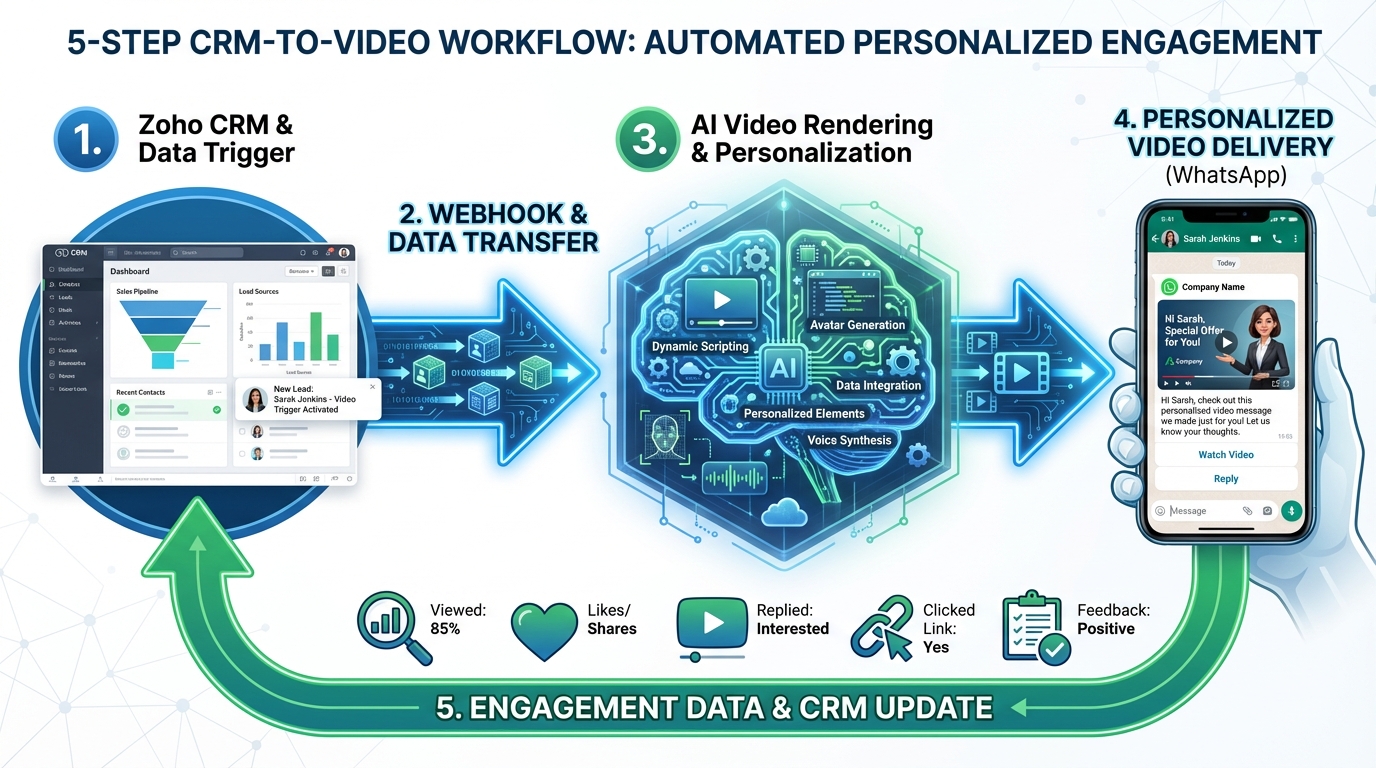
The standard operating procedure for a RevOps video automation Indian platform follows a five-stage loop:
- The Trigger: A lead status change in Zoho CRM (e.g., “Demo Completed”) or a high intent score in LeadSquared.
- The Orchestration: A CRM workflow triggers a Webhook POST request containing lead tokens (Name, City, Product Interest, Language).
- The Rendering: An AI video engine processes the request, swapping the avatar’s script, background, and voiceover in real-time.
- The Delivery: The generated video URL and a personalized GIF thumbnail are pushed to the lead via WhatsApp (using a BSP like Gupshup or Yellow.ai) or Zoho Campaigns. Explore WhatsApp video automation playbooks and distribution.
- The Feedback Loop: Engagement metrics (watch time, clicks) are written back to the CRM lead profile to update the “Intent Score.”
Security and Reliability
In 2026, a “200 OK” response is the bare minimum. Your integration must support:
- HMAC Signatures: To verify that the webhook is indeed coming from your CRM and not a malicious actor.
- Idempotency Keys: To prevent duplicate video generation if a CRM workflow triggers twice due to a sync error.
- Adaptive Bitrate Playback: Ensuring the video plays smoothly on a ₹10,000 Android device in rural India as well as it does on an iPhone 17 Pro in Mumbai.
Studio by TrueFan AI's 175+ language support and AI avatars ensure that a single lead record in Zoho can trigger a video in Marathi, Tamil, or Bengali without manual intervention, making this architecture truly “India-scale” ready.
3. Zoho CRM: Step-by-Step Webhook and Workflow Setup
Zoho CRM remains the backbone of Indian RevOps. To implement a personalized sales video Zoho workflow, you must leverage Zoho’s “Workflow Rules” and “Webhooks” or “Deluge Custom Functions.”
Step 1: Defining the Trigger
Navigate to Settings > Automation > Workflow Rules. Create a rule for the “Leads” or “Deals” module. A high-performing trigger in 2026 is the “Intent Score Threshold.” For example, when a lead’s Zia-calculated intent score exceeds 75, trigger the video.
Step 2: Configuring the Webhook
In the “Instant Actions” section of your workflow, select Webhook.
- URL to Notify: Your AI video API endpoint.
- Method: POST.
- Authorization: Use a Bearer Token in the header.
- Entity Parameters: This is where the magic happens. Map Zoho fields to your video tokens:
first_name->${Leads.First_Name}product_sku->${Leads.Product_Interest}language->${Leads.Preferred_Language}city->${Leads.City}
Step 3: The Deluge Script (Advanced)
For more complex logic—such as selecting a different video template based on the lead's industry—use a Deluge script.
leadId = lead.get("id");
language = lead.get("Preferred_Language");
templateId = if(language == "Hindi", "hindi_template_01", "english_template_01");

payload = {
  "lead_id": leadId,
  "template_id": templateId,
  "tokens": {
    "name": lead.get("First_Name"),
    "city": lead.get("City")
  }
};

response = invokeurl [
  url: "https://api.video-provider.com/v1/render"
  type: POST
  parameters: payload.toString()
  headers: {"Authorization": "Bearer YOUR_API_KEY"}
];
Step 4: Zoho Campaigns Integration
Once the video is rendered, the API should POST the video_url back to a custom field in Zoho CRM. In Zoho Campaigns, you can then use merge tags to insert a clickable thumbnail:
[](${Leads.Video_URL})
Sources:
4. LeadSquared and Freshsales: Specialized Indian Workflows
LeadSquared Video Personalization Setup
LeadSquared is built for high-volume lead processing. To set up Leadsquared video personalization, use the “Lapps” or “Webhooks” feature within the Automation Builder.
- Trigger: Lead Created or Lead Stage Change (e.g., “Application Started”).
- Webhook Payload: LeadSquared allows for deep customization of the JSON body. Ensure you include the
Lead_IDandOwner_Emailto allow for “Video from the Account Manager” style personalization. - Retry Logic: LeadSquared’s webhook engine is sensitive to timeouts. Ensure your video API responds with a
200 OKimmediately and processes the video asynchronously to avoid the webhook being disabled for “failure to respond.”
Freshsales AI Video Automation
Freshsales (Freshworks CRM) excels in its “Sales Sequences.” To implement Freshsales AI video automation, you can insert a webhook step directly into a sequence.
- Prospecting Use Case: Create a “Cold Outreach” sequence. Step 1: Send an automated email. Step 2: If no open in 24 hours, trigger a webhook to generate a personalized “Why [Company Name]?” video and send it via WhatsApp.
- Engagement Tracking: Use Freshsales' custom activities to log when a video is watched. This allows SDRs to call the lead exactly when they are watching the video, a tactic that has shown a 300% increase in connection rates in 2026.
Sources:
5. Governance, DPDP Act, and Multilingual Realities
Operating in India in 2026 requires a sophisticated approach to data governance and localization. This is where most global competitors fail, as they lack the “India-first” compliance and linguistic depth required.
DPDP Act 2026 Alignment
The Digital Personal Data Protection Act (DPDP) is now the law of the land. When using an Indian CRM video integration guide, your RevOps team must ensure the following (see the multilingual voice commerce compliance guide):
- Consent Management: The CRM must have a “Consent Captured” flag before a webhook is triggered.
- Data Minimization: Only send the tokens necessary for video generation (e.g., don't send the lead's full address if only the “City” is needed for the video script).
- Right to Erasure: Your video provider must have an API to delete generated videos and associated metadata if a lead exercises their “Right to be Forgotten.”
- Storage Localization: Ensure that lead data used for rendering remains on Indian servers to comply with sector-specific data residency requirements (especially for FinTech and HealthTech).
The Multilingual Mandate
India is not a monolingual market. A “personalized” video that is only in English is only partially personalized. In 2026, the most successful brands use the Language field in their CRM to drive the entire creative process. Learn more in the AI voice cloning for Indian accents guide.
- 175+ Languages: Your integration should support everything from Hindi and Bengali to regional dialects like Konkani or Maithili.
- Cultural Nuance: AI avatars should be able to adjust their attire or background based on the lead's region (e.g., a festive background for a lead in West Bengal during Durga Puja).
- Hinglish Support: For urban audiences, a “Hinglish” (Hindi + English) script often performs better than pure Hindi, sounding more natural and conversational.
6. ROI and Success Metrics for the 2026 Budget
Investing in an Indian CRM video integration guide requires a clear understanding of the ROI. In 2026, CFOs are looking for more than just “engagement”; they want pipeline velocity.
The ROI Formula
To justify the budget for AI video, RevOps teams use the following calculation:
Incremental Revenue = (Total Leads × Video Uplift in Booking Rate) × Win Rate × Average Deal Value
Data from early 2026 adopters shows:
- Sales Cycle Reduction: 40% faster conversion from “Demo” to “Closed Won” when personalized recap videos are used.
- Cost Per Acquisition (CPA): A 25% reduction in CPA because video-driven leads require fewer manual follow-ups from expensive SDR resources.
- WhatsApp ROI: Videos sent via WhatsApp have a 4x higher “Reply Rate” compared to standard text-based WhatsApp templates. See WhatsApp channel tactics and ROI for India.
Solutions like Studio by TrueFan AI demonstrate ROI through a 40% reduction in the sales cycle length by automating the most time-consuming part of prospecting: the personalized follow-up. By 2026, the cost of AI video rendering has dropped to a point where it is economically viable even for low-ticket B2C transactions, such as COD (Cash on Delivery) confirmations or insurance renewals.
2026 Budgeting Cues
When planning your 2026 martech budget, allocate:
- 30% to CRM Infrastructure: Zoho/LeadSquared licenses and Zia AI credits.
- 40% to Content Orchestration: AI video platform fees and API usage.
- 30% to Delivery Channels: WhatsApp Business API costs and SMS gateway fees.
7. Troubleshooting and FAQs
Troubleshooting Common Integration Issues
- Webhook Timeouts: If Zoho or LeadSquared marks your webhook as “Failed,” it’s usually because the endpoint took longer than 3–5 seconds to respond. Always use an asynchronous architecture where your server responds with a
202 Acceptedimmediately and then processes the video. - Token Mismatches: If a video says “Hello [First_Name],” it means the CRM field was empty. Always set “Fallback Values” in your video template (e.g., if
First_Nameis null, use “there”). - WhatsApp Template Rejection: Meta’s 2026 guidelines for AI-generated content are strict. Ensure your WhatsApp templates are pre-approved and clearly labeled as “Personalized Video Message.”
Frequently Asked Questions
Q1: How does the DPDP Act affect AI video personalization in 2026?
A: The DPDP Act requires explicit consent for processing personal data. Your CRM must track consent, and your video provider must support data deletion requests. Non-compliance can result in penalties up to ₹250 crore, so choosing a compliant partner is critical.
Q2: Can I use AI video for WhatsApp marketing in India?
A: Yes, but you must use a WhatsApp Business Service Provider (BSP). The workflow involves sending the video URL and a thumbnail via a pre-approved WhatsApp template. This is currently the highest-converting channel in India. See WhatsApp video automation playbooks.
Q3: Does Zoho CRM support video rendering natively?
A: No, Zoho CRM triggers the process via webhooks. You need an external AI video engine to handle the actual rendering and then push the data back to Zoho.
Q4: How do I handle video rendering for thousands of leads simultaneously?
A: By using an enterprise-grade API; for instance, Studio by TrueFan AI is built to handle high-concurrency rendering with built-in queue management, ensuring that even during a massive “Big Billion Days” style surge, your videos are delivered in minutes.
Q5: What is the average cost per personalized video in 2026?
A: Depending on volume and video length, costs have stabilized between ₹2 to ₹10 per personalized video, making it highly scalable for both mid-market and enterprise players.
Q6: Can I localize videos into regional Indian languages automatically?
A: Yes. By mapping the “Language” field in your CRM to the AI video API, the system can automatically select the correct voice model and script translation for over 175+ languages.
Implementation Checklist for RevOps Teams
- Audit CRM Data: Ensure fields like
First_Name,City, andLanguageare populated. - Define Triggers: Identify the 2–3 high-impact moments in the customer journey (e.g., New Lead, Proposal Sent).
- Select a Provider: Choose an AI video platform with ISO 27001 certification and India-based servers.
- Configure Webhooks: Set up the POST request in Zoho, LeadSquared, or Freshsales.
- Test & Iterate: Run a sandbox test with 100 leads to measure CTR before a full rollout.
By following this Indian CRM video integration guide, your RevOps team will be positioned to dominate the 2026 market, delivering a level of personalization that was previously impossible at scale. The future of Indian sales is not just automated; it is visual, vocal, and deeply local.
Recommended Internal Links
- Architecture and multimodal workflow for AI video at enterprise scale
- Voice cloning and multilingual Indian accent best practices
- Compliance, DPDP alignment, and multilingual video commerce architecture
- WhatsApp video automation playbooks and distribution architecture
- WhatsApp channel tactics, formats, and ROI insights for India
Frequently Asked Questions
How do I connect Zoho CRM webhooks to an AI video engine?
Create a Workflow Rule with a Webhook action in Zoho CRM, map lead fields to your video tokens, and POST to your render API. Respond immediately with 200/202 and process the video asynchronously. Write the resulting video URL back to a custom field and distribute via Zoho Campaigns or WhatsApp.
Why is WhatsApp the best delivery channel in India for 2026?
WhatsApp Business API traffic in India is projected to exceed 5B messages/day, with higher open and reply rates than email. Pre-approved templates with a GIF thumbnail and deep links to the personalized video consistently outperform other channels in engagement and conversions.
How do I ensure DPDP compliance when sending personalized videos?
Capture consent in CRM, minimize data sent to the video engine, support erasure requests via API, and keep processing on India-based infrastructure where required. Log access and processing activities for audits.
Can I automate multilingual videos from one template?
Yes. Use CRM fields like Language and City to drive script selection, TTS voice, and avatar choices. Platforms such as Studio by TrueFan AI support 175+ languages and dialects, enabling true India-scale personalization.



