
URL to Video AI Generator for E-commerce: Turn Any Product or Landing Page into On-Brand Videos in ~30 Seconds
Estimated reading time: ~12 minutes
Key Takeaways
- URL to video AI transforms live product and landing pages into on-brand videos in ~30 seconds, eliminating manual bottlenecks.
- API-driven creation scales thousands of SKU videos with brand kits, voiceovers, and marketplace-compliant presets.
- E-commerce integration streamlines Shopify uploads and Amazon listing videos while maintaining strict compliance.
- Dynamic personalization localizes prices, languages, and offers in real time for higher engagement and conversions.
- Measurement & ROI focuses on PDP dwell time, conversion lift, ROAS, and render latency to prove impact.
The modern e-commerce landscape is defined by a relentless demand for fresh, high-quality visual content. As of 2026, the traditional video production cycle—characterized by weeks of filming, editing, and revision—has become a significant operational bottleneck for high-growth brands.
A URL to video AI generator for turning webpages into videos offers a transformative solution, allowing retailers to bypass the logistical hurdles of manual production. By leveraging existing web assets, these systems provide a 30-second rendering time for e-commerce product videos, ensuring that every SKU in a catalog is supported by engaging motion content.
The primary challenge for performance marketing teams in 2026 is creative fatigue. With platforms like Meta and Google moving toward fully automated ad targeting, the only remaining lever for competitive advantage is creative volume and variety. This blog explores how web content video automation best practices and tips enables brands to scale their video output without increasing their creative headcount.
Platforms like TrueFan AI enable enterprises to bridge the gap between static product pages and dynamic video ads, ensuring that brand messaging remains consistent across every digital touchpoint.
1. Defining the URL to Video AI Generator: Precision in Automated Video Creation from URL
A URL to video AI generator is an advanced orchestration layer that integrates web scraping, natural language processing (NLP), and computer vision to synthesize video content. Unlike generic text-to-video tools that rely on descriptive prompts, this technology utilizes structured data directly from a live web environment.
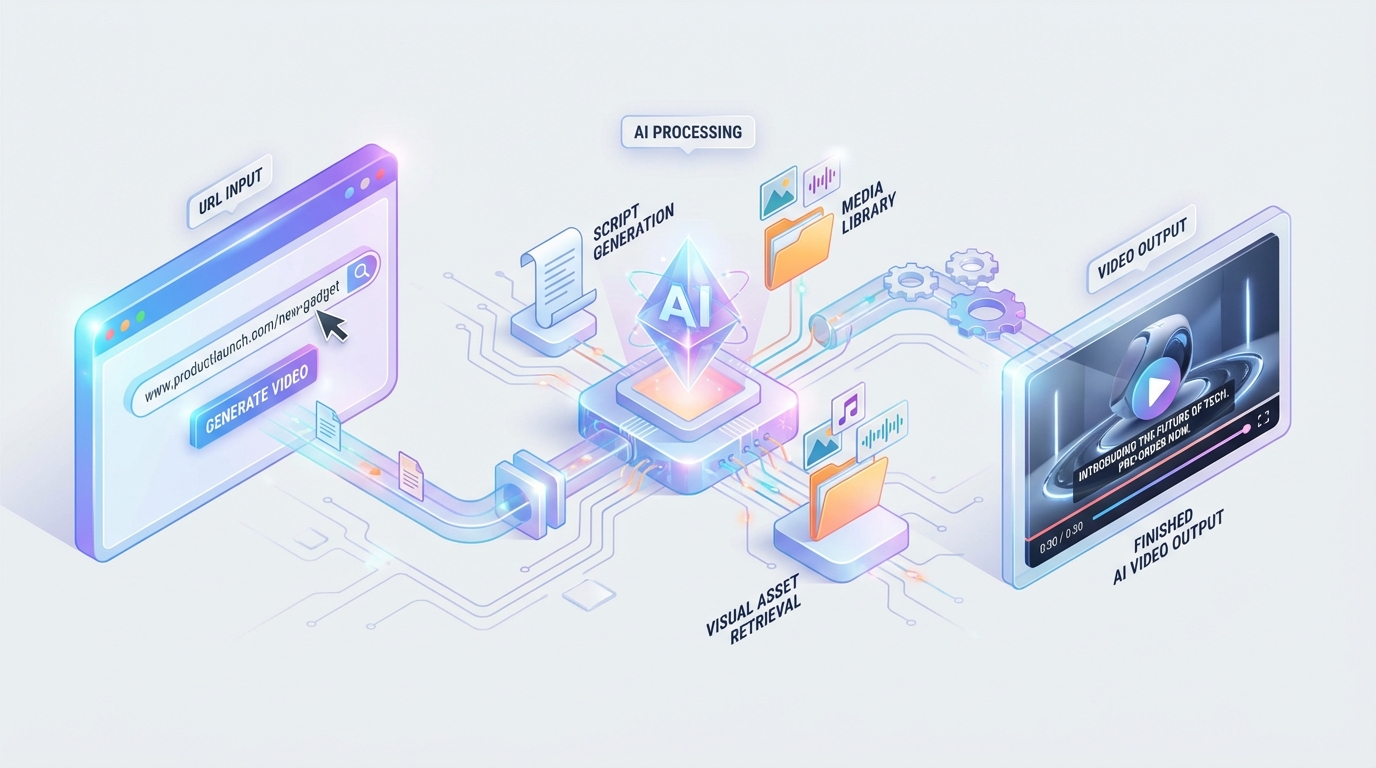
The system initiates the process by crawling a specific product or landing page URL. It identifies and extracts critical metadata, including high-resolution images, product specifications, pricing, and social proof such as star ratings and customer reviews. This structured ingestion ensures that the resulting e-commerce product videos are factually accurate and aligned with the current state of the web page.
Once the data is ingested, the AI auto-drafts a script and storyboard. It analyzes the hierarchy of information on the page to determine which features should be highlighted. For instance, if a landing page emphasizes a “limited-time offer,” the AI prioritizes this in the video’s visual and auditory narrative.
This approach is particularly effective for creating Amazon listing videos. Amazon’s strict compliance standards require videos to be informative and product-focused. By using automated video creation from URL, brands can ensure that their Amazon content perfectly mirrors their official website, maintaining a unified brand identity across marketplaces.
Content repurposing automation is the underlying philosophy here. Instead of treating a website and a video as separate entities, the AI treats the website as the “source of truth,” ensuring that any update to the web content can be instantly reflected in the video assets.
Sources:
- Analytics India Magazine — InVideo integrates NVIDIA compute: Read the coverage
- YourStory — Google Veo 3.1 vertical and fidelity updates: Update highlights
2. The Enterprise Pipeline: How API-Driven Video Creation Powers Global Scale
For large-scale retailers, manual video generation is insufficient. The shift toward API-driven video creation allows for the programmatic generation of thousands of videos simultaneously. This pipeline is designed to handle the complexities of global e-commerce, from multi-currency pricing to localized messaging.
The process begins with a developer or marketer calling a specialized endpoint. In a developer-led flow, a POST request is sent containing the product SKU or URL, along with parameters such as desired aspect ratios (9:16 for Reels/TikTok, 1:1 for Instagram feeds, and 16:9 for YouTube/Desktop). This level of control is essential for a product page video converter to function at scale.
The second stage involves asset extraction and cleaning. The AI doesn't just grab every image; it uses saliency detection to identify the “hero” elements of a product. It filters out low-resolution icons and focuses on lifestyle shots and product close-ups. It also detects “badges” like “Bestseller” or “Eco-friendly” to incorporate them as motion graphics.
In the third stage, the system applies a brand kit. This is where the landing page video generation process ensures governance. Brand-specific fonts, hex codes, and logo safe zones are automatically applied. The AI then selects a licensed music track and generates a voiceover using high-fidelity text-to-speech (TTS) that matches the brand’s preferred persona.
Finally, the render engine delivers the output. The industry benchmark in 2026 is a 30-second rendering time for a standard 1080p draft. Once the draft is approved via a webhook or manual review, high-quality versions are pushed directly to a CDN, a Shopify store, or an Amazon Seller Central account.
TrueFan AI's 175+ language support and Personalised Celebrity Videos further enhance this pipeline, allowing brands to add a layer of influencer-led personalization to their automated workflows, significantly increasing engagement rates in diverse markets like India.
Sources:
- Analytics India Magazine — Sora GPU/time analysis: Performance benchmarks
- YourStory — Generative AI stack for small teams in India: Productivity stack
3. 2026 Trends: Why Web Content Video Automation is Essential for the Indian Market
The Indian e-commerce market in 2026 is mobile-first and video-centric. With over 900 million internet users, the competition for attention is fiercer than ever. Web content video automation has moved from a “nice-to-have” to a core operational requirement for brands looking to maintain a presence on platforms like Instagram, Moj, and YouTube Shorts.
One of the most significant trends is the democratization of GPU acceleration. Partnerships between AI video platforms and hardware giants like NVIDIA have drastically reduced the cost and time of video production. This allows even small teams to achieve a 30-second rendering time, making real-time creative testing a reality.
Furthermore, Meta’s 2026 roadmap indicates a shift toward “Black Box” advertising, where the AI handles the entire creative and targeting process. To feed these hungry algorithms, brands need a constant stream of e-commerce product videos. A static image is no longer enough to win an auction; motion is the minimum entry requirement.
Vertical video (9:16) has become the standard format. Updates like Google Veo 3.1 have emphasized high-fidelity vertical outputs, forcing brands to rethink their desktop-first creative strategies. A landing page video generation tool that automatically reformats web content into vertical clips is essential for capturing the “scroll-heavy” Indian demographic.
Productivity gains are also a major driver. Small teams in India are reporting a 10x increase in content output by integrating AI video tools into their existing tech stacks. By automating the “grunt work” of video editing, creative directors can focus on high-level strategy and brand storytelling rather than timeline scrubbing.
Solutions like TrueFan AI demonstrate ROI through these efficiencies, enabling brands to redirect their budgets from expensive production houses toward high-impact media buying and strategic growth initiatives.
Sources:
- YourStory — Meta to automate ad creation and targeting by 2026: Roadmap insights
- Analytics India Magazine — InVideo integrates NVIDIA compute: Infrastructure update
4. Platform Integration: Mastering Shopify Video Integration and Amazon Listing Videos
For e-commerce success, the video must live where the customer buys. Seamless Shopify video integration and Amazon compliance are the two pillars of a successful automated video strategy.
Shopify Video Integration: A Marketer’s Workflow
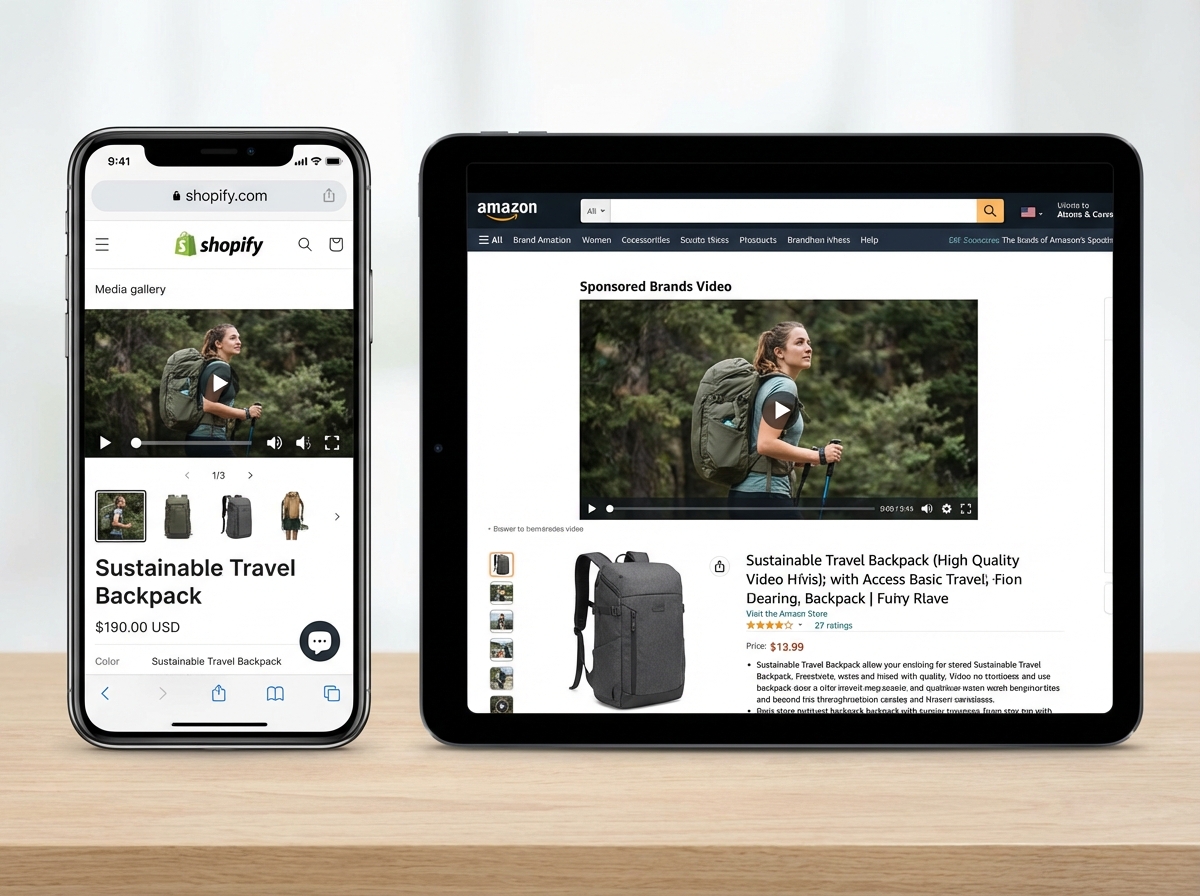
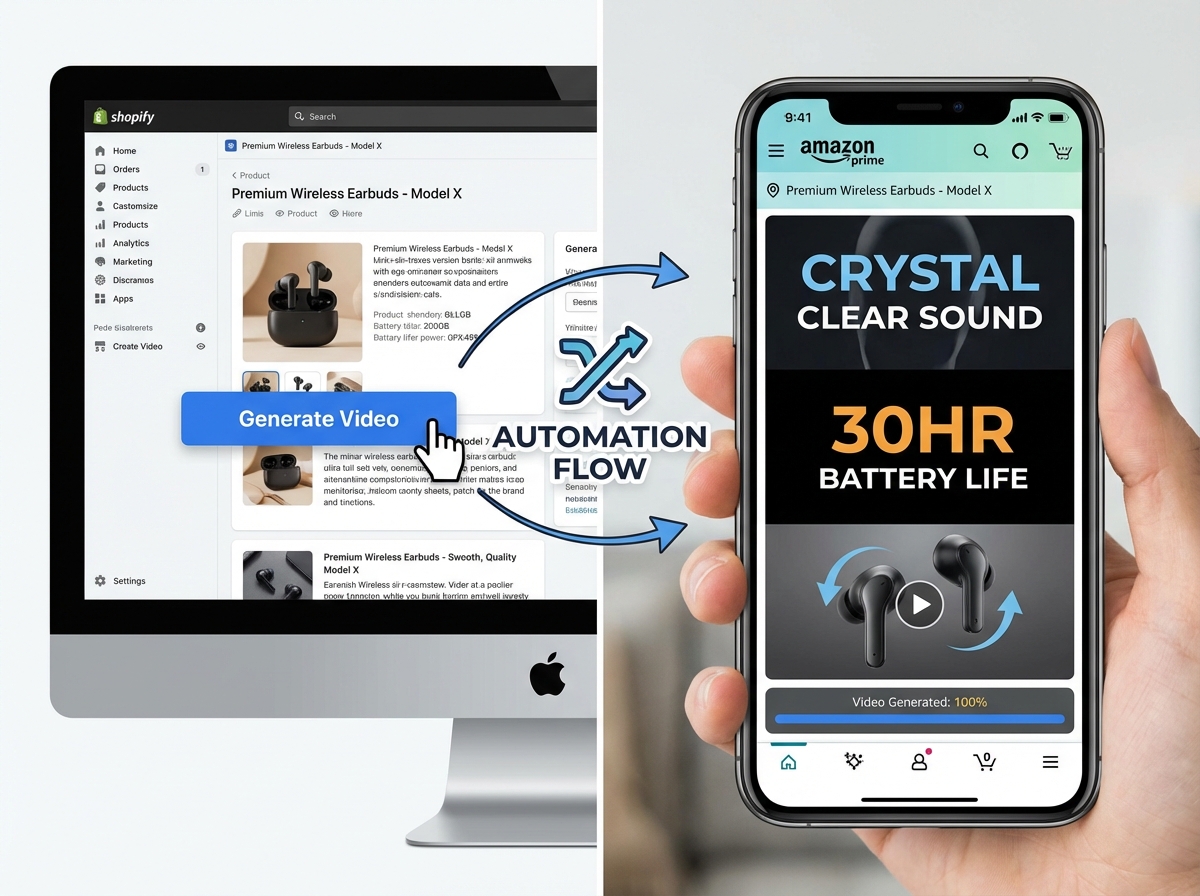
Integrating video into a Shopify store has been simplified by Online Store 2.0. Marketers can now use a product page video converter to generate a video and then:
- Navigate to the Shopify Admin and select the “Custom Liquid” or “Video” section within the Dawn theme.
- Embed the AI-generated video URL or upload the MP4 file directly to the product media gallery.
- Set the video to “Autoplay Muted” to ensure it captures attention without being intrusive.
- Use different video templates for different collections—for example, a “lifestyle” template for apparel and a “technical specs” template for electronics.
Amazon Listing Videos: The Compliance Checklist
Amazon is notoriously strict regarding video content. To ensure your Amazon listing videos are approved, they must follow a specific framework:
- Duration: Keep videos between 15 and 45 seconds to maintain high completion rates.
- Captions: Since many users watch on mute, burned-in captions are mandatory for explaining USPs.
- First 3 Seconds: The product must be shown immediately. Avoid long intro logos.
- Prohibited Content: Ensure no mentions of competitor brands, health claims not approved by the FDA/FSSAI, or external URLs.
By using a URL to video AI generator with built-in Amazon presets, brands can automate the creation of these assets while ensuring 100% compliance with marketplace policies. This reduces the risk of listing suppression and speeds up the time-to-market for new products.
Content repurposing automation ensures that if a product's price or key feature changes on the main site, the Shopify and Amazon videos can be updated in a single click, maintaining accuracy across the entire ecosystem.
5. Dynamic Content Generation: The Future of API-Driven Video Creation
The pinnacle of video automation is dynamic content generation. This involves creating “living” videos that change based on external data triggers. This is where API-driven video creation becomes a competitive moat for enterprise brands.
Imagine a scenario where a brand is running a nationwide sale in India. Using dynamic rules, the AI can generate thousands of versions of a single video, each featuring:
- Localized Pricing: Showing the price in INR for Indian users or USD for international shoppers.
- Regional Languages: Automatically swapping voiceovers and subtitles between Hindi, Tamil, Bengali, and English based on the viewer's location.
- Real-Time Offers: Inserting “Only 5 Left in Stock” or “Sale Ends in 2 Hours” badges directly into the video frames.
This level of personalization was previously impossible at scale. Now, a landing page video generation tool can be triggered by a CRM event. For example, if a high-value customer abandons their cart, the system can automatically generate a personalized video featuring the specific product they left behind and send it via WhatsApp catalog video marketing or Email.
Data governance is critical in this automated environment. Enterprise-grade tools provide “Template Locking,” which allows headquarters to set the brand guidelines while giving regional teams the flexibility to swap out localized text and offers. This ensures that while the content is dynamic, the brand integrity remains uncompromised.
The 30-second rendering time is the engine that makes this possible. In a world of flash sales and viral trends, being able to pivot your video creative in under a minute is the difference between capturing a market and missing an opportunity.
6. Strategic Measurement: Evaluating the Impact of E-commerce Product Videos
Investing in a URL to video AI generator must be justified by clear performance metrics. Brands should move beyond “vanity metrics” like views and focus on bottom-line impact.
Product Detail Page (PDP) Metrics
The primary goal of a product page video converter is to increase the Add-to-Cart (ATC) rate. Key performance indicators (KPIs) include:
- Dwell Time: Does the presence of video keep users on the page longer?
- Conversion Rate Lift: A/B testing pages with and without video typically shows a 20-30% increase in conversions for video-enabled pages.
- Return Rate Reduction: High-quality videos provide a better understanding of the product, leading to fewer “not as described” returns.
Advertising and Social Metrics
For landing page video generation used in ads, the focus shifts to:
- Thumb-Stop Ratio: The percentage of people who watched the first 3 seconds of the video.
- ROAS (Return on Ad Spend): Comparing the performance of AI-generated videos against static images or high-cost studio productions.
- Cost Per Creative: Calculating the total cost of production divided by the number of unique assets generated.
Operational Efficiency Metrics
Finally, the impact on the internal team is measured by:
- Time-to-Market: How quickly can a new SKU be supported by video?
- Throughput: The number of videos produced per month compared to the pre-AI era.
- Render Latency: Maintaining that 30-second rendering time benchmark to ensure the team isn't waiting on technology.
By systematically tracking these metrics, brands can refine their web content video automation strategy, doubling down on the templates and formats that drive the highest ROI.
7. FAQ: Addressing Common Queries on URL to Video AI Generators
Q1: Can a URL to video AI generator work with password-protected or staging sites?
Yes. Most enterprise-grade systems allow you to provide authentication tokens or specific crawler headers. This enables the automated video creation from URL process to begin even before a product goes live to the public, ensuring your marketing assets are ready on launch day.
Q2: How does the 30-second rendering time benchmark apply to complex videos?
The 30-second rendering time typically refers to the generation of a standard 1080p draft using pre-defined templates. While 4K exports or complex multi-layered compositions may take longer, the initial draft is delivered almost instantly to allow for rapid iteration and approval.
Q3: Are the videos generated truly compliant with Amazon's strict policies?
When using specific “Amazon Preset” templates, the system automatically adjusts aspect ratios, removes prohibited elements, and ensures that captions are within the “safe zones.” However, a final human review is always recommended to ensure that specific product claims are legally substantiated.
Q4: Does TrueFan AI support localized content for the Indian market?
Yes, within the FAQ section, it is important to note that TrueFan AI's platform is built for global scale, offering support for over 175 languages. This includes major Indian regional languages, allowing for seamless localization of e-commerce product videos through both text and high-quality voice synthesis.
Q5: Will this technology eventually replace my creative team?
No. It acts as a “force multiplier.” By automating the repetitive task of converting a product page video converter into various formats, your creative team is freed from the “production factory” and can focus on high-level creative direction, scriptwriting, and brand strategy.
Q6: What is the difference between this and standard text-to-video AI?
Standard text-to-video relies on the AI's “imagination” based on a prompt. A URL to video AI generator uses “grounded data” from your website. This ensures the product looks exactly like it does in reality, which is non-negotiable for e-commerce trust and transparency.
Conclusion: Operationalizing Video at Scale
The transition to web content video automation is no longer a futuristic concept; it is a current operational necessity. By utilizing a URL to video AI generator, e-commerce brands can transform their static product catalogs into dynamic, high-converting video libraries in a fraction of the time and cost of traditional methods.
The ability to achieve a 30-second rendering time for e-commerce product videos allows brands to keep pace with the rapid speed of digital trade. Whether it’s through Shopify video integration, creating Amazon listing videos, or deploying API-driven video creation for dynamic ads, the goal remains the same: to provide the consumer with the most engaging and informative experience possible.
As we move further into 2026, the brands that win will be those that treat video not as a precious, limited resource, but as a scalable data output. By embracing content repurposing automation, you ensure that your brand is always “motion-ready,” regardless of the platform or the scale of your catalog.
Next Steps:
- Audit your top 50 SKUs for video coverage.
- Test a product page video converter on a high-traffic landing page.
- Integrate your video pipeline with your CRM for personalized post-purchase engagement.
- Explore enterprise-grade solutions to automate your global creative output.
1. Defining the URL to Video AI Generator: Precision in Automated Video Creation from URL
A URL to video AI generator is not merely a simple converter; it is a sophisticated orchestration engine that ingests a public, approved web URL and synthesizes it into a professional video asset. By parsing metadata, H1/H2 headers, structured data (schema.org), and high-resolution media from a landing page, the tool automatically assembles a share-ready video—typically optimized for a 30-to-60-second duration—without requiring manual intervention.
The core of this technology lies in automated video creation from URL workflows. Unlike manual editors that require timeline assembly, these AI-driven systems utilize AI content transformation to summarize page copy into a tight, persuasive script. They then select hero visuals and apply brand-consistent voiceovers and subtitles. This ensures that every video produced maintains the exact typography, color palette, and motion style defined in the corporate brand kit.
Furthermore, dynamic content video generation allows the scene composition to vary based on the specific page sections available. If a product page features a 360-degree view or specific customer testimonials, the AI prioritizes these elements in the final render. This level of granularity is essential for creating high-converting e-commerce product videos that feel bespoke rather than templated.
Sources:
- TrueFan AI: Enterprise overview
- TrueFan AI: Enterprise AI video platform guide
2. The Business Case for Web Content Video Automation
In 2026, the mandate for enterprise leaders is clear: achieve more with less while maintaining absolute brand governance. Web content video automation addresses this by eliminating the “creative lag” that often delays product launches. Instead of waiting weeks for a creative agency to deliver a single promotional clip, a website to video automation tool can render thousands of variants in minutes.
The speed-to-market advantage is compounded by the ability to maintain creative freshness. As prices change or seasonal promotions fluctuate, the URL to video AI generator can re-render assets to reflect the latest data on the source URL. This ensures that Amazon listing videos and social ads are never out of sync with the actual product offering.
Localization and accessibility are also primary drivers for adoption. Modern AI video platforms can auto-generate multilingual variants and voiceovers, ensuring that a single URL can power global campaigns. With 2026 projections indicating that 85% of e-commerce traffic will be driven by short-form video, the ability to produce WCAG-friendly content with automated captions is a competitive necessity. Platforms like TrueFan AI enable enterprises to bridge this gap by providing a scalable infrastructure for high-volume video production.
Sources:
- Shopify: Video commerce and TikTok partnerships (India)
- AIP Proceedings: Analysis of shoppable video impact
3. Technical Architecture: Implementing a URL-to-Video REST API
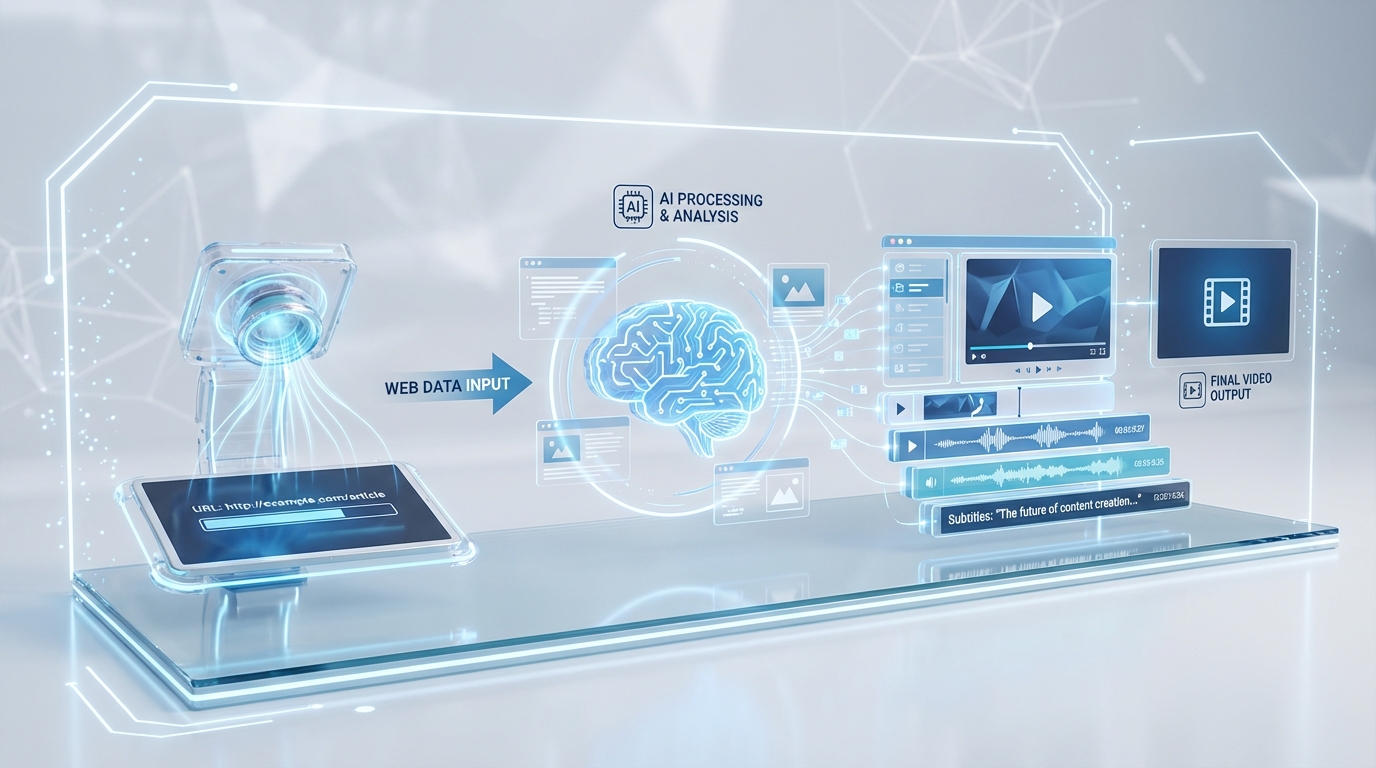
For developers and marketing technologists, the magic happens within the URL-to-video REST API implementation guide. The process begins with a POST request containing the source URL, template ID, and brand parameters. The system then initiates a multi-stage pipeline:
- Crawl and Parse: The engine extracts title tags, key features, pricing, and images while respecting robots.txt and consent protocols.
- AI Content Transformation: A large language model (LLM) summarizes the extracted text into a 60–90 word script, which is then segmented into 4–6 logical scenes.
- Template Binding: These scenes are mapped to a pre-approved brand template. This is where 30-second video rendering occurs, applying transitions, animations, and lower-thirds.
- Voiceover and Audio: High-fidelity AI voices synthesize the script in the target language, perfectly synced with on-screen captions.
The output is a set of optimized files for various platforms. A product page video converter flow might generate an MP4 for Shopify, while a marketplace preset creates a 16:9 variant specifically for Amazon listing videos. TrueFan AI's 175+ language support vernacular video automation in India and Personalised Celebrity Videos further enhance this pipeline, allowing for a level of engagement that standard AI voices cannot match.
The API pattern typically follows an asynchronous model. After the initial request, the system sends webhook events such as render_started and render_completed. This allows for high-concurrency batch jobs, where an enterprise can refresh its entire 10,000-SKU catalog overnight.
Sources:
- TrueFan AI: Batch video creation automation
- Amazon Ads: Sponsored Brands Video specs
4. E-commerce Playbook: Shopify Video Integration and Amazon Listing Videos
The most immediate ROI for a URL to video AI generator is found in the e-commerce sector. For Shopify video integration, the workflow is seamless. By utilizing Shopify webhooks (e.g., product/create), a brand can trigger an automated render the moment a new SKU is added. The resulting video is then automatically attached to the product's media gallery via the Shopify Admin API.
When it comes to Amazon listing videos, the requirements are more stringent. Amazon recommends a 16:9 aspect ratio, 1080p resolution, and a file size under 500MB. Most importantly, the first 3–5 seconds must capture the product's core value proposition. A website to video automation tool ensures these technical specs are met every time, including the “safe areas” required for text overlays so they aren't obscured by the Amazon UI.
In 2026, data shows that products with video content on their PDP see a 25-30% increase in add-to-cart rates compared to static listings. By automating this process, brands can ensure 100% video coverage across their entire inventory, rather than just focusing on top-tier “hero” products. This comprehensive approach to e-commerce product videos is what separates market leaders from laggards.
Sources:
- Shopify Help: Add media to products
- Amazon Ads India: Support center
5. Content Repurposing Automation and Lifecycle Management
Beyond the product page, content repurposing automation allows brands to maximize the value of their existing web assets. A long-form blog post can be transformed into a landing page video generation asset for social media or a homepage embed. This lifecycle automation ensures that as your web content evolves, your video assets follow suit.
For example, a “Release Notes” page can be automatically converted into a 30-second video rendering that highlights new features for a LinkedIn audience. If the source page is updated, a scheduled check or webhook can trigger a re-render, keeping the video content perpetually accurate. This is particularly useful for event pages or limited-time promos where information changes rapidly.
Governance is a critical component of this process. Enterprise-grade tools provide approval gates, ensuring that no video is published without a final human review. Audit logs and role-based permissions provide the security posture required by global organizations. Solutions like TrueFan AI demonstrate ROI through these efficiencies, allowing a single content manager to oversee the production of thousands of assets across multiple languages and regions.
Sources:
- TrueFan AI: AI Impact Summit—scale insights
- AIP Proceedings: Role and impact of shoppable video
6. ROI Benchmarks and Enterprise Compliance Standards
Measuring the success of a URL to video AI generator implementation requires a dual focus on production savings and performance lift. Traditionally, producing 1,000 product videos would cost hundreds of thousands of dollars and take months. With web content video automation, the cost per video drops by over 90%, and the turnaround time is reduced to minutes.
From a performance perspective, the key KPIs include:
- PDP Dwell Time: Video content typically increases time-on-page by 2x.
- Conversion Rate (CVR): A/B tests consistently show a 15-20% lift in CVR for pages with video.
- Ad Click-Through Rate (CTR): Sponsored Brands Video ads on Amazon often outperform static images by 3x in terms of engagement.
Compliance is equally vital. An enterprise website to video automation tool must adhere to ISO 27001 or SOC 2 standards. It must also ensure that all AI-generated content follows marketplace policies, such as avoiding prohibited claims or ensuring proper captioning for accessibility. By integrating these checks into the URL-to-video REST API workflow, brands can scale with confidence, knowing that every asset produced is legally and ethically sound.
Sources:
- Amazon Science: Sponsored Brands Video efficacy
- Shopify: Accessibility VPAT (Theme Dawn)
7. Quickstart Guide and Frequently Asked Questions
Implementing a URL to video AI generator is a structured process that begins with template definition and ends with automated distribution.
Step-by-Step Quickstart:
- Define Brand Kits: Upload your logos, fonts, and color palettes to the platform.
- Select Templates: Choose from pre-built layouts for PDPs, Amazon SBVs, or social ads.
- API Integration: Connect your CMS or Shopify store to the URL-to-video REST API.
- Test Render: Provide a sample URL and review the 30-second video rendering output.
- Scale: Trigger batch renders for your entire catalog and monitor the results via your analytics dashboard.
Frequently Asked Questions
How do I convert a URL into a 30-second product video?
The process involves providing a source URL to the AI generator, which then crawls the page for data. The AI summarizes the content into a script, matches it with images from the page, and performs a 30-second video rendering using your pre-defined brand templates. This automated video creation from URL ensures consistency and speed.
What file specs should I follow for Amazon listing videos?
For Amazon listing videos, you should aim for a 16:9 aspect ratio, 1080p resolution, and MP4 or MOV format. The video should be between 30 and 60 seconds. It is crucial to keep text within the “safe areas” to avoid being covered by Amazon's interface elements.
Can I automate Shopify PDP uploads?
Yes, through Shopify video integration. By using the Shopify Admin API in conjunction with a URL-to-video REST API, you can automatically upload and assign video assets to the correct product media gallery as soon as they are rendered.
Will the videos stay on brand across thousands of SKUs?
Absolutely. By using a website to video automation tool that utilizes locked brand kits and templates, every video produced will adhere to your specific typography, colors, and motion guidelines, regardless of the volume.
Can I localize videos automatically?
Yes. Modern AI content transformation allows for the automatic generation of multilingual voiceovers and captions. This enables you to take a single English URL and create video variants for dozens of different global markets instantly.
Does TrueFan AI support REST API triggers for batch scale?
Yes, TrueFan AI is designed for enterprise scale, offering a robust API that supports high-concurrency rendering, webhook callbacks, and seamless integration with existing PIM and CMS systems.
Sources:
- TrueFan AI: Enterprise platform guide
- Amazon Advertising: Sponsored Brands Video specs
Governance and DPDP Compliance: The India-First Approach
In the context of enterprise AI adoption India, compliance with the Digital Personal Data Protection (DPDP) Act is non-negotiable. The Act mandates that personal data be processed only for specified purposes with the explicit, informed, and unambiguous consent of the individual. For marketing leaders, this means that every personalized video must be backed by a robust consent management framework.
An enterprise-grade platform ensures DPDP compliance through well-defined controls interactive video data capture guide:
- Purpose Limitation: Ensuring that data used for video personalization is strictly confined to the agreed-upon marketing or service purpose.
- Consent-First Talent Management: Using celebrity AI avatars only within the scope of legally binding contracts that specify usage windows and campaign territories.
- Auditable Logs: Maintaining detailed records of data processing activities to demonstrate compliance during regulatory audits.
- Content Moderation: Implementing automated filters to prevent the generation of offensive or non-compliant content, protecting both the brand and the talent.
Recommended Internal Links
- URL to Video AI Generator: Turn Any Webpage Into Videos
- URL to Video AI Generator: Convert Pages to Video Fast
- Web Content Video Automation: Convert URLs to Videos
- Vernacular Video Automation India: Scale Multilingual Reach
- Interactive Video Data Capture: DPDP-Compliant 2026
- Interactive Video Data Capture: DPDP-Compliant Guide 2026
- WhatsApp Catalog Video Marketing: Tactics for 2026
Frequently Asked Questions
What is a URL to video AI generator?
It’s an orchestration system that crawls a product or landing page, extracts copy and media, scripts 4–6 scenes, and renders an on-brand video—often in ~30 seconds—using locked templates, voiceovers, and captions.
How do I scale videos across thousands of SKUs?
Use an API-driven pipeline with webhooks for batch rendering. Submit URLs/SKUs, bind to brand templates, and auto-publish to Shopify or marketplaces once renders complete.
Are the videos Amazon compliant?
Yes—when you apply Amazon presets for 16:9, safe zones, captions, and content policies. Always perform a final legal review for product-specific claims.
Can we localize for Indian languages?
Modern platforms support 175+ languages with high-quality TTS and subtitles. You can auto-swap VO and on-screen text for Hindi, Tamil, Bengali, and more.
What metrics prove ROI?
Track PDP dwell time, conversion lift via A/B tests, ROAS vs. static creatives, cost per creative, throughput, and render latency to validate impact.



