
AI Video Generator Complete Workflow India 2026: 5–10 Shorts/Reels Daily Under ₹1500/Month
Estimated reading time: ~12 minutes
Key Takeaways
- Build a complete AI video workflow that produces 5–10 Shorts/Reels daily for under ₹1500/month.
- Use free and low-cost tools like Wav2Lip, Edge-TTS, CapCut, and Canva to cut production time.
- Batching and automation via Google Sheets + Apps Script enable consistent daily output at scale.
- Stay compliant with India’s DPDP Act through transparency, consent, and data security practices.
- Upgrade to Studio by TrueFan AI when you need 4K quality, licensed avatars, and API automation.
AI video generator complete workflow India 2026 is no longer a futuristic concept but a daily reality for thousands of Indian creators who are now producing high-quality, viral content for less than the cost of a single pizza. If you are looking for a budget AI video creator complete setup that allows you to scale from zero to ten videos a day without burning out or breaking the bank, this guide provides the exact blueprint to dominate Instagram Reels, YouTube Shorts, and WhatsApp Channels.
1. The 2026 Landscape: Why Budget AI Workflows are Dominating India
The Indian digital landscape has undergone a seismic shift. As of early 2026, India's short-form video market is projected to reach a staggering $12 billion, driven by a 45% CAGR in AI-assisted content creation. Data from recent industry reports suggests that the average daily consumption of short-form video in India has hit 95 minutes per user, creating an insatiable demand for fresh content.
For creators, the math has changed. In 2023, producing a high-quality talking-head video required a studio, lighting, and hours of editing. In 2026, AI video production costs in India have dropped by 85%, allowing a single creator to do the work of an entire production house. According to Cloud9Digital's 2026 report, 78% of Indian businesses now use AI for marketing, and those utilizing AI-driven video see an 82% increase in ROI compared to traditional methods.
Platforms like Studio by TrueFan AI enable creators and brands to bridge the gap between “low-budget” and “high-authority” by providing professional-grade avatars that look and sound like real Indian influencers. Solutions like Studio by TrueFan AI demonstrate ROI through massive reductions in “time-to-publish,” allowing users to test ten different hooks in the time it used to take to film one, as shown in the fastest AI video generator benchmark.
Key 2026 Market Statistics:
- Market Size: India’s AI video sector is valued at $12B. Source: Adobe Digital Trends 2026.
- ROI Boost: 82% higher conversion rates for AI-integrated video ads. Source: SellersCommerce 2026.
- Adoption: 78% of Indian SMEs have integrated at least one AI video tool into their workflow. Source: Cloud9Digital 2026.
- Consumption: 95 minutes/day is the average time spent on Shorts/Reels in India.
- Cost Efficiency: Production costs are down 85% compared to the 2023 baseline.
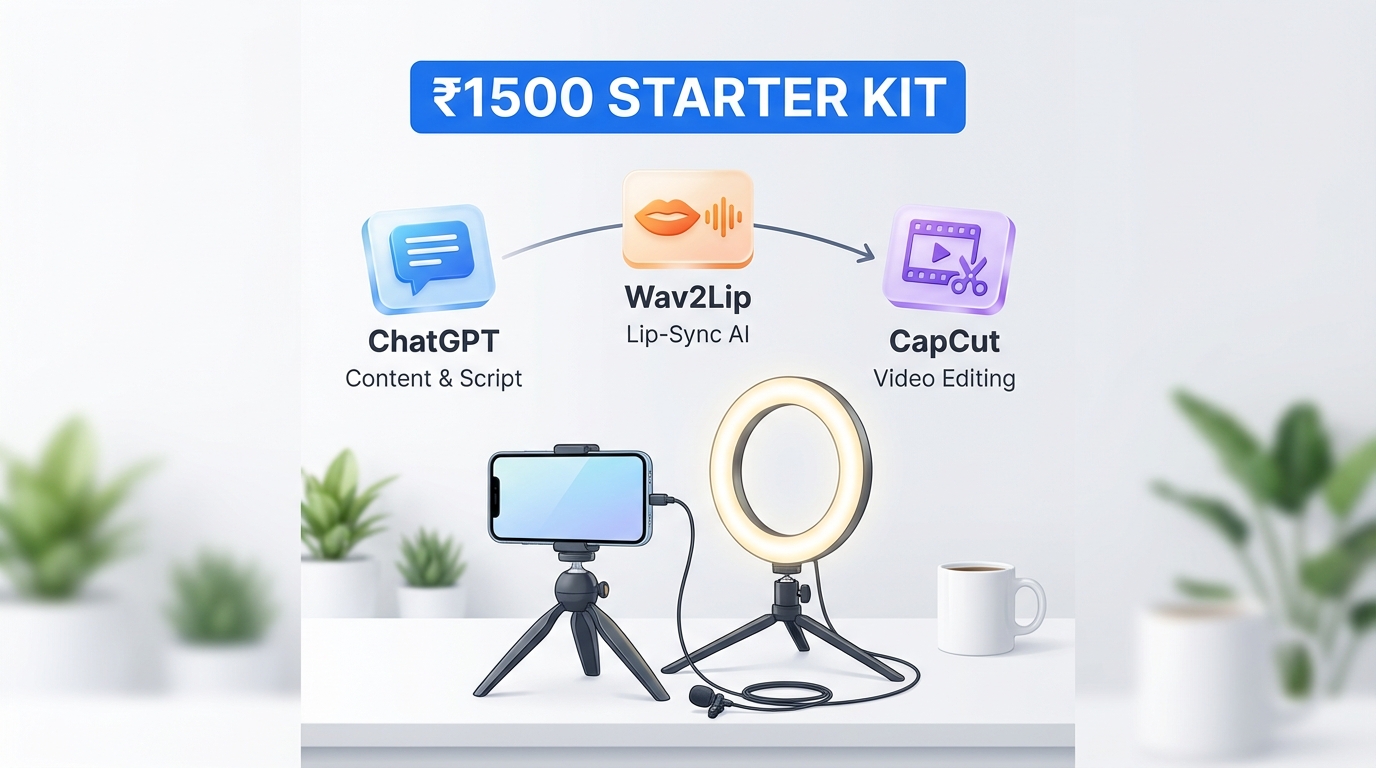
2. The ₹1500 Starter Kit: Hardware & Software Stack
To execute an end-to-end AI video workflow under 1500 rupees, you don't need a high-end PC. Most of the heavy lifting is done in the cloud or via optimized mobile apps. See our AI video tools for 4GB RAM guide. Here is your “Starter Kit” for 2026.
Hardware Essentials (The “Zero Budget” Setup)
- Smartphone: Any Android or iPhone from the last 3 years.
- Audio: A basic wired earphone mic or a budget lavalier mic (₹400–₹600).
- Lighting: Natural sunlight (golden hour) or a basic ₹500 ring light.
- Stability: A ₹300 tripod or a stack of books.
The Software Stack (Monthly Budget: < ₹1500)
- Scripting (₹0): ChatGPT or Google Gemini (Free Tiers).
- Voice & Lip-Sync (₹0 - ₹500):
- Wav2Lip: An open-source tool developed by researchers at IIIT-Hyderabad. It is the gold standard for free, high-quality lip-syncing. Source: Wav2Lip GitHub.
- Edge-TTS: High-quality, free text-to-speech that sounds remarkably human. Learn more in our AI voice cloning for Indian accents guide.
- Text-to-Video Backup (₹0): InVideo AI free tier. While it carries a watermark, it is excellent for generating B-roll heavy videos from a single prompt. Source: InVideo AI.
- Editing & Captions (₹0): CapCut. Its auto-captioning feature and “AI-generated” stickers are industry leaders in 2026.
- Thumbnails (₹0): Canva Free.
- Automation (₹0): Google Sheets + Apps Script for tracking and batching.
Total Monthly Outlay: Approximately ₹500–₹800 for miscellaneous credits or premium assets, well within the ₹1500 limit.
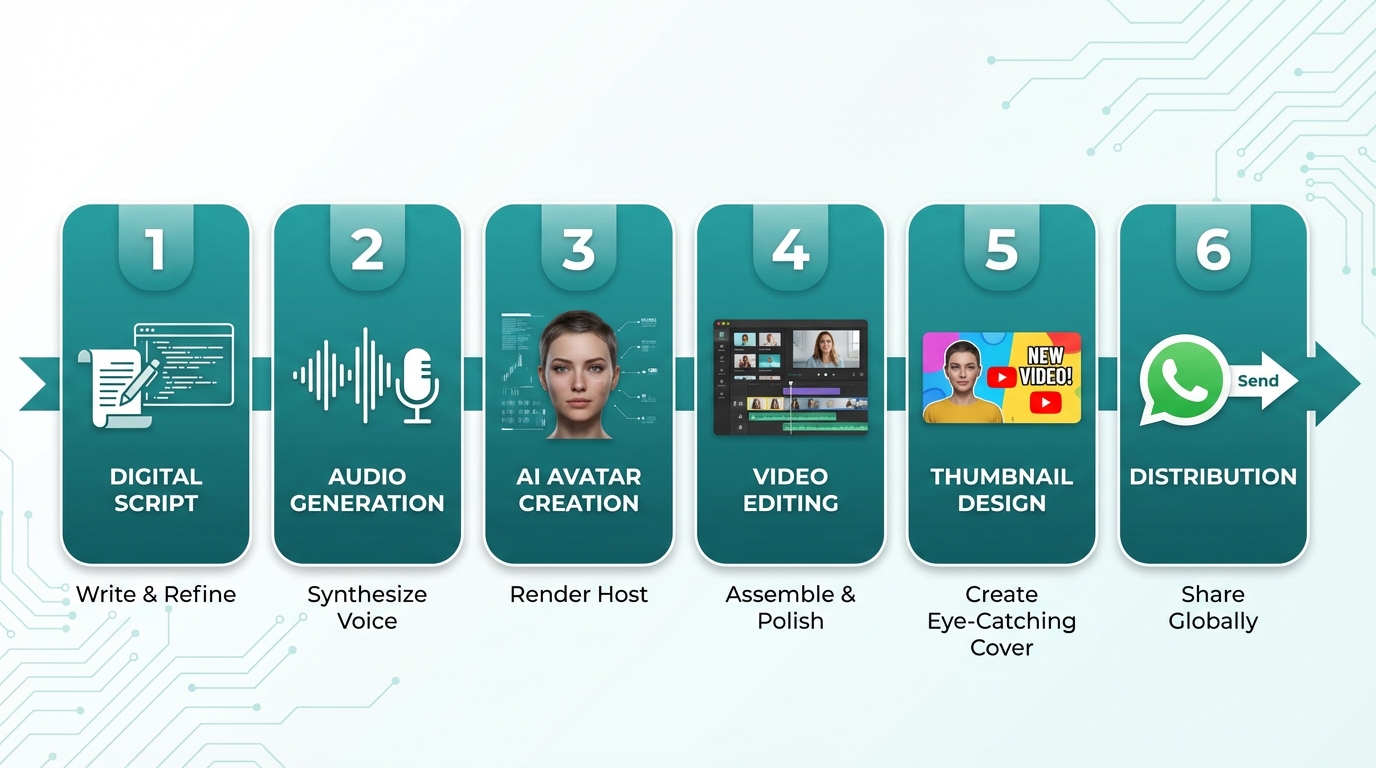
3. The 6-Step Master Workflow: From Script to Viral Reel
This is the core of the free AI video generator workflow step by step. By following this sequence, you can move from an idea to a finished video in under 15 minutes.
Step 1: Scripting for Retention (The 2-Second Rule)
In 2026, the “hook” is everything. Use this prompt for your AI scriptwriter:
"Write 5 Hinglish Reel scripts (15s each) about [Topic]. Start with a 2-second controversial hook. Use 1 actionable tip. End with a CTA to 'Check the link in bio'. Keep it under 100 words."
See the detailed playbook in our Hinglish AI video generator guide.
Step 2: Generating the Audio
Take your script to a TTS engine like OpenVoice or Edge-TTS. Choose a voice that matches your target demographic (e.g., “Indian English - Prabhat” or “Hindi - Madhur”). Export as a 44.1 kHz WAV file for maximum clarity. Explore voice options in our AI voice cloning for Indian accents guide.
Step 3: Creating the AI Avatar
This is where the magic happens. You have two paths:
- The Budget Path: Use a static, high-quality portrait of yourself (or a licensed stock photo). Run it through Wav2Lip along with your audio file. This will animate the mouth perfectly to the speech.
- The Professional Path: Studio by TrueFan AI's 175+ language support and AI avatars allow you to skip the technical setup. You simply select an avatar like Gunika or Aryan, paste your script, and get a production-ready video in minutes. Learn more about real-time experiences in our real-time interactive AI avatars in India guide.
Step 4: Editing in CapCut
Import your avatar video into CapCut.
- Auto-Captions: Click ‘Text’ -> ‘Auto-captions’. Choose a “Bicolor” style (e.g., Yellow and White) to highlight keywords.
- B-Roll Overlays: Every 3 seconds, add a relevant overlay (stock footage or screenshots) to keep the viewer's eyes moving.
- Background Music: Use trending tracks at -22dB volume.
Step 5: Thumbnail & Metadata
Use Canva to create a high-contrast thumbnail. In 2026, “Face + Big Text + Bright Background” still wins. For your AI avatar generator to YouTube pipeline, ensure your title includes your primary keyword and a curiosity gap (e.g., “The ₹1500 Secret to 1M Views”).
Step 6: The WhatsApp Multiplier
Don't just post to Reels. Export a version for your WhatsApp Channel. See our guide to video optimization for low bandwidth. Use the new 2026 WhatsApp features like “AI Stickers” to create personalized engagement prompts. Source: Gadgets360 WhatsApp AI Stickers Guide.
4. Scaling to 10 Videos Daily: Automation & Batching
The secret to an AI video creation pipeline 5 videos daily (or even 10) is not working harder, but batching smarter. If you try to make one video at a time, you will fail.
The “Batch-Processing” Schedule
- Monday (60 mins): Generate 50 scripts using AI.
- Tuesday (60 mins): Batch-generate all 50 audio files.
- Wednesday (90 mins): Run the AI avatar renders for the week.
- Thursday/Friday: Final editing and scheduling.
Daily Video Automation Workflow AI India
To truly automate, use a Google Sheets Content Calendar.
- Column A: Topic
- Column B: Script
- Column C: Status (Draft/Rendered/Published)
- Column D: Link to Asset
By using a simple Apps Script, you can set up a system where moving a file to a specific Google Drive folder automatically triggers a notification to your editor or even a direct upload to a scheduling tool like Meta Business Suite. Explore a step-by-step setup in our guide to YouTube Shorts automation with AI. This custom AI avatars workflow automation free setup ensures that your “production line” never stops moving.
5. Compliance & Ethics: Navigating India’s DPDP Act 2026
As of 2026, the Digital Personal Data Protection (DPDP) Act is fully enforceable in India. Creators using AI must be aware of three critical pillars:
- Transparency: You must disclose when a video features a synthetic or AI-generated avatar. A simple “AI-Generated Content” tag in the description or a small watermark is sufficient.
- Consent: If you are training a custom AI avatar based on a real person, you must have explicit, documented consent.
- Data Security: Ensure the tools you use are compliant with Indian data residency requirements.
The Ministry of Electronics and Information Technology (MeitY) has released updated guidelines for 2026 that emphasize “traceability” of AI content to prevent deepfakes. Source: MeitY DPDP Act 2023/2026. Using reputable platforms ensures you stay on the right side of the law while scaling your brand.
6. The Enterprise Leap: When to Move to Studio by TrueFan AI
While the ₹1500 workflow is perfect for individual creators and students, there comes a point where “free” costs too much in terms of time and technical friction. This is when you transition to an AI spokesperson video production system.
Why Upgrade?
If you are an agency managing 10+ clients or a brand needing 4K quality and “zero-glitch” lip-sync, the manual Wav2Lip/CapCut workflow becomes a bottleneck. Studio by TrueFan AI is designed for this exact scale.
Key Advantages of Studio by TrueFan AI:
- Licensed Influencer Avatars: Use the digital twins of real stars like Gunika or Aryan, giving your brand instant credibility.
- API & Webhook Integration: Automate your entire funnel. Imagine a customer signs up for your newsletter, and 60 seconds later, they receive a personalized WhatsApp video from an AI avatar welcoming them by name.
- Enterprise-Grade Security: ISO 27001 and SOC 2 certification means your data (and your clients' data) is handled with global security standards.
- 175+ Languages: Instantly localize your content for every state in India, from Tamil to Marathi, with perfect regional accents.
For teams, the Starter plan at ₹2,999/month offers a professional leap that pays for itself in just a few hours of saved labor.
7. Conclusion & FAQs
Mastering the AI video generator complete workflow India 2026 is the single most important skill for the modern creator. By combining free open-source tools with a disciplined batching strategy, you can produce 5–10 high-quality videos daily for under ₹1500 a month. Whether you are building a personal brand on Reels or a massive WhatsApp Channel, the tools are now in your hands.
Research Sources & Citations:
- AnimateAI Pro: Best AI-Driven Video Tools 2026 India — Source
- MeitY: Digital Personal Data Protection Act 2023/2026 — Source
- Wav2Lip: Open-Source Lip-Sync Research (IIIT-H) — Source
- Cloud9Digital: AI Marketing Statistics India 2026 — Source
- SellersCommerce: Video Marketing ROI Data 2026 — Source
- Gadgets360: WhatsApp AI Features Guide — Source
Recommended Internal Links
Frequently Asked Questions
What is the best AI video generator tutorial for beginners in India?
The best approach for beginners is to start with a free AI video generator workflow step by step. Begin by using ChatGPT for scripts, Edge-TTS for voice, and CapCut for editing. Once you understand the basics of “hook, value, CTA,” you can move into more advanced tools like Wav2Lip for lip-syncing.
How do I run a free text-to-video workflow for Reels/Shorts and WhatsApp in 2026?
Use a combination of InVideo AI (for B-roll) and CapCut (for assembly). For WhatsApp, ensure your exports are under 16MB to maintain quality, and use the “WhatsApp Channel” feature to broadcast your AI-generated updates.
Can I build a custom AI avatars workflow automation free?
Yes. With Google Sheets to manage your scripts and a daily video automation workflow AI India setup (using Apps Script), you can automate organization and scheduling. Rendering may remain manual on free tiers, but 90% of management can be automated.
How to produce an AI video creation pipeline—5 videos daily under ₹1500?
Batching is key. Dedicate one day to generating scripts, another to audio, and another to avatar renders. Use free tools for heavy lifting and reserve your ₹1500 budget for high-impact assets like premium music or credits for high-resolution renders.
When should I upgrade to a pro system like Studio by TrueFan AI?
Upgrade when troubleshooting free tools takes over 5 hours a week or you need enterprise features. Platforms like Studio by TrueFan AI are essential when you need 4K quality, licensed influencer avatars, and API-level automation that free tools cannot provide.



