

AI video tools 4GB RAM India 2026: Pro results on old phones and low-spec laptops (no GPU needed)
Estimated reading time: 12 minutes
Key Takeaways
- Server-side AI enables pro-quality video creation on 4GB RAM devices with no GPU.
- Choose tools that prioritize memory efficiency, proxy editing, and bitrate control.
- Follow optimized mobile and laptop workflows to avoid crashes and lag.
- Regional language support and offline-first editing are crucial for India’s connectivity realities.
- Leverage Studio by TrueFan AI to scale multilingual avatar videos across devices.
The Indian creator economy is undergoing a massive shift in 2026, but it isn’t just happening in high-end studios in Mumbai or Bangalore. It is happening in Tier 2 and Tier 3 cities, where millions of students and small business owners are using AI video tools 4GB RAM India 2026 to produce world-class content on hardware that many would consider “obsolete.” If you are struggling with a low-memory Android phone or a student laptop without a dedicated GPU, this guide is your blueprint for success.
For years, the narrative was that you needed a high-end iPhone or a gaming PC to create high-quality video. However, as we move through 2026, software optimization and server-side processing have democratized creativity. Whether you are looking for a low memory AI video creator or a way to produce AI video without GPU India, the tools available today are more efficient than ever. In fact, recent market data suggests that despite the rise of flagship devices, the budget segment (under ₹15,000) still accounts for over 60% of the Indian smartphone market, which is projected to reach 1.1 billion users by the end of 2026.
Source: EY India Media & Entertainment Report 2025-2026
In this comprehensive guide, we will explore the best budget device video tools, step-by-step mobile and laptop workflows, and how to navigate the unique constraints of 4GB RAM to produce Reels, Shorts, and WhatsApp Statuses that look like they were made on a ₹1 lakh setup.
1. The 4GB RAM Renaissance: Why Low-Spec Hardware Still Rules India in 2026
It might seem counterintuitive in an era of 16GB RAM smartphones, but 4GB RAM is making a massive comeback in the budget segment. According to recent reports, smartphones are returning to 4GB RAM in 2026 as manufacturers focus on software optimization and “Lite” AI models to keep devices affordable for the Indian masses.
Source: m9.news
This “4GB RAM Renaissance” is fueled by two major factors:
- On-Device AI Optimization: Google and other tech giants have optimized their AI features to run on older hardware. For instance, Google Photos’ Gemini-powered AI editing tools are now rolling out in India, working seamlessly on Android 8+ devices with just 4GB of RAM.
- Server-Side Offloading: The most intensive AI tasks—like lip-syncing, voice cloning, and generative video—are now handled by powerful cloud servers. This means your device only acts as a remote control, making it a truly RAM efficient AI video India solution.
Source: News18
Source: Madhyamam Online
For a creator in India, this means your “old” phone is no longer a barrier. By 2026, India’s AI market is expected to touch $17 billion.
Source: NASSCOM-BCG
Understanding the Constraints
- RAM Limits: 4GB is enough for the OS and one heavy app. If you try to run multiple background apps while editing, you will experience “preview lag.”
- Storage Bottlenecks: Budget phones often have slower eMMC storage. Large 4K files will cause the app to crash. Stick to 1080p or 720p.
- GPU Absence: Most budget laptops and phones lack a discrete GPU. You must rely on CPU-based rendering or cloud-based AI.
2. The Selection Framework: How to Pick RAM-Efficient AI Video Tools
Not all “free” or “AI” tools are created equal. To find the best AI video tools 4GB RAM India 2026, you need a framework that prioritizes efficiency over flashy features. When evaluating a low memory AI video creator, look for these five criteria:
A. Memory Efficiency and App Size
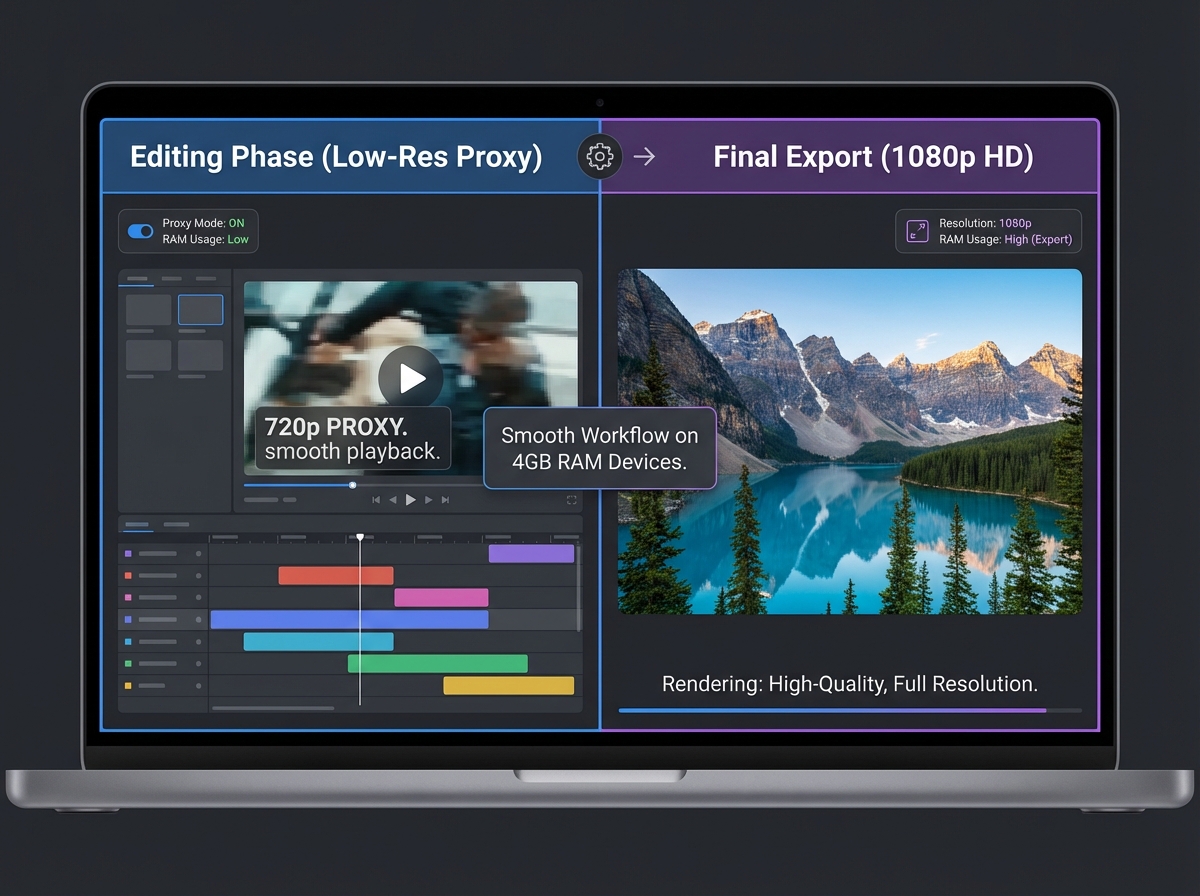
An app that takes up 2GB of storage is likely to hog your RAM. Look for “Lite” versions or apps under 100MB. The best tools for 4GB RAM devices use “Proxy Editing”—they create a low-resolution version of your video for you to edit, and only use the high-resolution file during the final export.
B. Server-Side vs. On-Device AI
This is the most critical distinction for 2026. On-device AI (like basic filters or background blur) uses your phone’s processor. Heavy AI (like generating a talking avatar) should be done on the server. Platforms like Studio by TrueFan AI enable creators to generate complex, high-quality AI videos without taxing their local hardware, as the heavy lifting happens in the cloud.
C. Offline Capability
In many parts of India, data connectivity can be spotty. A good workflow involves an offline AI video tools India approach where you do the basic trimming, cutting, and text overlays offline, and only connect to the internet for heavy AI enhancements or final publishing.
D. Export and Bitrate Control
A tool that only allows “High” or “Low” exports is useless. You need granular control. For WhatsApp Status, you need a tool that can export at 480p with a bitrate of 1.5 Mbps. For Reels, you need 1080p but at a manageable 6–8 Mbps to ensure the export doesn’t crash your 4GB RAM device.
E. Regional Language Support
Since 90% of new internet users in India prefer regional languages, your tool must support Hindi, Tamil, Telugu, etc., without crashing when rendering complex fonts.
3. The Ultimate Toolkit: Mobile and Laptop Apps for 4GB RAM Devices
If you are looking for a lightweight video editing app mobile or AI video tools low spec laptop, these are the battle-tested winners for 2026.
Mobile (Android-First Picks)
- VN Video Editor: The gold standard for 4GB RAM phones. It offers a clean timeline and supports proxy-like smooth previews. It is stable even when handling multiple text layers.
- InShot: Ideal for quick “Status” updates. It has a very small install size and excellent 9:16 presets for Reels and Shorts.
- YouCut: Known for its superior compression. If you are worried about file sizes, YouCut can shrink a 100MB video to 10MB without a massive loss in quality—perfect for sharing on low-data networks.
- CapCut (Lite Mode): While the full version can be heavy, using “Lite” templates and setting the preview resolution to “Low” makes it viable for 4GB RAM devices.
- Google Photos AI: Don’t ignore the built-in tools. Use Google Photos for AI-powered color correction and background blur before importing the clip into your editor.
Laptop (Windows/Linux - No GPU)
- Shotcut: A completely free, open-source editor that runs on the CPU. It features a “Proxy” mode that is a lifesaver for 4GB RAM laptops. You edit in 360p, and it renders in 1080p. See the memory-efficient video tools India guide.
- VSDC Free: A non-linear editor that is surprisingly light on resources. It works well on older Windows laptops and offers advanced color correction that doesn’t require a GPU.
- OpenShot: Very simple to use. If you are a student making a basic explainer video, this is the most stable student laptop video creation free option.
The “Cloud” Powerhouse
For tasks that are impossible on 4GB RAM—like high-end lip-syncing—you must move to the browser. Studio by TrueFan AI’s 175+ language support and AI avatars let you create professional spokesperson videos from any budget laptop or phone browser, bypassing the need for local RAM or GPU entirely. Explore related reads on AI voice cloning for Indian accents and real-time interactive AI avatars in India.

4. Optimized Workflows: From Old Smartphones to JioPhone Compatibility
Creating a video is one thing; making it work on a video creation old smartphone India setup is another. Here is the step-by-step workflow for 2026.
Step 1: Capture (The “Light” Way)
Don’t record in 4K. Your 4GB RAM phone will struggle to play it back, let alone edit it. Record in 1080p at 30fps. If your phone supports HEVC (H.265), use it to save space, but check if your editing app supports it. If not, stick to H.264.
Step 2: The “Proxy” Edit
In apps like VN or Shotcut, enable “Performance Mode” or “Proxy Editing.” This creates a temporary, low-quality version of your footage. Your edits will be snappy, and the app won’t crash. Keep your timeline short—under 60 seconds is the “sweet spot” for 4GB RAM.
Step 3: AI Enhancement
Use offline AI video tools India for basic tasks. For example, use the “Auto-Caption” feature in VN while offline (if the language pack is downloaded). For heavy AI, upload your edited clip to a cloud service.
Step 4: The JioPhone Workaround
A common question is: “Is AI video Jio phone compatible?” The answer is yes, but not through an app. Since KaiOS doesn’t support Android apps, you must:
- Generate the video on a PC or another smartphone.
- Export using the H.264 Baseline Profile at 480p or 360p.
- Keep the bitrate between 500–800 kbps.
- Share the MP4 file via WhatsApp. This ensures the JioPhone can play the video without lagging.
Step 5: Exporting for Success
- For WhatsApp Status: 480x852 resolution, 1.2 Mbps bitrate.
- For Instagram Reels: 1080x1920 resolution, 6 Mbps bitrate. If the app crashes at 90% export, drop the resolution to 720p.
5. Scaling with Server-Side AI: The Enterprise Advantage for Budget Creators
For brands and agencies working with thousands of micro-influencers in Tier 2 cities, the challenge is consistency. You cannot expect every creator to have a high-end device. This is where server-side AI becomes a strategic asset.
Solutions like Studio by TrueFan AI demonstrate ROI through their ability to centralize the heavy processing. Instead of a creator spending 4 hours trying to render a video on a lagging 4GB RAM phone, they simply input a script into a browser-based interface. The server generates a perfectly lip-synced, high-definition video in minutes.
Why Server-Side AI is the Future for India:
- Device Agnostic: It works on a ₹7,000 phone as well as it does on a ₹1,00,000 MacBook.
- Multilingual at Scale: You can take one script and generate 10 versions in different Indian regional languages instantly. Learn more about the multilingual voice commerce platform.
- Brand Safety: For enterprises, using a “walled garden” AI platform ensures that all content meets compliance standards (ISO 27001, SOC 2) and avoids the risks of unauthorized deepfakes.
- Direct Distribution: Many server-side platforms now offer direct WhatsApp API integration. This means a video can be generated and sent to a customer’s phone without ever being “downloaded” and “uploaded” by a human, saving massive amounts of data.
By 2026, the “Edit Locally, Generate Globally” model will be the standard. Creators will do their creative storytelling on budget device video tools and use enterprise AI for the high-tech finishing touches.
6. Troubleshooting & 2026 Tool Directory
Even with the best AI video tools 4GB RAM India 2026, you will run into issues. Here is how to fix them.
Common Problems & Solutions
- App Crashes During Export: This is almost always a RAM issue. Close all other apps (including WhatsApp and Instagram). Turn on “Airplane Mode” to stop background data sync. If it still crashes, lower your export bitrate.
- Audio Out of Sync: This happens on low-spec laptops when using Variable Frame Rate (VFR) footage. Use a tool like “Handbrake” to convert your video to a Constant Frame Rate (CFR) of 30fps before you start editing.
- Storage Full: AI video apps create large “Cache” files. Go to your app settings and “Clear Cache” after every project.
2026 Tool Quick-Reference
| Constraint | Recommended Tool | Best Use Case |
|---|---|---|
| 4GB RAM Android | VN Video Editor / YouCut | Reels, Shorts, WhatsApp Status |
| Low-Spec Laptop | Shotcut (with Proxies) | YouTube Explainer Videos |
| No GPU / No RAM | Studio by TrueFan AI | Multilingual Avatars, Brand Promos |
| JioPhone Sharing | WhatsApp (MP4 360p) | Hyper-local distribution |
| Thumbnail AI | Google Photos Gemini | High-quality stills from video |
The 2026 Trend Watch
As we look toward 2027, expect more “Hybrid AI” tools. These will use a small amount of on-device RAM for real-time feedback while the final high-quality render is queued in the cloud. This will make the memory optimized video creator experience even smoother for the next generation of Indian creators.
Source: Anangsha Substack
Conclusion and Next Steps
The era of “hardware elitism” is over. With the right AI video tools 4GB RAM India 2026, a creator in a small village has the same reach as a creator in a metro city.
Ready to scale your content without upgrading your hardware?
- Primary Action: Book a demo of Studio by TrueFan AI to see how server-side rendering can transform your workflow.
- Secondary Action: Download our free checklist: “The 4GB RAM Creator’s Toolkit — Mobile and Laptop Setups for 2026.”
Frequently Asked Questions
Can I really do AI video without GPU in India on a 4GB RAM phone?
Absolutely. While you can’t run heavy generative models locally, you can use AI video without GPU India workflows by editing with lightweight apps (like VN) and leveraging cloud platforms for generation. Studio by TrueFan AI works in the browser, so your phone’s GPU doesn’t matter—just a stable internet connection.
Which AI video tools work best on 4GB RAM phones in 2026?
For editing, VN and InShot are the most stable on low-memory Android devices. For AI-powered photo and b-roll enhancement, Google Photos is now a top choice in India for budget devices. For talking-head or avatar videos, use a server-side SaaS that handles processing in the cloud.
How do I edit videos for JioPhone users?
Editing directly on a JioPhone is difficult. Use a compressed video creator mobile workflow on a standard Android phone. Export as MP4 using H.264 Baseline at 360p resolution and 500–800 kbps bitrate so the file downloads and plays smoothly on KaiOS.
What is the best free workflow for a student with a low-spec laptop?
Use Shotcut with Proxy files enabled. You can edit smoothly on 4GB RAM and let the machine render 1080p while you’re away. This is a student laptop video creation free powerhouse setup.
Is it safe to use AI video tools on budget devices?
Yes—stick to reputable apps and avoid “modded” APKs. Enterprise-grade platforms with moderation and compliance features are recommended. Avoiding malware keeps your device fast and secure.



