
AI video generator for Meesho sellers India: Create WhatsApp-ready product videos under ₹500
Estimated reading time: ~11 minutes
Key Takeaways
- Video is essential for Meesho sellers in 2026 as Indian social commerce becomes video-first and vernacular-focused.
- Follow WhatsApp-first specs (9:16, under 16MB, 20–45s, burned-in captions) for frictionless sharing and higher retention.
- Use a step-by-step AI workflow to turn 4–6 photos into lip-synced Hindi/Hinglish videos fast.
- Build an under-₹500 tech stack with free/low-cost tools to keep CAC low while testing multiple hooks.
- Scale trust and consistency with custom AI avatars and a disciplined WhatsApp distribution playbook.
In the hyper-competitive world of Indian social commerce, static images are no longer enough to stop the scroll. If you are a reseller or a micro-entrepreneur, using an AI video generator for Meesho sellers India is the fastest way to turn basic product photos into high-converting, WhatsApp-ready video ads that drive sales. With over 175 million users on Meesho as of late 2024, the platform is increasingly dominated by Tier-2 and Tier-3 city buyers who prefer visual, vernacular content over long descriptions. (Hinglish AI video generator guide)
The challenge for most sellers is clear: you have great products but limited budgets. You need professional-looking videos in Hindi or Hinglish, but you can’t afford expensive editors or studio shoots. This guide will show you how to leverage a Meesho product video maker AI to create stunning 9:16 vertical videos for under ₹500, optimized perfectly for WhatsApp Status, Broadcast lists, and Instagram Reels.
1. Why Video is Non-Negotiable for Meesho Sellers in 2026
The Indian digital landscape has shifted. By 2026, digital ad spend in India is projected to reach a staggering $14.56 billion, with ecommerce and FMCG sectors accounting for nearly 34% of that total spend (Source: Yahoo Finance analysis of India’s digital ad spend; Ipsos: State of Digital Marketing in India). For Meesho sellers, this means the "noise" in the market is louder than ever.
The Data Behind the Shift
- 35% YoY Order Growth: Meesho continues to see massive growth, fueled by small-town India and Gen Z shoppers who are "video-first" (Source: Economic Times: Meesho 2024 growth).
- ₹69,856 Crore Market: The total digital advertising market in India is forecast to hit nearly ₹70,000 crore by 2026, making AI video ads for social commerce India a critical tool for survival (Source: India Digital Advertising: 2026 market focus).
- Vernacular Priority: Meesho’s own push into multilingual AI voice bots and vernacular video series signals that the future of selling is local. If your video isn't in the buyer's native tongue, you're losing money (Source: Indian Retailer: Meesho’s multilingual AI bot).
Platforms like Studio by TrueFan AI enable sellers to bridge this gap by providing tools that generate high-quality, lip-synced videos in 175+ languages, ensuring your product resonates with a shopper in Gorakhpur just as much as one in Guntur. (Hinglish AI video generator guide)
2. WhatsApp-First Video Specs: The Secret to Frictionless Sharing
Most sellers make the mistake of creating high-resolution videos that are too "heavy" for WhatsApp. If a video takes 10 seconds to download, your customer has already moved to the next Status. To succeed with a WhatsApp product video generator Meesho strategy, you must follow these technical "recipes":
The "Frictionless" Export Recipe
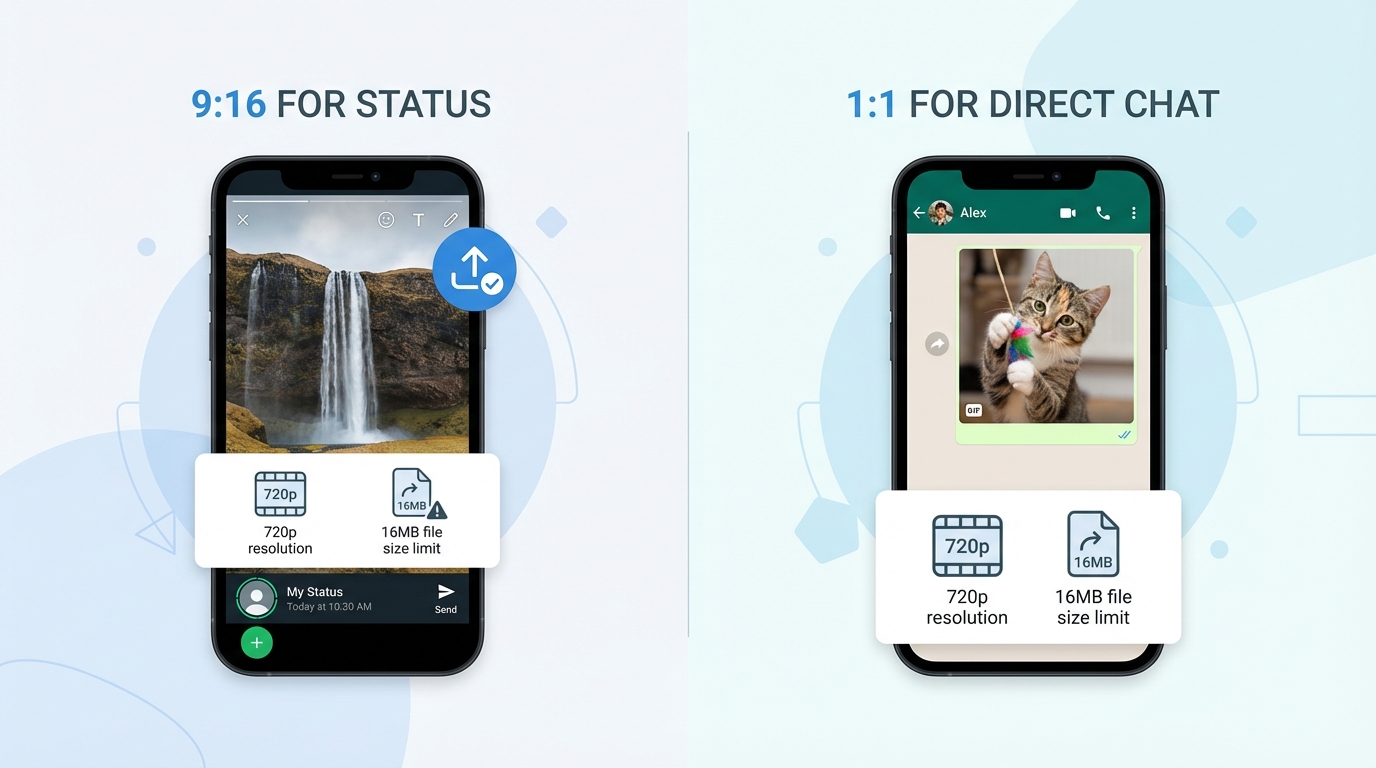
- Aspect Ratio: Always use 9:16 (720x1280) for WhatsApp Status and 1:1 (1080x1080) for direct chat thumbnails.
- Duration: Keep promos between 20–45 seconds. While WhatsApp Status now supports up to 90 seconds, retention drops sharply after the 30-second mark (Source: WhatsApp FAQ on Status length).
- File Size: Target under 16MB. WhatsApp’s default compression can degrade quality if the original file is too large. By keeping it under 16MB, you ensure the video stays crisp even on 4G/3G networks.
- Bitrate Settings: Set your video bitrate between 1.2–2.5 Mbps. This is the "sweet spot" for mobile viewing in India.
- Burn-in Captions: 80% of users watch WhatsApp Status on mute. You must "burn in" (hardcode) Hindi or Hinglish subtitles so the message is clear without sound.
3. Step-by-Step Workflow: Converting Photos to AI Video in Hindi
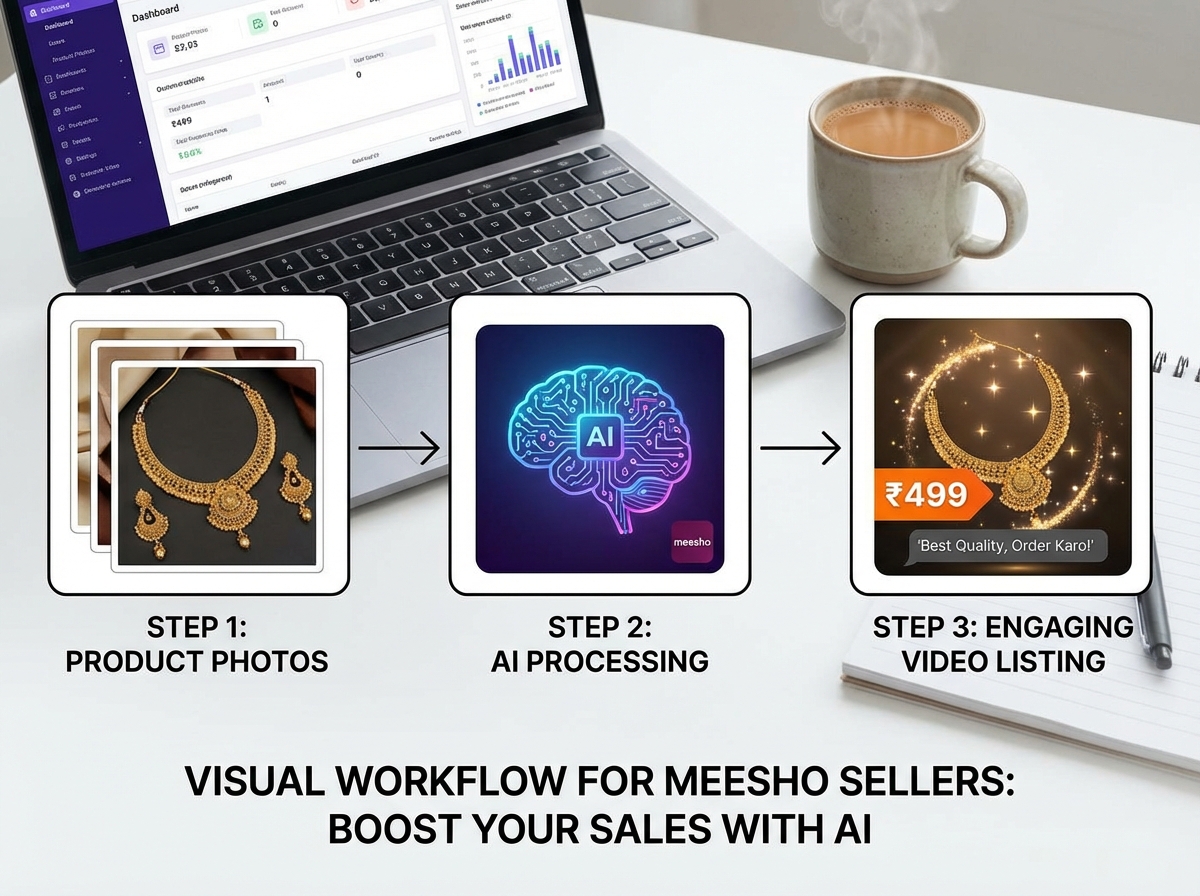
If you only have 4 or 5 photos from your supplier, you can still create a professional-grade video. This is the core of the convert product photos to video AI Hindi workflow. (Hinglish AI video generator tips)
Step 1: Image Preparation & AI Upscaling
Don't use blurry photos. If your supplier photos are low-res, use an AI image upscaler like Scalio to enhance the texture of fabrics or the shine of jewelry. Collect a front view, back view, a close-up of the material, and a "lifestyle" shot (Source: Scalio Meesho product photography).
Step 2: The Hinglish Script
Write a script that sounds like a conversation, not a TV ad.
- Hook: "Saree lover ho? Yeh dekho!"
- USP: "Pure Georgette fabric, bilkul light weight."
- Price: "Sirf ₹499 mein, market se sasta."
- Trust: "COD available hai aur 7-day easy returns."
- CTA: "Abhi DM karo ya link pe click karo."
Step 3: Using a Free AI Video Maker for Ecommerce Catalog India
Import your photos into an AI tool. (Free AI video generator guide) Use "Auto-Ken Burns" effects to add motion to static images. Overlay your script using a Hindi Text-to-Speech (TTS) engine. Tools like Koro AI offer specific templates for Indian fashion and jewelry that already have trending sound cues built-in (Source: Koro AI product video maker).
Step 4: Final Export & Compression
Export using the "WhatsApp Recipe" mentioned above. If the file is still over 20MB, use a mobile compressor like CapCut or VideoCompress to bring it down to 720p.
4. Text to Video AI for Meesho Catalog: The Prompt Cookbook
For sellers who want to move faster, text to video AI for Meesho catalog allows you to generate entire scenes from just a description. (AI video generator from URL) This is ideal for "explainer" style videos where you want to show how a kitchen gadget works or how a lipstick shade looks on different skin tones.
The "Meesho Seller" Prompt Structure
"Create a 30-second vertical video for a Meesho product. Product: [Insert Item]. Price: [Insert Price]. Language: Hinglish. Tone: Exciting and friendly. Focus on [Insert USP]. End with a Call to Action to DM for orders."
Category-Specific Templates
- Fashion (Saree/Kurti): Focus on the "Drape" and "Feel." Use phrases like "Summer-friendly fabric" or "No lining needed."
- Jewelry: Focus on "Weight" and "Shine." Use phrases like "Anti-tarnish guarantee" or "Kaano mein halka."
- Home & Kitchen: Focus on "Durability." Use the "Drop Test" visual—show the product being used in a real kitchen setting.
Studio by TrueFan AI's 175+ language support and AI avatars make it incredibly easy to take these prompts and turn them into videos featuring real-looking human presenters who speak the local dialect of your target audience, significantly increasing trust.
5. The Under-₹500 Tech Stack: High Quality, Low Cost
You don't need a ₹50,000 budget to create AI video ads for social commerce India. Here is how to build a Meesho video ad creator under 500 rupees stack:
| Tool Category | Recommended Tool | Cost |
|---|---|---|
| Scripting | ListIQ (for keyword extraction) | Free |
| Visuals | Supplier Photos + Scalio (Upscaling) | Free Tier |
| Video Generation | Koro AI / TrueFan Studio Starter | ₹0 - ₹250/video |
| Editing/Captions | CapCut Mobile | Free |
| Compression | Video Compressor (Android/iOS) | Free |
| Total | ~₹250 per video |
By batching your work—creating 5 videos in one sitting—you can reduce your "per video" cost even further. (Fastest AI video generator benchmark) A single successful video can sell 50+ units on Meesho, making the ROI on a ₹250 investment massive. Solutions like Studio by TrueFan AI demonstrate ROI through rapid content production that allows sellers to test 10 different product "hooks" for the price of one traditional photo shoot.
6. Distribution Playbook: How to Get Views on WhatsApp
Creating the video is only half the battle. You need to get it in front of buyers.
WhatsApp Status Strategy
- The 3-Slot Rule: Post 3 videos a day. One at 9 AM (Morning scroll), one at 2 PM (Lunch break), and one at 8 PM (Post-dinner relaxation). (Dukaan-style WhatsApp Status video tips)
- The First Frame Hook: The very first second of your video must show the price or a "Sale" sticker. If the user doesn't see value immediately, they will skip to the next Status.
Broadcast Lists & Communities
- Segment Your Lists: Don't send a Saree video to someone who only buys kitchen tools. Create separate Broadcast lists for "Fashion," "Home," and "Jewelry."
- The "Document" Trick: If you want to send a high-quality 1080p video without any WhatsApp compression, send it as a "Document" instead of a "Gallery" item. This ensures the customer sees every detail of the product.
Tracking Success
Use a link shortener (like Bitly or any UTM generator) for your Meesho product links. This allows you to see exactly how many people clicked from your WhatsApp Status versus your Broadcast list.
7. Scaling with Custom AI Avatars for Meesho Product Demos
As your business grows from 10 orders a day to 100, you need a brand identity. This is where custom AI avatars for Meesho product demos come in. (AI avatar UGC ad creator) Instead of just showing photos, you can have a consistent "face" for your brand—an AI version of yourself or a professional model—who introduces every product.
Why Avatars Work for Meesho
- Trust: Buyers in Tier-2 cities buy from people, not just "stores." A human face explaining the return policy builds instant credibility.
- Consistency: Every video has the same look and feel, making your Meesho shop look like a professional brand.
- Speed: Once you have an avatar set up, you just upload a script, and the video is ready in minutes. No more setting up lights or cameras.
For larger wholesalers or brands managing thousands of resellers, this technology allows you to provide "Personalized Seller Kits." You can generate a video where the avatar says, "Hi, I'm [Reseller Name]'s assistant, and here is today's deal!" This level of personalization is the gold standard for AI video generator social selling India 2026.
8. Conclusion & Quick-Start Checklist
The era of selling with just photos is ending. By 2026, the most successful Meesho sellers will be those who embrace AI video ads for social commerce India. You now have the roadmap to create high-quality, vernacular videos for less than the price of a pizza.
Your 24-Hour Action Plan:
- Select 3 top-selling SKUs from your Meesho dashboard.
- Upscale the photos using a free AI tool to ensure they look premium.
- Write a 30-second Hinglish script focusing on Price, COD, and Returns.
- Generate the video using a Meesho product video maker AI.
- Compress to <16MB and post to your WhatsApp Status tonight.
Sources:
- Yahoo Finance: India digital ad spend projections for 2026
- Economic Times: Meesho 2024 growth metrics
- WhatsApp FAQ: Status duration and sharing limits
- Indian Retailer: Vernacular AI trends
- TrueFan AI Blog: Marketplace video playbook
Frequently Asked Questions
Which is the best free AI video maker for ecommerce catalog India?
For beginners, tools like Koro AI or the free tiers of mobile editors like CapCut are excellent. However, if you want professional-grade lip-sync and a library of real human influencers to act as your brand ambassadors, Studio by TrueFan AI is the top choice for serious sellers. You can hit the under-₹500 goal by using their starter plans and batch-producing your content.
How to convert product photos to video AI Hindi for Meesho?
The process involves four steps: (1) Upload 4–6 high-quality photos, (2) Input a Hindi/Hinglish script, (3) Select a Hindi Text-to-Speech voice, and (4) Apply "Ken Burns" or "Zoom" transitions. Ensure you burn in the subtitles so the video is effective even on mute.
What is the WhatsApp video size limit for Meesho promotions?
While WhatsApp allows files up to 2GB in "Document" mode, for Status and standard Gallery sharing, you should keep videos under 16MB. This ensures fast loading and prevents WhatsApp from over-compressing your video and making it look blurry.
Can I use AI videos for Instagram Reels and Moj too?
Absolutely. The 9:16 vertical format you create for WhatsApp Status is perfectly optimized for Instagram Reels (shoppable video ads on Instagram Reels), YouTube Shorts (YouTube Shorts automation with AI), Moj, and ShareChat. Cross-posting your AI videos is the best way to drive organic traffic back to your Meesho store.
How do I handle buyers who have slow internet?
Always include the most important information (Price and Product Name) as a static text overlay that appears in the first 2 seconds. Even if the video buffers slightly, the buyer sees the deal immediately. Also, keep your bitrate low (around 1.5 Mbps) to ensure smooth playback on 3G/4G connections.
Is it legal to use AI avatars for selling on Meesho?
Yes, provided you use licensed platforms that have the rights to the AI models' likeness. Professional tools ensure that all avatars are either fictional or fully consented, protecting you from copyright issues.



