
AI Video Generator App Android India 2026: The Ultimate Guide to Professional Reels Without a Laptop
Estimated reading time: ~11 minutes
Key Takeaways
- Prioritize cloud rendering over on-device processing for smoother exports on budget Android phones.
- Choose apps with watermark-free tiers, regional language support, and UPI-based INR pricing under ₹500.
- Follow a Zero-Laptop workflow: script, voice, captions, and 1080p cloud export directly from mobile.
- Create safe, high-quality AI avatars with consent-first platforms like Studio by TrueFan AI.
- Scale to enterprise-grade governance, localization, and API automation when consumer apps hit capability limits.
In 2026, the content landscape in India has shifted entirely to the palm of your hand. If you are looking for an AI video generator app Android India 2026, you are part of a massive movement where creators from Mumbai to Madurai are ditching heavy laptops for mobile-first workflows. With the Indian AI video market projected to hit a staggering $847 million by the end of 2026, the ability to generate high-quality, 9:16 vertical content on a budget smartphone is no longer a luxury—it is a competitive necessity.
The rise of advanced models like Google Veo 3.1 has democratized professional-grade production. Today, a student in a Tier 2 city can use an AI video generator app Android India 2026 to create viral Reels that look like they were shot in a high-end studio. Whether you are an influencer, a small business owner, or a student, this guide will help you navigate the best mobile tools, watermark-free options, and budget-friendly plans available in the Indian market today.
1. The 2026 Buyer’s Checklist: Choosing the Right Android AI Video App
Selecting an AI video app in India requires more than just looking at the star rating on the Play Store. Because many users operate on mid-range devices with 4GB to 8GB of RAM, the technical architecture of the app matters as much as its creative features.
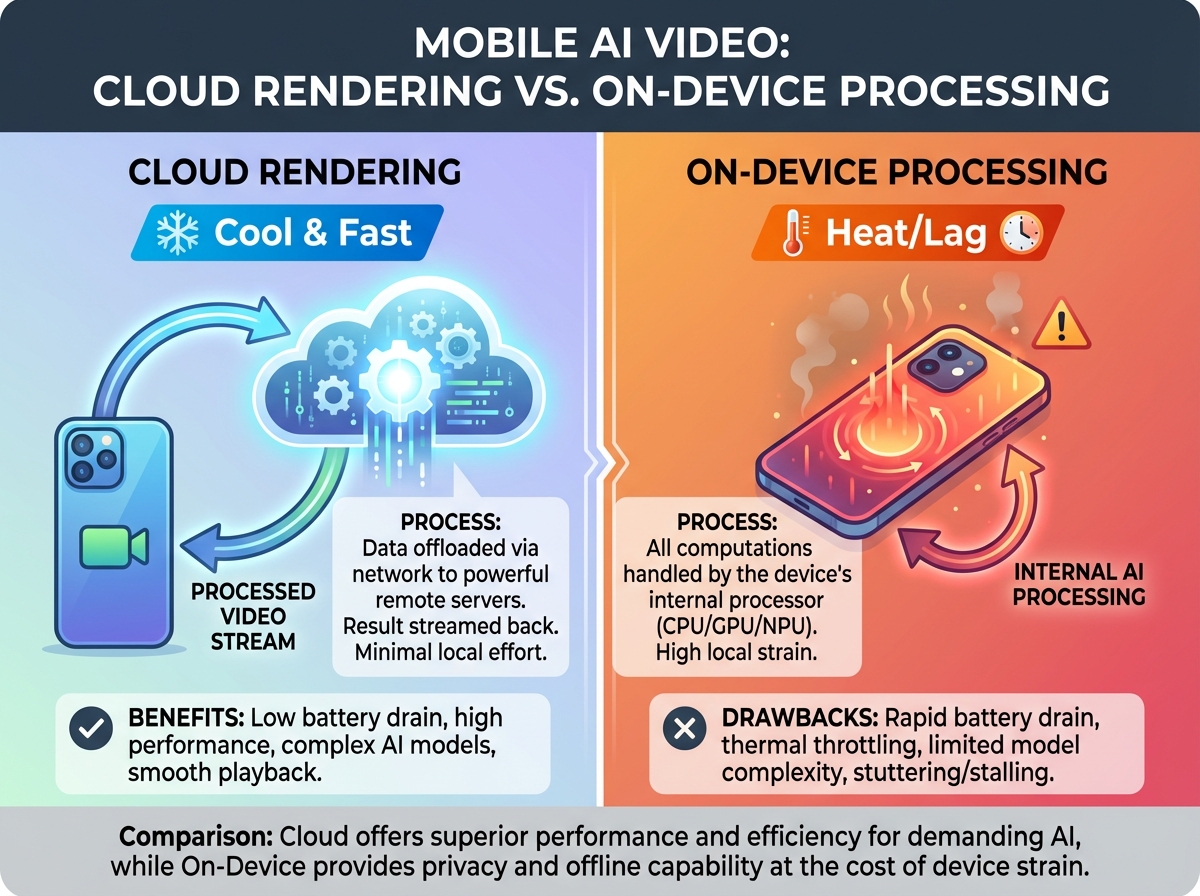
Cloud Rendering vs. On-Device Processing
For a smooth experience on budget phones, prioritize cloud-based AI video generator mobile apps. These tools offload the heavy computational lifting to remote servers, ensuring your phone doesn't overheat or lag during the 1080p export process. This is particularly vital for the 91% of Indian businesses now using video as their primary marketing tool.
Watermark Policies and Export Limits
The “free” tag in 2026 often comes with strings attached (free AI video generator unlimited guide). Most apps gate high-definition (HD) exports or add a prominent logo. If you are searching for an AI video maker Android without watermark (how to remove AI watermark legally), you must look for apps that offer “daily free credits” or affordable “starter” tiers. Many top-rated apps now offer monthly promos specifically for the Indian market, often priced under ₹500.
Regional Language and Accent Support
India’s linguistic diversity is its strength. A top-tier app must support not just Hindi and English, but “Hinglish” (Hinglish AI video generator for India), Tamil, Telugu, Bengali, and Marathi. Look for apps that handle retroflex consonants (like the 'ट' and 'ड' sounds) accurately in their text-to-speech engines to avoid sounding robotic.
UPI Integration and Local Pricing
In 2026, seamless payment is a dealbreaker. The best apps for the Indian market have integrated UPI (Google Pay, PhonePe, Paytm) directly into their checkout flow, offering localized INR pricing that reflects the purchasing power of Indian creators.
Source: AI Marketing Statistics India 2026 | Cloud9 Digital
2. Best AI Video Creator Mobile India: 2026 Shortlist
The market is crowded, but a few players have emerged as leaders for the Android ecosystem in India. Here is a breakdown of the top contenders for 2026.
CapCut (Android)
CapCut remains the gold standard for Reels-first creators. In 2026, its AI integration has evolved to include “Smart Templates” that automatically sync AI-generated B-roll with trending audio.
- Best For: Viral Instagram Reels and TikTok-style transitions.
- Watermark: Removable in the Pro version (often available via monthly INR promos).
- Key Feature: Auto-captions with 98% accuracy for Hinglish.
InVideo AI (Android)
InVideo AI has simplified the text-to-video AI app for mobile India experience. You simply type a prompt like “Create a 30-second Reel about the best street food in Lucknow,” and the app generates the script, voiceover, and visuals.
- Best For: Content creators who need to move from idea to export in under 60 seconds.
- Pricing: Competitive INR tiers with UPI support.
PixVerse (Android)
PixVerse has gained massive traction in 2026 for its “Motion-First” AI. It allows users to animate static images or generate cinematic clips (Cinematic AI Video Generator India) from text prompts with incredible stability.
- Best For: High-end cinematic Reels and creative storytelling.
- Device Performance: Optimized for mid-range Androids via aggressive cloud offloading.
AI Video Generator (by Video.ai)
This is a straightforward, no-frills tool for those who need a quick AI spokesperson video app mobile. It features a library of virtual avatars that can deliver scripts in multiple Indian accents.
- Best For: Small business owners making “talking head” ads.
Source: Top AI Video Generation Tools 2026 | MensXP
3. Text-to-Video & Spokesperson Workflows: No Laptop Needed
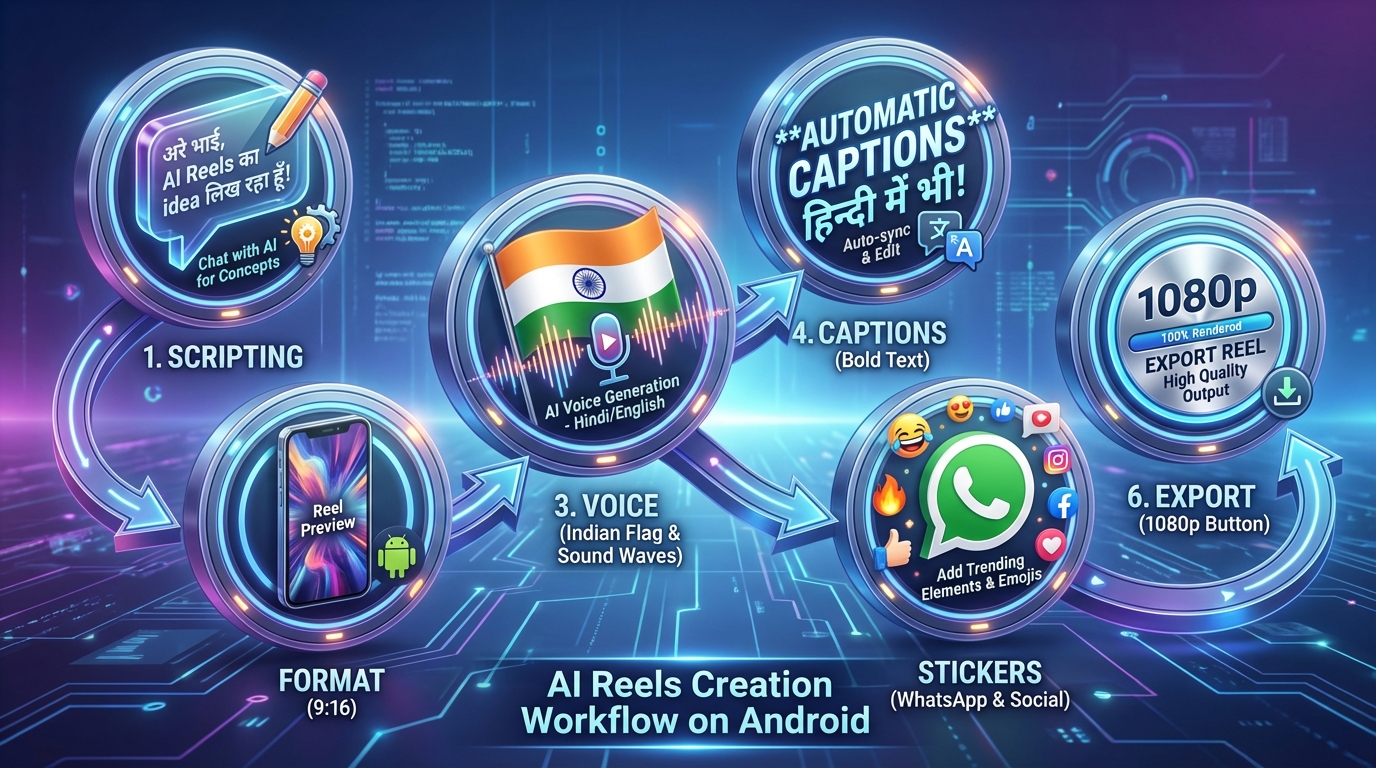
The biggest breakthrough in 2026 is the “Zero-Laptop Workflow.” You can now execute a full production cycle—from script to social—entirely on an Android device.
The 60-Second Reels Workflow
- Scripting: Use the built-in AI writer to draft a 90-word Hinglish script.
- Format Selection: Choose the 9:16 vertical preset (optimized for Google Veo 3.1's native vertical support).
- Voice Selection: Pick a “Warm Indian English” or “Natural Hindi” voice.
- Auto-Captions: Generate captions and use the “Highlight” feature to bold key terms like “Sale” or “Free.”
- Sticker CTAs: Add a WhatsApp or Instagram “Link in Bio” sticker.
- Cloud Export: Export at 1080p, 30fps.
AI Spokesperson Realism
For brand videos, the AI spokesperson video app mobile (Faceless YouTube Channel AI India) category has seen a 73% year-over-year growth in adoption among Indian SMBs. These apps use “Digital Twins” of real actors. Platforms like Studio by TrueFan AI enable creators to access licensed influencer-style personas that deliver messages with perfect lip-syncing, even for complex regional dialects.
When using these apps on mobile, ensure you are in a high-bandwidth 5G zone or on stable Wi-Fi, as the initial upload of custom “selfie-to-avatar” data can consume between 50MB to 200MB of data.
4. Budget Realities: Watermarks, APK Safety, and Plans Under ₹500
While the technology is advanced, the economics of content creation in India remain price-sensitive.
The “Under ₹500” Strategy
Many global apps have introduced “India-only” micro-subscriptions. These plans, often priced between ₹199 and ₹499 per month, usually unlock:
- Removal of the app watermark.
- Access to 1080p (Full HD) exports.
- A set number of “AI Credits” for spokesperson generation.
AI Avatar Video Maker APK India: Safety First
Because some advanced AI features roll out in specific regions first, many Indian users look for an AI avatar video maker APK India to sideload apps. Warning: Sideloading carries significant risks.
- Permissions: Never grant an APK “Always-on” access to your microphone or camera.
- Source: Only download from verified community sites or the official publisher's website.
- Privacy: Be wary of apps that request access to your entire photo gallery for a simple “selfie-to-avatar” generation.
Optimizing for Budget Phones (4GB RAM)
If you are using an AI video creator for budget phone India (Budget Phone Video Editor Comparison India 2026), follow these three rules to prevent crashes:
- Clear Cache: Before starting a render, clear the cache of all background apps.
- Proxy Preview: Use “Low-Resolution Preview” modes while editing to save memory.
- Cloud-Only: Avoid apps that try to do “Local AI” processing; they will drain your battery and likely crash on a budget chipset.
Source: India AI Video Market Size & Outlook | Grand View Research
5. Custom AI Avatars: Selfie-to-Spokesperson Safely
The most personal trend in 2026 is the custom AI avatars app Android movement. This allows you to train an AI on your own face and voice, so you can “record” videos without actually being in front of a camera.
Training Your Digital Twin on Android
- The Capture: Record 10-20 short clips of yourself in natural lighting. Ensure you vary your expressions but keep your head relatively stable.
- The Consent: Only use platforms that have a clear “Consent-First” policy. Avoid “Deepfake” apps that don't require a live liveness check.
- The Privacy: Ensure the app deletes your raw training footage after the AI model is built.
For those looking for professional results, Studio by TrueFan AI's 175+ language support and AI avatars provide a secure, licensed environment where your likeness is protected by enterprise-grade security protocols, including ISO 27001 and SOC 2 certification.
6. Enterprise Scaling: When to Move to Studio by TrueFan AI
While consumer apps are great for individual creators, businesses and agencies often hit a “quality ceiling.” If you are managing a brand that requires thousands of personalized videos for a WhatsApp marketing campaign or multi-language educational content, consumer-grade Android apps may fall short.
Why Enterprises Choose Dedicated Platforms
- Governance and Safety: Consumer apps often lack the “Walled Garden” approach needed for brand safety. You need platforms that block political endorsements or hate speech at the API level.
- Localization at Scale: Generating a video in Hindi is one thing; generating it in 15 regional languages simultaneously requires a robust backend. Solutions like Studio by TrueFan AI demonstrate ROI through their ability to reduce production costs by up to 82% compared to traditional video shoots.
- API Integration: For developers, the ability to trigger a video generation from a CRM or an e-commerce trigger (AI video generator from URL) (like a “Thank You” video after a purchase) is essential.
For organizations that have outgrown basic mobile editors, moving to a professional suite is the logical next step. These platforms offer “Real Influencers as AI Avatars,” allowing brands to use the faces of known Indian personalities legally and ethically.
Source: Video Marketing Statistics 2026: Trends & ROI | SQ Magazine
7. FAQ: Everything You Need to Know About Mobile AI Video in India
See the comprehensive FAQ section at the end of this article.
Conclusion: The Future is Vertical and Mobile
The AI video generator app Android India 2026 market is no longer just about “fun filters.” It is a robust ecosystem that allows anyone with a budget Android phone to become a high-end content producer. By choosing the right cloud-based AI video generator mobile tool and following a “No-Laptop” workflow, you can achieve a 3.5x higher ROI on your social media efforts.
Whether you are starting with a free tool like CapCut or scaling your business with Studio by TrueFan AI, the barrier to entry has never been lower. Start creating today, and let the AI handle the heavy lifting while you focus on your story.
External Sources & Citations:
- Google Veo 3.1 Vertical Video Support | LiveMint
- India Video Analytics Market Growth 2026-2034 | IMARC Group
- AI Video Statistics for 2026 | Ngram
- Digital Media Trends 2026 | Deloitte Insights
- Google Veo 3.1 Native 9:16 Support | Gadgets360
Recommended Internal Links
- Google Veo availability in India
- Free AI video generator with unlimited exports
- How to remove AI watermarks legally in India
- Hinglish AI video generator for India
- Cinematic AI Video Generator India (2026 tools compared)
- Launch a faceless YouTube channel with AI avatars
- Budget phone video editor comparison (India 2026)
- WhatsApp video commerce integration setup (India 2026)
- AI video generator from URL (e-commerce automation)
- YouTube Shorts editor for Android (budget AI picks in India)
Frequently Asked Questions
Can I really create a professional video without a laptop in 2026?
Absolutely. With the AI video generator app no laptop needed movement, modern Android chipsets and 5G connectivity allow you to handle everything from scriptwriting to 4K cloud rendering on your phone.
How do I remove the watermark from my AI videos for free?
Most apps require a paid tier to remove watermarks. However, some apps offer “Reward Credits”—you can watch a few ads to earn a “Watermark-Free Export” for a single video. Always check the “Promos” section for India-specific discounts.
Which app is best for “Hinglish” auto-captions?
CapCut and InVideo AI currently lead the market for Hinglish. They recognize the code-switching between Hindi and English that is common in Indian social media content.
Is it safe to use my own face to create an AI avatar?
It is safe only if you use reputable platforms. Look for apps that have a “Consent-First” model. Studio by TrueFan AI is a prime example of a platform that prioritizes ethical AI, ensuring that all avatars are either fictional or fully licensed with the creator's explicit permission.
How much data does an AI video app use?
A typical 15-second 1080p render and upload can consume between 30MB and 60MB. If you are training a custom avatar, expect to use up to 200MB for the initial video uploads.
Are there any AI video apps under ₹500 per month?
Yes, many apps like InVideo and various “AI Reels Makers” offer introductory or student plans in India that fall within the ₹199 to ₹499 range.



